Become a MacRumors Supporter for $50/year with no ads, ability to filter front page stories, and private forums.

AGANG

macrumors member
Original poster
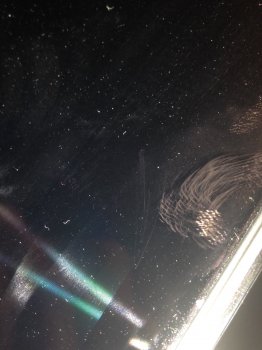
I have a 13" inch macbook pro retina (2015). I clean the retina screen with destilled water and included cloth (as Apple says). With this cleaning form I did some dustscratches. How can I clean my retina screen without scratches?
Thank you🙂
 
Dust should not be able to scratch your screen, take it into apple and ask about it, it may be a AR coating issue and they might replace the screen for you.
 
  • Like
Reactions: 3568358
Your screen should not scratch from cleaning by any means. Contact apple about the Anti-Reflective Coating on your screen.
 
What do you think? Do I have a screen issue?
 

Attachments

  • image1.jpeg
    image1.jpeg
    552 KB · Views: 156
This looks like a dirty screen to me. Are you sure there are scratches? Try cleaning it thoroughly, maybe add more water and look for those again.
 
no:/ This is scrach but fortunately doesnt make "rainbow color" when I see something white picture.
So is this an issue? Anybody has dustscratches too?
 
That's some pretty abrasive dust you've got going on there. My 2015 rMBP doesn't have any scratches currently. I'm hoping to keep it this way.
 
How do you clean your rMBP?

I use a regular old microfiber cloth and gently graze the screen to wipe dust off. If there are any specks on there that won't brush off I put a drop or 2 of water on the cloth and wipe just the spot where the speck is. I've never once wiped the entire screen with a damp cloth, haven't had to yet. Screen is as perfect as it was in April when I got it and when not in use I keep it inside a case. Definitely could be an anti-glare coating issue with your screen, that seems rather extreme.
 
  • Like
Reactions: 3568358
I hope that isn't an issue, just a bad form of my cleaning method. I dont like service after a purchase of my macbook pro.
 
It doesn't seems like a coating issue :/ .. You can clean your macbook with wipes special for glasses...Those which doesn't affect the anti-reflective displays.
Also you could go at an Apple Service to see what's that "scratch".
 
Register on MacRumors! This sidebar will go away, and you'll see fewer ads.