
Become a MacRumors Supporter for $50/year with no ads, ability to filter front page stories, and private forums.

MK500

macrumors 6502
Original poster
I have “Screen Unknown Senders” turned on, but still get messages on my lock screen from senders that are not in my contacts.

Why can’t this work as well as “Screen Unknown Callers” does for phone calls? This was the feature I was most looking forward to in iOS 26. I’m so disappointed.

Anyone else having this problem?
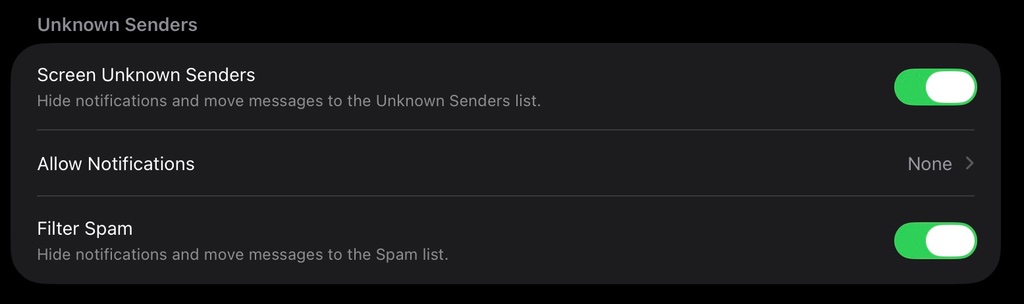
IMG_7375.jpeg
 
This seems to have broken for my messages in the last few weeks, too. Right in time for political spam.

It's going to unknown, but still triggers a notification on phone and watch. Infuriating.
 
  • Like
Reactions: MK500
Still getting unwanted texts. Mostly from political campaigns. It seems somewhat random. Like maybe 1 per day gets through?

For everyone that this is working for: is it 100% working? Or do some get through?

It seems fairly simple to block anyone not in my contacts. Works for voice calls. Sigh.
 
Still getting unwanted texts. Mostly from political campaigns. It seems somewhat random. Like maybe 1 per day gets through?

For everyone that this is working for: is it 100% working? Or do some get through?

It seems fairly simple to block anyone not in my contacts. Works for voice calls. Sigh.
Same. On my iPhone they get silently moved to the unknown senders list, but I'm still getting notifications for them on my iPad. I compared the settings on both devices and they are the same.
 
Has there been a resolution of this? My watch (and Mac) still dings for unknown senders even though it is set to mirror the phone where it is turned off.
 
  • Like
Reactions: xpxp2002
Has there been a resolution of this? My watch (and Mac) still dings for unknown senders even though it is set to mirror the phone where it is turned off.
Same for me on iPad. It is set to filter unknown senders but I still get notifications as soon as those messages come in while I can clearly see that they are being silently filtered on the iPhone.
 
Register on MacRumors! This sidebar will go away, and you'll see fewer ads.