
Become a MacRumors Supporter for $50/year with no ads, ability to filter front page stories, and private forums.

Slo Pesci

macrumors 65816
Original poster
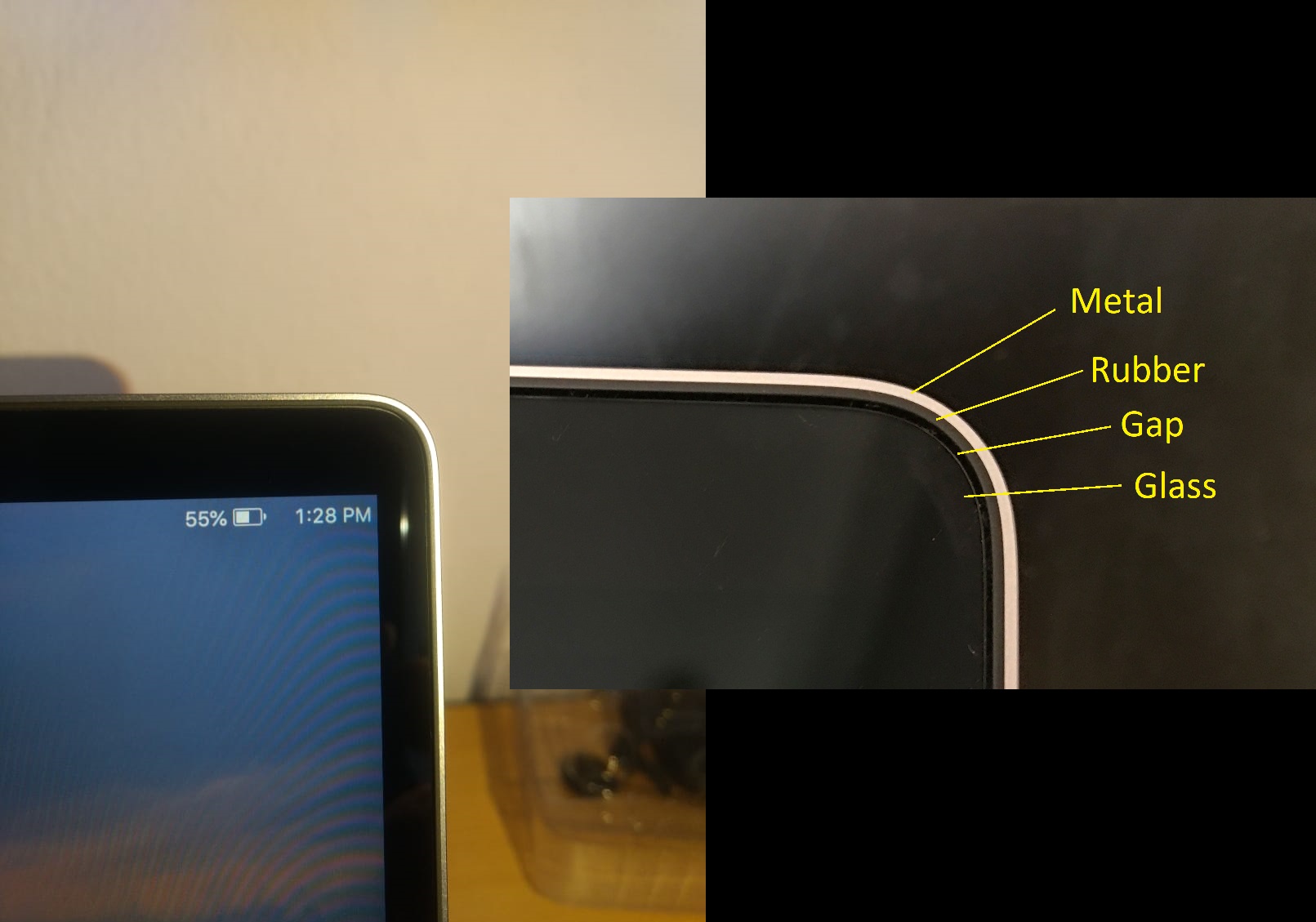
So i have this really strange issue that i've noticed with 3 different Macbooks. All from 2018 to the current M1. The issue is the adhesive gasket underneath the display is not 100% sealed. This is why there are many posts about people noticing light leaking from between the edge of the screen and the rubber gasket around the edge. But on my last 3 models i have noticed that a couple of very tiny specs of dust have made their way through that adhesive gasket underneath the glass and made there way between the backlight and the actual display. After a few weeks of use i will notice a tiny spec near the black border on the display behind the glass. This happens to me maybe because i work in a somewhat dusty environment.

These are not dead pixels and these were not there when the laptop was brand new.

So my question is, is there anything i could rig up to make that little gap around the display a tighter seal ? Maybe a special tape or silicone ?

I really need to use Mac OS and since all of Apple's modern laptops are made the same way i have no other options.

Any help would be appreciated.

9rfh0xayybp31.jpg


The top 2 images i grabbed from online since they had a clear picture of the gap. This bottom picture is from my Macbook Air M1. it's very hard to capture an image of but i pointed the cursor at the spec of dust to make it a bit easier to spot.

IMG_0060.jpg
 
Last edited by a moderator:
So i have this really strange issue that i've noticed with 3 different Macbooks. All from 2018 to the current M1. The issue is the adhesive gasket underneath the display is not 100% sealed. This is why there are many posts about people noticing light leaking from between the edge of the screen and the rubber gasket around the edge. But on my last 3 models i have noticed that a couple of very tiny specs of dust have made their way through that adhesive gasket underneath the glass and made there way between the backlight and the actual display. After a few weeks of use i will notice a tiny spec near the black border on the display behind the glass. This happens to me maybe because i work in a somewhat dusty environment.

These are not dead pixels and these were not there when the laptop was brand new.

So my question is, is there anything i could rig up to make that little gap around the display a tighter seal ? Maybe a special tape or silicone ?

I really need to use Mac OS and since all of Apple's modern laptops are made the same way i have no other options.

Any help would be appreciated.


View attachment 1723438


The top 2 images i grabbed from online since they had a clear picture of the gap. This bottom picture is from my Macbook Air M1. it's very hard to capture an image of but i pointed the cursor at the spec of dust to make it a bit easier to spot.

View attachment 1723440
Have you looked into those T-5000 or T-8000 glues resins?
 
Im not sure about the viscosity but I don't think you need it too runny, since it might run under the glass like the dust particle.
It doesn't make much sense in my mind, that a solid dust particle would be able to get inside the display like that. I know tiny bugs have managed to get into the display assembly and crawl under the laminated glass, but that's because they are able to crawl in. A dust particle would be a solid particle with no apparent mechanism to move it into such a strange place. A fluid however, could very easily flow into the display and I would think that is a lot more likely to damage it. Plus, by using resin, you are now introducing additional mechanical stresses onto the display panel, which it was not designed for.

I would strongly suspect this is actually some kind of defect with the display panel, or surface damage. My last Macs before my M5 MBP were early retinas, which had issues with the surface (can't remember if it was an oleophobic chemical coating, a surface antiglare layer, or the glass itself) delaminating - as well as an issue I had on both of mine, where any particularly tough dust could punch tiny pinholes into the display. I think the polarizing layer must have been on the surface of the panel, because when these tiny holes developed, the spot would let a speck of pure white light through permanently. That's my hunch anyway.

On my new MBP I have not noticed any defects with the display surface, which is what I had on both prior models. And I have not noticed any uneven backlighting, which is apparently an extremely common defect on Windows machines. I bounced between Lenovo and Surface devices between my last Macs and now, and every single one had uneven backlighting develop pretty quickly because of weight against the display while in my backpack - or from day 1 due to the bezel putting uneven pressure on the edge of the panel.

The only thing I am noticing is large dust particles getting jammed in the gap between the panel and the gasket, where light from a certain angle makes them very obvious. (That's why I wound up here, researching this.) It's kinda bothered me but Fred's mention of a brush got me thinking, and I was able to clear most of it out with one. There is a large particle that is stubborn but I don't care enough to risk damaging the display panel trying to remove it.

Edit: I did care enough to try something else, I found that the little Zeiss wipes I use for the display come in a little pouch that's just thin and stiff enough to work as a little pick, but soft enough to not risk putting pressure on the glass edge. I was able to finagle it out that way. Obviously try something like that at your own risk.
 
  • Like
Reactions: Fred Zed
I ended up stumbling across a Hugh Jeffreys video that reminded me how the displays are laminated together. I bet if anything manages to get into the display, it's getting between the back of the glass, and the front of the backlight filter sheets. I suppose if enough of the adhesive failed somehow, in theory dust could get behind. Still seems unlikely to me though.
 
Register on MacRumors! This sidebar will go away, and you'll see fewer ads.