Become a MacRumors Supporter for $50/year with no ads, ability to filter front page stories, and private forums.

MacRumors

macrumors bot
Original poster


In an age of digital ubiquity, knowing how to easily keep track of your online transactions is crucial, especially as an Apple user who frequently downloads apps, music, movies, and more from various Apple services.
apple-account@2x.jpg

Your Apple Account purchase history is a comprehensive log of all the content you've bought using your account, not just on your iPhone, but across all your Apple devices. Knowing how to access this information on your device can give you valuable insights into your digital spending habits, help you manage your subscriptions, or even assist in troubleshooting or disputing unauthorized purchases.

So whether you're trying to keep a budget, ensure that your family's purchases are appropriate, or simply curious about when you bought that app or movie, here's how to view your Apple Account purchase history on an iPhone or iPad logged into your account.

View Purchase History in Settings

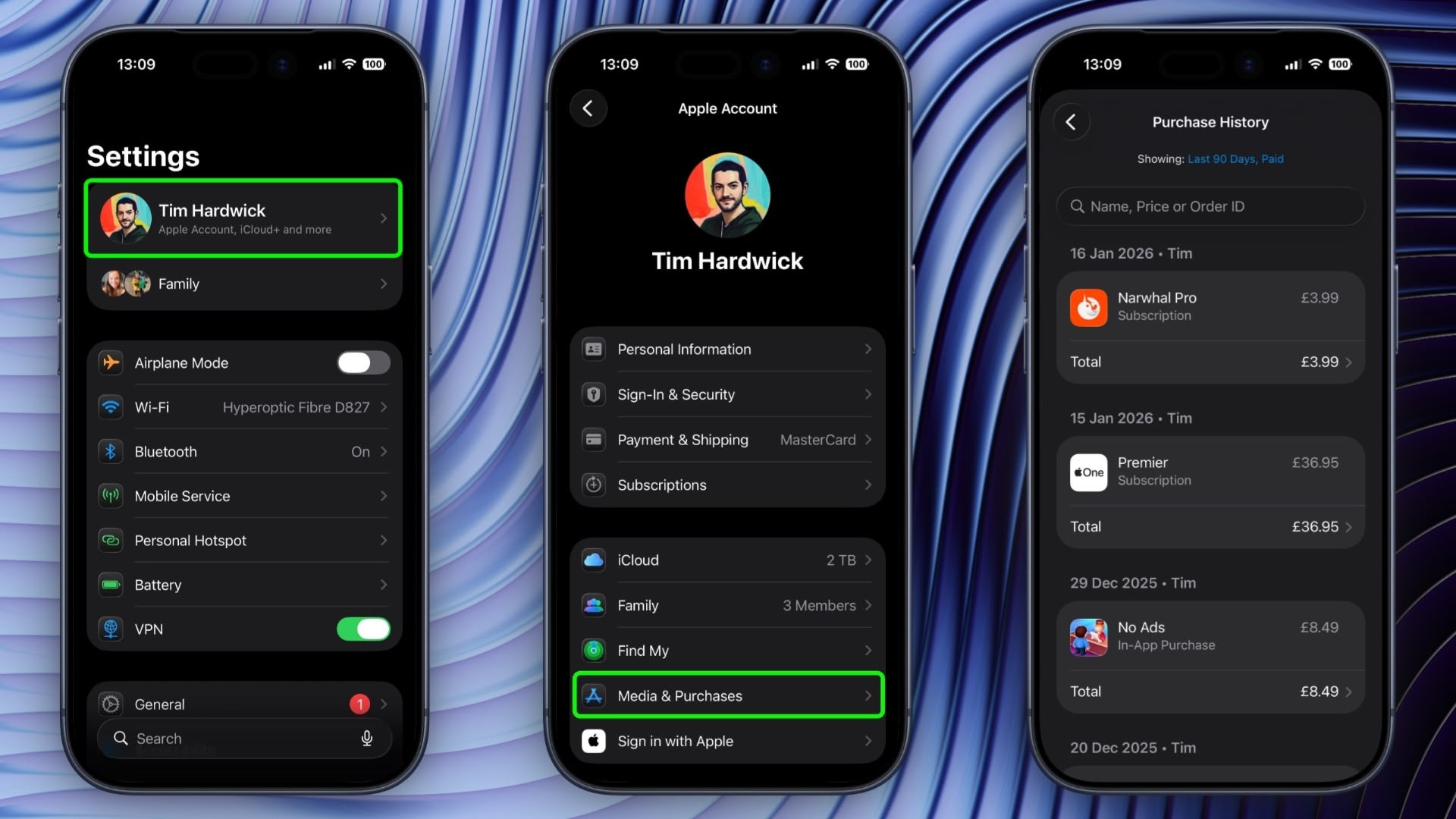
  1. Open the Settings app and tap your Apple Account banner at the top.
  2. Tap Media & Purchases.
  3. Tap View Account in the popup and authenticate with Face ID or Touch ID.
  4. Scroll down and tap Purchase History.
view-apple-account-purchase-history3.jpeg


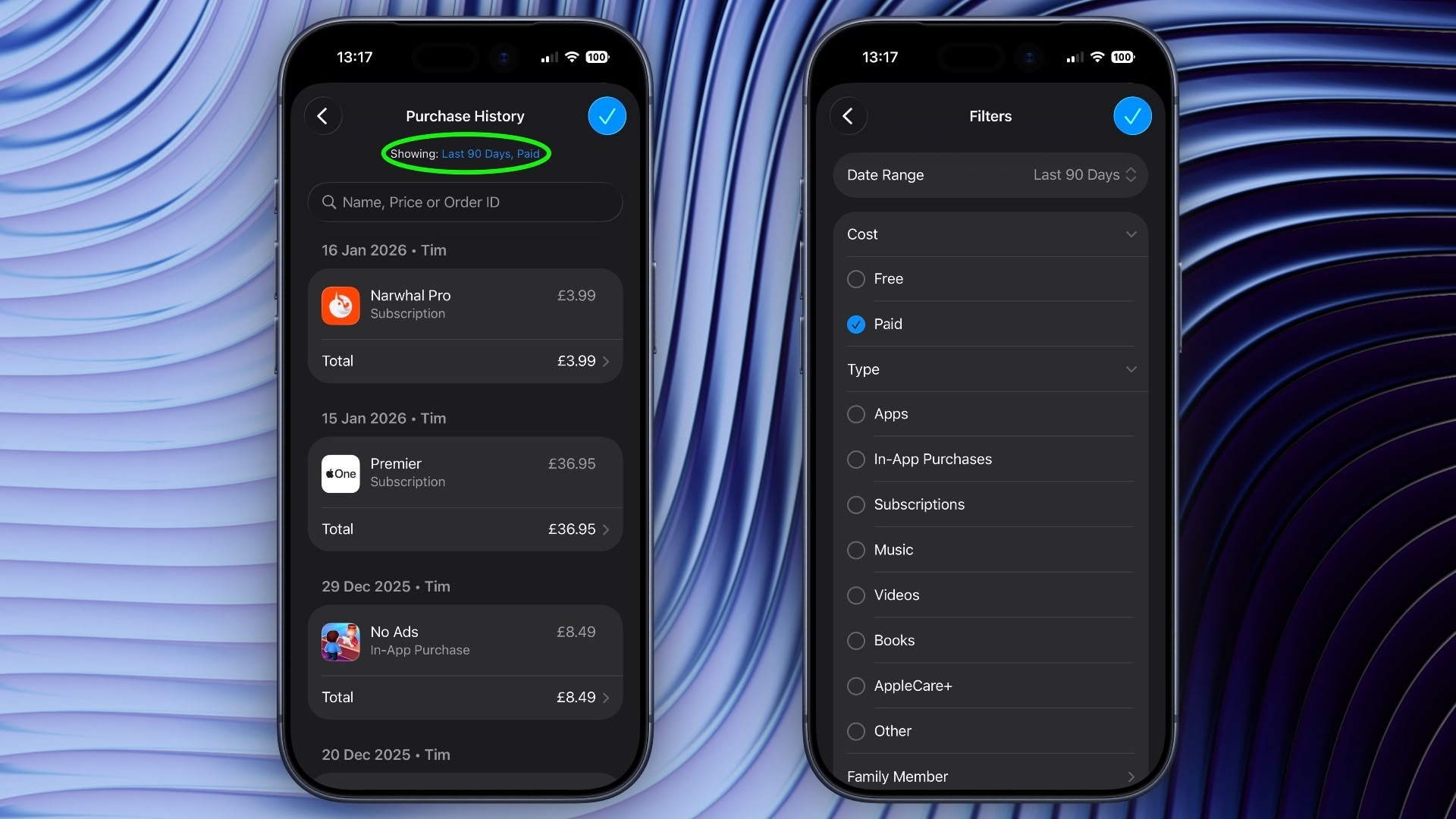
You are now viewing the purchase history for this Apple Account across all the devices tied to the account. If you are looking for a specific purchase, you can use the search field at the top to enter a name, price, or order ID.
view-apple-account-purchase-history1.jpeg

If you tap the blue text next to "Showing:" you can also filter the history by date range, price, and purchase type.

View Purchase History in App Store

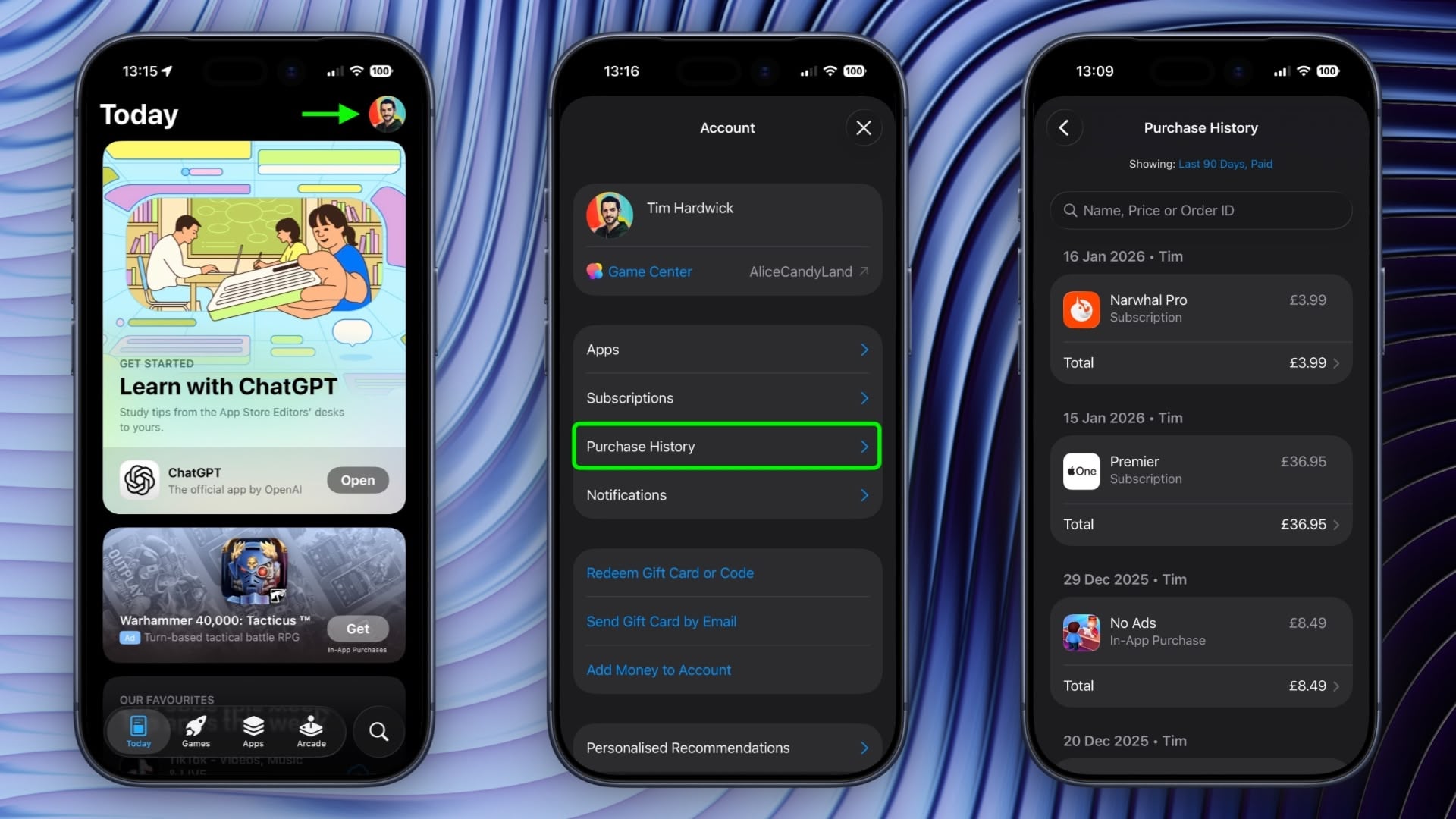
In iOS 17.4 and iPadOS 17.4 or later, you can access the same purchase history a little bit faster via the App Store app on iPhone and iPad.
app-store-purchase-history.jpeg

Simply tap your account profile in the top-right corner, then tap Purchase History and authenticate with Face ID or Touch ID when prompted.

Article Link: Search Your Apple Account Purchase History on iPhone
 
I would love to see this extended to hardware purchases too. Some of this info is available on the Apple ID site but I'd like to see a comprehensive list on the phone.
 
  • Like
Reactions: Agile55 and drrich2
I wouldn’t recommend anyone to use Apple Pay function. I have on several occasions bought something to just try it out (or in some cases the ChatGPT subscription has landed on a closed mail account and it cannot be restored on ChatGPT) and when i have requested a refund from Apple I have been declined. I have appeal every decision but still getting declined, and of course the classic no reasoning to why has been given.

I don’t have the exact figures in my head but it’s somewhere between 150-200 USD.
In my eyes Apple is a bunch of thieves and they cannot be trusted.

/Swedish citizen
 
Sadly I cannot find a way to search every year all at once. I could only search a single year at a time for a specific app. Maybe I'm missing something.
 
  • Like
Reactions: ignatius345
Sadly I cannot find a way to search every year all at once. I could only search a single year at a time for a specific app. Maybe I'm missing something.
Always the same with Apple in settings, simple things are often very difficult or impossible to do.
 
Sadly I cannot find a way to search every year all at once. I could only search a single year at a time for a specific app. Maybe I'm missing something.
I don’t think you’re missing anything. You used to be able to search all of your purchases at once but now they’ve made it a PITA for no reason.

But if you go into: App Store > Account (your profile pic in the upper right corner) > Apps you can search through the full list of any app you’ve ever downloaded. If you’re using Family Sharing, you’ll see a separate list for each person in the family.
 
Register on MacRumors! This sidebar will go away, and you'll see fewer ads.