


Got a tip for us?
Let us know
Become a MacRumors Supporter for $50/year with no ads, ability to filter front page stories, and private forums.
Carrier Selecting Wireless Network Alert
- Thread starter i1280
- Start date
- Sort by reaction score
You are using an out of date browser. It may not display this or other websites correctly.
You should upgrade or use an alternative browser.
You should upgrade or use an alternative browser.
In wifi settings, is "ask to join networks" disabled?
-If it's enabled, disable it (give it a restart if it doesn't take effect).
-If it's disabled, enable it and then disable. again, give it a restart.
-If it's enabled, disable it (give it a restart if it doesn't take effect).
-If it's disabled, enable it and then disable. again, give it a restart.
Last edited:

Yup, @beernut nailed it. That should take care of the issue.I'm running an iPhone 6s on Verizon and when I get phone calls, I get a "Select A Wireless Network" alert that comes up if I am near wifi. Why is this happening and how can I get it to stop? Has this happened to anyone else?

Yes, disabling that will also save some battery since it will not be constantly scanning and searching for wifi networks.
In wifi settings, is "ask to join networks" disabled?
-If it's disabled, enable it and then disable. again, give it a restart.
I tried this with a restart and haven't had any issues since...but not sure I've been in wifi ranges either. I'll post if it continues/happens again. Thanks for the suggestions!!
It's not an issue. It's a feature. Once you've disabled the feature as described, it won't pop up again.I tried this with a restart and haven't had any issues since...but not sure I've been in wifi ranges either. I'll post if it continues/happens again. Thanks for the suggestions!!
Ironically, it just occurred. It happens when I get a phone call sometimes before and sometimes after I hang up or the call is declined. It never happens when I am within range of wifi unless there's a phone call...???
Something is not right then.
I'd do a restore and setup as new.
Sounds like a software bug.
Do you have wifi calling enabled?Ironically, it just occurred. It happens when I get a phone call sometimes before and sometimes after I hang up or the call is declined. It never happens when I am within range of wifi unless there's a phone call...???
Could it be a bug related to that?
Last edited:

i think willmtaylor is right. Mine was doing that with wifi calling enabled, I turned it off and now it doesn't do that.
Something is not right then.
I'd do a restore and setup as new.
Sounds like a software bug.
I did that once. Still occurred.
Do you have wifi calling enabled? Could it be a bag related to that?
I Do not. It's turned off and I don't believe that Verizon offers that option yet.
Verizon has been offering WiFi calling for phones that support it since iOS 9.1 days or so.I Do not. It's turned off and I don't believe that Verizon offers that option yet.
[doublepost=1478095108][/doublepost]
Are you sure you have the "ask to join" option disabled? Perhaps try enabling and disabling it again. Maybe even reset your network settings too if you are still seeing something odd.I tried this with a restart and haven't had any issues since...but not sure I've been in wifi ranges either. I'll post if it continues/happens again. Thanks for the suggestions!!
Verizon has been offering WiFi calling for phones that support it since iOS 9.1 days or so.
[doublepost=1478095108][/doublepost]
Are you sure you have the "ask to join" option disabled? Perhaps try enabling and disabling it again. Maybe even reset your network settings too if you are still seeing something odd.
I believe so:

I will try to reset the network settings later and see what happens...
Lol. I didn't realize Verizon was offering that...
But do you have THIS disabled?I believe so:
I will try to reset the network settings later and see what happens...
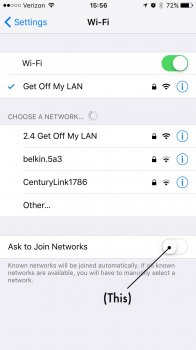


^ Awesome SSID 
I don't know how anyone can stand to have that option turned on.
I don't know how anyone can stand to have that option turned on.
It used to be "pretty fly for a wifi," but then I got old and uncool. ;-)^ Awesome SSID
I don't know how anyone can stand to have that option turned on.
If it does come up for some reason, can you try to take a screenshot of it as well, just to see what you are seeing (in case it might somehow be something else other than what most of us here have been thinking it is).I reset my network settings and reset the phone...I'll let you guys know if that helps.

I'm running an iPhone 6s on Verizon and when I get phone calls, I get a "Select A Wireless Network" alert that comes up if I am near wifi. Why is this happening and how can I get it to stop? Has this happened to anyone else?
I've had the exact same problem since updating to IOS 10. I was using a iPhone 6 originally, and had hoped the problem would go away once I upgraded to the 6s. It did not. Wifi calling is off, "ask to join"is off, and I have tried resetting network settings as well.
[doublepost=1478182303][/doublepost]
If it does come up for some reason, can you try to take a screenshot of it as well, just to see what you are seeing (in case it might somehow be something else other than what most of us here have been thinking it is).
Here is a screenshot of what I am experiencing. Seemingly, it only happens if a call comes through while data is also being used. It pops up and I have to dismiss it before I can access the call screen. Once I end the call to go back to what I was doing, I am often prompted again and have to dismiss.
I suspect it has something to do with data (LTE) being used while the call is in progress.. I thought Verizon supported data while on a call at this point..
Do you have LTE enabled for both data and voice?I've had the exact same problem since updating to IOS 10. I was using a iPhone 6 originally, and had hoped the problem would go away once I upgraded to the 6s. It did not. Wifi calling is off, "ask to join"is off, and I have tried resetting network settings as well.
[doublepost=1478182303][/doublepost]
Here is a screenshot of what I am experiencing. Seemingly, it only happens if a call comes through while data is also being used. It pops up and I have to dismiss it before I can access the call screen. Once I end the call to go back to what I was doing, I am often prompted again and have to dismiss.
I suspect it has something to do with data (LTE) being used while the call is in progress.. I thought Verizon supported data while on a call at this point..
View attachment 670066
Are any of the networks that come up ones that you at lesser sometimes use or perhaps used at some point before?
Do you have LTE enabled for both data and voice?
Are any of the networks that come up ones that you at lesser sometimes use or perhaps used at some point before?
Yep.
[doublepost=1478182746][/doublepost]
Yep.

Do you have LTE enabled for both data and voice?
Are any of the networks that come up ones that you at lesser sometimes use or perhaps used at some point before?
No. It just happens every time I am off wifi and a call comes through.
But only if you are using the phone at that time, right? Does it happen if you are just not doing anything and let's say only swiping to another home screen or looking in some folder? Or is it only if you are inside or using some app? Any particular apps?Yep.
View attachment 670067
[doublepost=1478182746][/doublepost]
No. It just happens every time I am off wifi and a call comes through.
Register on MacRumors! This sidebar will go away, and you'll see fewer ads.