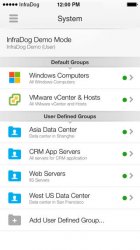
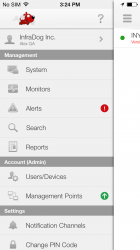
We are proud to introduce Server Mobile Admin by Infradog.
It is time we upgrade sysadmins life style.
Remote server admin can be this simple:
- Monitor, Access and Control computers/servers from smartphones simply by TOUCH, anywhere, anytime.
- One Management Point on One computer is enough to remotely manage all computers/servers in your network
- No need to configure firewall at all. i.e. open firewall port
Version 2.0.0 (Mar 13, 2014)
New Features (Management Point 2.0.30609.0 is required)
=================================
- Management Point Auto-update on mobile
- UI improvements
- Small Business Edition for 10 Free system licenses
New Features in previous releases
=================================
Network Device Monitoring (Printer, Router, Storage, Firewall etc.)
- Auto discovery for network device IP address, MAC address, model, manufacturer
- Up or Down monitoring
- Port monitoring
- Port scanning
Windows server
- Ports scanning
- Wake-On-LAN
Active Directory
- Quick search on all password expired users
- User password expiration date
- User organization structure
Management Point
- MP can be installed on local domain controller and discover domain locally


Upgrade your life style:
http://www.youtube.com/watch?v=DzZDe9wLFjU
Solution Overview:
http://www.youtube.com/watch?v=13XyyZaJxfk
Download at App Store:
https://itunes.apple.com/us/app/server-mobile-admin/id588213260?mt=8
Feature list: http://www.infradog.com/features.aspx
More features are coming.
Visit us at: www.infradog.com
Facebook: https://www.facebook.com/InfraDog
Twitter: https://twitter.com/InfraDog
Key features on mobile:
1. Windows Server monitoring and access
- CPU
- Memory
- Disk
- Event Log
- Services (Start/Stop)
- Network port scanning
- Process (Kill)
- Shut-down/Reboot/Wake-On-LAN
2. VMware Management
- VMware vSphere vCenter or standalone ESXi host
- VMware Host level: CPU, Memory utilization and Shutdown, Reboot, Maintenance Mode.
- VMware Guest level: CPU, Memory, Disk utilization, Power Off/On, Suspend/Resume, Reset, Shut Down
- VMware Guest live console
- VMware Guest modify # of CPU, Size of memory
- VMware Guest migration (vMotion)
- VMware Guest association with InfraDog managed server instance
3. Active Directory
- Unlock user
- Reset password
- Enable/disable user
- Modify group membership
- Capture employee photo by mobile camera and upload to Active Directory
- Quick find locked, disabled, inactive and password never expires users
4. IPMI hardware control(Intelligent Platform Management Interface)
- Support HP iLO; Dell DRAC; IBM RSA; Fujitsu ServerView and other IPMI compatible devices.
- Cold Reset; Power On or Off.
- Real-Time CPU and Mainboard temperature and cooling fan speed.
- In App Association between IPMI connection and InfraDog managed physical Instance.
5. Network Device Monitoring (Printer, Router, Storage, Firewall etc.)
- Auto discovery for network device IP address, MAC address, model, manufacturer
- Connection status for network devices
- Port monitoring
- Port scanning
- Wake-On-LAN
6. Alerts
- Email alert
- Mobile push notification (unlimited)
- In-App alert history
7. IT Asset management
- In-App pair with Barcode asset tag
- Search asset by Barcode (Phone Camera)
- Display server hardware warranty information on mobile (Dell, HP, IBM, Fujitsu)
8. Real time reporting
- Detailed server inventory chart report (PDF) sent by email
9. Search
- Search by IP/ host name or Microsoft KB
- Location based search for Microsoft Pinpoint
10. Multi-Users and Profiles
- Invite additional sysadmins or users for your account
- Manage multiple customer IT environments on a single mobile device
Operating systems supported:
- Desktop: Windows XP and above
- Server: Windows 2003 and above
- VMware: vSphere 4 and above
- Active Directory: Windows 2003 AD and above
- IPMI: 1.5 and 2.0
It is time we upgrade sysadmins life style.
Remote server admin can be this simple:
- Monitor, Access and Control computers/servers from smartphones simply by TOUCH, anywhere, anytime.
- One Management Point on One computer is enough to remotely manage all computers/servers in your network
- No need to configure firewall at all. i.e. open firewall port
Version 2.0.0 (Mar 13, 2014)
New Features (Management Point 2.0.30609.0 is required)
=================================
- Management Point Auto-update on mobile
- UI improvements
- Small Business Edition for 10 Free system licenses
New Features in previous releases
=================================
Network Device Monitoring (Printer, Router, Storage, Firewall etc.)
- Auto discovery for network device IP address, MAC address, model, manufacturer
- Up or Down monitoring
- Port monitoring
- Port scanning
Windows server
- Ports scanning
- Wake-On-LAN
Active Directory
- Quick search on all password expired users
- User password expiration date
- User organization structure
Management Point
- MP can be installed on local domain controller and discover domain locally
Upgrade your life style:
http://www.youtube.com/watch?v=DzZDe9wLFjU
Solution Overview:
http://www.youtube.com/watch?v=13XyyZaJxfk
Download at App Store:
https://itunes.apple.com/us/app/server-mobile-admin/id588213260?mt=8
Feature list: http://www.infradog.com/features.aspx
More features are coming.
Visit us at: www.infradog.com
Facebook: https://www.facebook.com/InfraDog
Twitter: https://twitter.com/InfraDog
Key features on mobile:
1. Windows Server monitoring and access
- CPU
- Memory
- Disk
- Event Log
- Services (Start/Stop)
- Network port scanning
- Process (Kill)
- Shut-down/Reboot/Wake-On-LAN
2. VMware Management
- VMware vSphere vCenter or standalone ESXi host
- VMware Host level: CPU, Memory utilization and Shutdown, Reboot, Maintenance Mode.
- VMware Guest level: CPU, Memory, Disk utilization, Power Off/On, Suspend/Resume, Reset, Shut Down
- VMware Guest live console
- VMware Guest modify # of CPU, Size of memory
- VMware Guest migration (vMotion)
- VMware Guest association with InfraDog managed server instance
3. Active Directory
- Unlock user
- Reset password
- Enable/disable user
- Modify group membership
- Capture employee photo by mobile camera and upload to Active Directory
- Quick find locked, disabled, inactive and password never expires users
4. IPMI hardware control(Intelligent Platform Management Interface)
- Support HP iLO; Dell DRAC; IBM RSA; Fujitsu ServerView and other IPMI compatible devices.
- Cold Reset; Power On or Off.
- Real-Time CPU and Mainboard temperature and cooling fan speed.
- In App Association between IPMI connection and InfraDog managed physical Instance.
5. Network Device Monitoring (Printer, Router, Storage, Firewall etc.)
- Auto discovery for network device IP address, MAC address, model, manufacturer
- Connection status for network devices
- Port monitoring
- Port scanning
- Wake-On-LAN
6. Alerts
- Email alert
- Mobile push notification (unlimited)
- In-App alert history
7. IT Asset management
- In-App pair with Barcode asset tag
- Search asset by Barcode (Phone Camera)
- Display server hardware warranty information on mobile (Dell, HP, IBM, Fujitsu)
8. Real time reporting
- Detailed server inventory chart report (PDF) sent by email
9. Search
- Search by IP/ host name or Microsoft KB
- Location based search for Microsoft Pinpoint
10. Multi-Users and Profiles
- Invite additional sysadmins or users for your account
- Manage multiple customer IT environments on a single mobile device
Operating systems supported:
- Desktop: Windows XP and above
- Server: Windows 2003 and above
- VMware: vSphere 4 and above
- Active Directory: Windows 2003 AD and above
- IPMI: 1.5 and 2.0
Attachments

Last edited: