


Become a MacRumors Supporter for $50/year with no ads, ability to filter front page stories, and private forums.

MacRumors

macrumors bot
Original poster
Apr 12, 2001
70,335
41,944


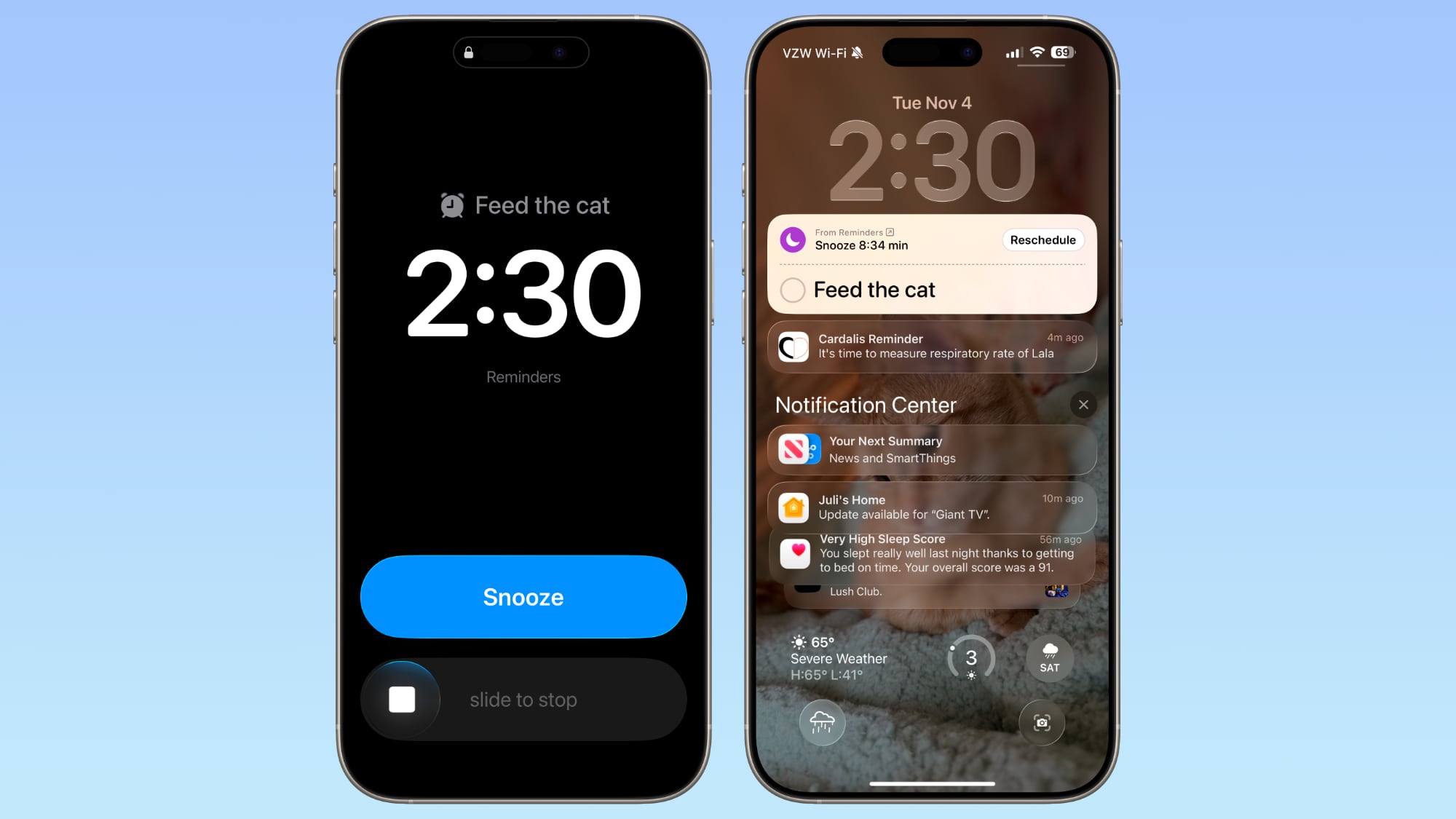
In iOS 26.2, currently in beta, Apple has added a new optional feature that provides the Reminders app with a more urgent notification system. When you need to ensure you don't miss an important task, you can now set an alarm that works just like your morning wake-up call, with a snooze button and slide-to-stop slider.
ios-26-2-alarm-reminders.jpg

The feature distinguishes Reminder alarms from standard Clock alarms by applying a distinctive blue color to the snooze button, allowing you to easily tell which type of alarm is going off. You can also choose to see a Complete button instead of a Snooze button on the alarm screen that marks the reminder as completed.

Enable Alarms for Reminders

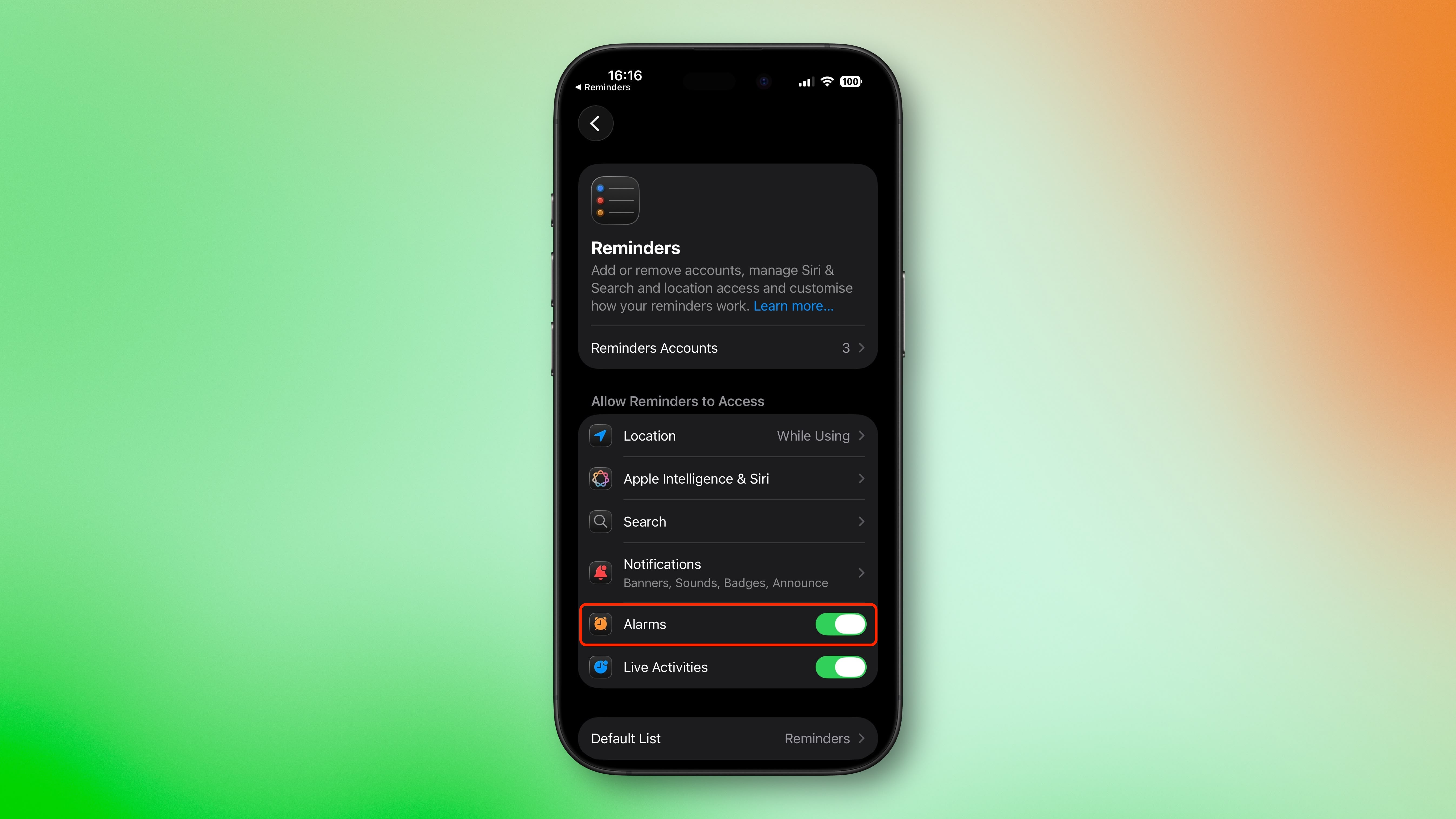
Before you can use alarms with reminders, you need to grant the Reminders app permission to access iPhone alarms.
  1. Open the Settings app on your iPhone.
  2. Swipe to the bottom and tap Apps ➝ Reminders.
  3. In the "Allow Reminders to Access" section, toggle on the switch next to Alarms.
reminders-settings-alarms.jpg


Create a Reminder With an Alarm

Once you've enabled alarm access, creating an urgent reminder is straightforward.
  1. Open the Reminders app.
  2. Create a new reminder or tap an existing one.
  3. Tap the info button (ⓘ) next to the reminder.
  4. Turn on Time and select when you want to be alerted.
    Turn on the Urgent switch to enable an alarm.

When the designated time arrives, your iPhone will sound an alarm. You'll see a snooze option and a slide-to-stop control on your screen. If you choose to stop or snooze the alarm, a notification appears with options to complete the reminder or reschedule it. Note that tapping to complete the reminder opens the Reminders app, where you'll need to tap again to mark it as done. Alarms will activate even when a Focus is on or your device is muted.

Show a 'Complete' Button on Reminder Alarms

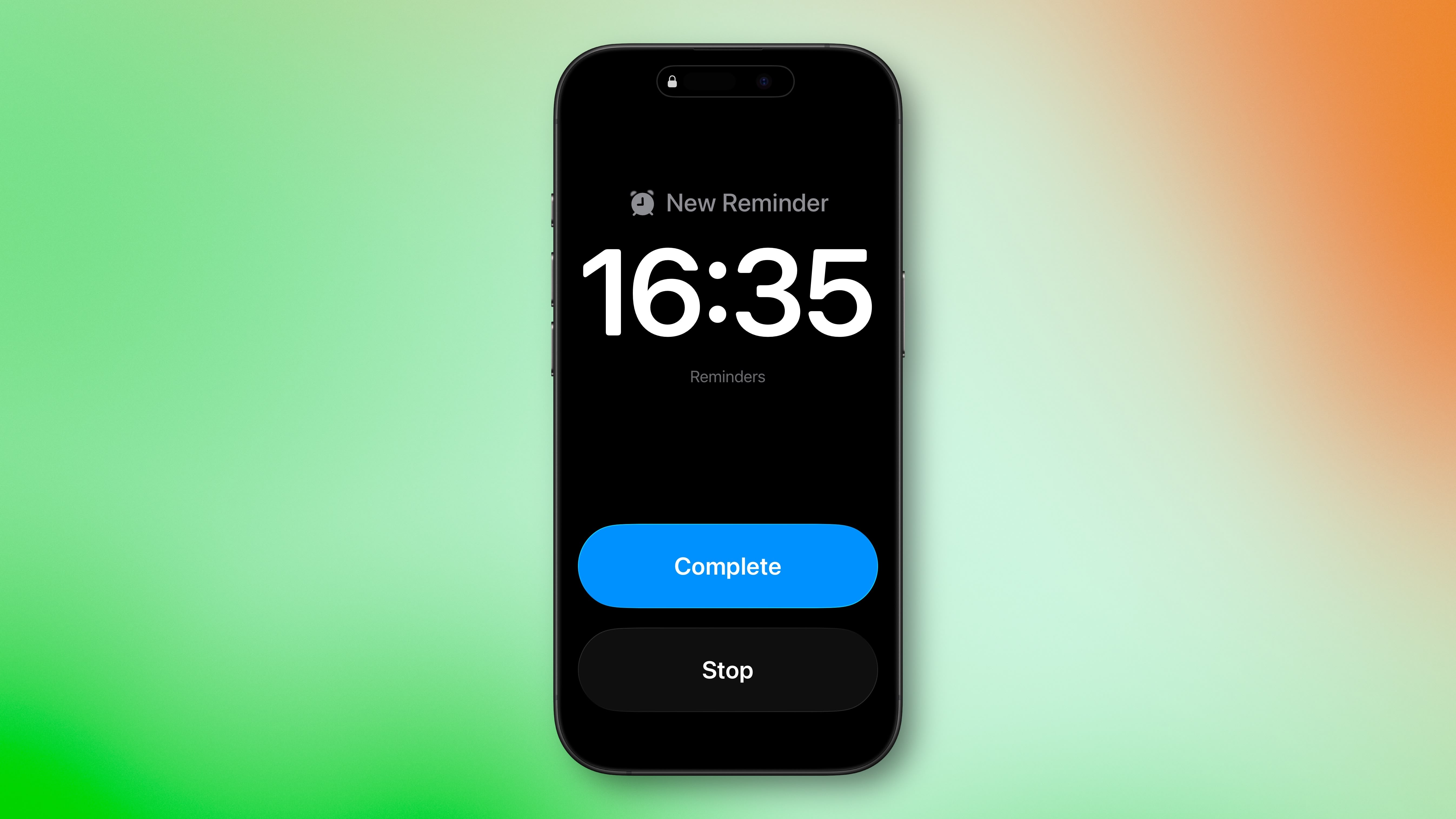
You can streamline your alarm-reminder by replacing the snooze option with a Complete button that immediately marks the reminder as done.
  1. Open the Settings app on your iPhone.
  2. Swipe to the bottom and tap Apps ➝ Reminders.
  3. In the "Urgent Reminders" section, toggle on the switch next to Complete for Alarm.
reminders-alarm-complete.jpg


With this setting enabled, you can instantly complete reminders without opening the app, which is handy for quick tasks you finish on the spot. Apple is expected to release iOS 26.2 in December.

Article Link: Set Alarm-Style iPhone Reminders in iOS 26.2
 
Last edited:
Never liked the idea of a dedicated "reminders" app. Calendar and Alarm done right should handle all needed reminder functions—be that a reminder to clear the shore, to go town and buy the thing, to phone so and so, or an alarm to catch a plane or wake up for work. Every user entry into the calendar that's not a holiday or a birthday should be called a reminder.

Future alarms should be a thing—"set an alarm for April 1 at 9 am.... April Fools" as should recurrently monthly and yearly alarms.

One is an audible alarm, like a morning alarm, and one is a reminder, a notification. Asking Siri to "set a reminder" should give two options: candler reminder or set an alarm—user decides on urgency.
 
Last edited:
  • Disagree
Reactions: hagar
Focus modes are a confusing mess. The most unlike-Apple feature ever created.

And now these new features arrive that completely overwrite them.
 
Once again, no “Urgent” toggle is available on my iPhone 14 PM. I’m not the only 14 PM user this is happening to. No clue why these articles don’t address this.
 
I would prefer that the "snooze" button be an option allowing one to just be alerted with only "stop" button. The "snooze" is the first think you see and easy to hit by mistake instead of the less intuitive stoke to stop.

Ah, a more pertinent reminder might be "fulfill perscription for x" rather than those automatic alarm clock cats and dogs. Well, a dog you remind you every 10 minutes to be fed it they could persuade you.
 
The snooze can be swapped out for a "complete" option, but that will - of course - mark the reminder as done.

It follows the new Alarm which also has a snooze button and a slide to turn off.
 
I just did a test and created a new "urgent" alarm on my Macbook. I got a warning saying the alarm would only ring on the phone.

So nothing to do with caldav, which makes sense as it's not a calendar event.
I use my reminders app using CalDAV (Nextcloud), and Apple already prevents nestled reminders while it being a feature of CalDAV.

So I was wondering if this is a proprietary feature that Apple prevents other providers from using or if Nextcloud doesn't support it yet (the 'urgent' switch does not appear at all). I am a bit sceptical about the latter because Apple already is blocking features from Nextcloud/CalDAV.
 
I use my reminders app using CalDAV (Nextcloud), and Apple already prevents nestled reminders while it being a feature of CalDAV.

So I was wondering if this is a proprietary feature that Apple prevents other providers from using or if Nextcloud doesn't support it yet (the 'urgent' switch does not appear at all). I am a bit sceptical about the latter because Apple already is blocking features from Nextcloud/CalDAV.

I thought Apple moved Reminders out of caldav and into their own proprietary format a few years ago, as part of this upgrade:
 
The other useful thing about this is setting "clock" alarms for a future date, beyond 24 hs. For some reason the clock app can't set alarms for more than one day.

This solves it, kinda.
 
I thought Apple moved Reminders out of caldav and into their own proprietary format a few years ago, as part of this upgrade:
That was an interesting reminder. I forgot about those functions. You can still use CalDAV, but they start to limit the usability of it (I badly phrased that as they do not cut functions, but they don't support pretty basic features that do exist in iCloud). Especially for nestled reminders is such a shame they don't (broadly/fullt) support the open standard.
 
  • Like
Reactions: adrianlondon
My biggest issue is that reminders in Reminders don’t function like reminders, they function like calendar events.

My use case: I have a task I need to get done (with or without a specific date). I need to be reminded daily of that task daily if I don’t check it off.

As far as I know, there is no way to have Reminders actually remind (nag?) you, about things you didn’t do.
 
I feel like Complete for Alarm should say Complete or Snooze. Complete and Stop are redundant where one it just stopping without marking as complete.
 
My biggest issue is that reminders in Reminders don’t function like reminders, they function like calendar events.

My use case: I have a task I need to get done (with or without a specific date). I need to be reminded daily of that task daily if I don’t check it off.

As far as I know, there is no way to have Reminders actually remind (nag?) you, about things you didn’t do.

You could write a shortcut, triggered by an automation at a set time of day, that creates a notification for any reminders which are due today or earlier, or are due in the next x days etc.

Definitely not as easy as just having it in the Reminders app, but Shortcuts are cool. Well, I like 'em!
 
Very happy to see this. Have missed some reminders in the past. This should definitely ensure that nothing will be missed.
 
  • Like
Reactions: mganu
Register on MacRumors! This sidebar will go away, and you'll see fewer ads.