
Got a tip for us?
Let us know
Become a MacRumors Supporter for $50/year with no ads, ability to filter front page stories, and private forums.
Shortcut/Automation
- Thread starter MarkX
- Start date
- Sort by reaction score
You are using an out of date browser. It may not display this or other websites correctly.
You should upgrade or use an alternative browser.
You should upgrade or use an alternative browser.
The Apple Watch cannot run automations; they're driven by the iPhone.
However, the Apple Watch can run shortcuts without the iPhone being nearby. A workaround would be to create a shortcut that starts a workout and sets the water lock. Then when you want to do a workout, run that shortcut instead (either through a widget in the Smart Stack, complication, Siri, action button, etc).
However, the Apple Watch can run shortcuts without the iPhone being nearby. A workaround would be to create a shortcut that starts a workout and sets the water lock. Then when you want to do a workout, run that shortcut instead (either through a widget in the Smart Stack, complication, Siri, action button, etc).


The Apple Watch cannot run automations; they're driven by the iPhone.
However, the Apple Watch can run shortcuts without the iPhone being nearby. A workaround would be to create a shortcut that starts a workout and sets the water lock. Then when you want to do a workout, run that shortcut instead (either through a widget in the Smart Stack, complication, Siri, action button, etc).
I'll look in to trying to sort that. Thanks


Along the lines of what @iStorm wrote, you can also have an Automation for "When Workout Starts" and that will set the water lock. Matching Automation for "When Workout Ends" to unset lock.
Let's one start a Workout via Watch per usual.
(Or similar: if have a Focus that starts when a workout starts, sub "Workout" with "Focusnamehere" Automations [how I do it])
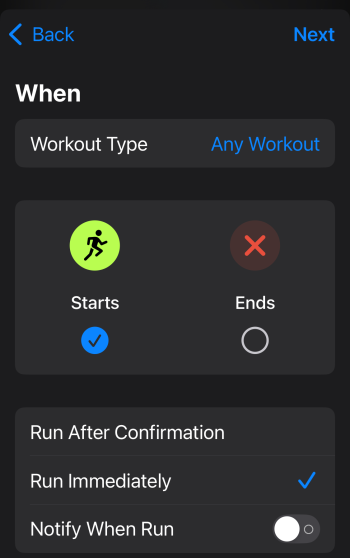
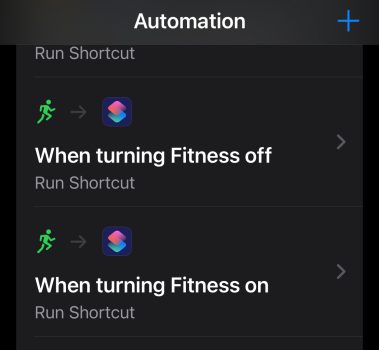
Let's one start a Workout via Watch per usual.
(Or similar: if have a Focus that starts when a workout starts, sub "Workout" with "Focusnamehere" Automations [how I do it])
Along the lines of what @iStorm wrote, you can also have an Automation for "When Workout Starts" and that will set the water lock. Matching Automation for "When Workout Ends" to unset lock.
Let's one start a Workout via Watch per usual.
(Or similar: if have a Focus that starts when a workout starts, sub "Workout" with "Focusnamehere" Automations [how I do it])
View attachment 2473192 View attachment 2473194
I run without my phone so an automation won’t work. So I was told above so I’m trying to work out how to set up shortcut.
I’m new to shortcuts, haven’t ever looked at them until today!
Will still work with Automations.
With straight Shortcut route (aka iStorm rec), need to have the phone in-hand to start the workout via a Shortcut. With Automations, phone just needs to be near by: start on Watch, notifies phone, Automation runs which runs Shortcut. Ditto at finish/end.
With straight Shortcut route (aka iStorm rec), need to have the phone in-hand to start the workout via a Shortcut. With Automations, phone just needs to be near by: start on Watch, notifies phone, Automation runs which runs Shortcut. Ditto at finish/end.
I have a couple automations to turn the always-on display on/off at certain times of the day. They have never worked when my phone was off, so I figured the phone had to be on and nearby for automations to work with the watch. Everything I read online seems to indicate that the phone needs to be nearby as well. Has that changed? Or does it work "remotely" for cellular Apple Watches with a data plan?Will still work with Automations.
With straight Shortcut route (aka iStorm rec), need to have the phone in-hand to start the workout via a Shortcut. With Automations, phone just needs to be near by: start on Watch, notifies phone, Automation runs which runs Shortcut. Ditto at finish/end.
I assume the OP is starting the workout when he's away from home or his phone, so I don't think an automation will work. If OP is starting a workout while near his phone, then yes, an automation should work.
As for my suggestion, you can run the shortcut from the watch too; it does not need to be run from the phone. I tested it out by creating the shortcut, turning my phone off, and running the shortcut from my watch. It started an outdoor run workout and turned on water lock.
I have a couple automations to turn the always-on display on/off at certain times of the day. They have never worked when my phone was off, so I figured the phone had to be on and nearby for automations to work with the watch. Everything I read online seems to indicate that the phone needs to be nearby as well. Has that changed? Or does it work "remotely" for cellular Apple Watches with a data plan?
I assume the OP is starting the workout when he's away from home or his phone, so I don't think an automation will work. If OP is starting a workout while near his phone, then yes, an automation should work.
As for my suggestion, you can run the shortcut from the watch too; it does not need to be run from the phone. I tested it out by creating the shortcut, turning my phone off, and running the shortcut from my watch. It started an outdoor run workout and turned on water lock.
How did you set up the shortcut, I'm struggling to do it!

Parowdy
Suspended
But that wouldn’t work when not connected to the phone. As OP said, he might not be and it also sounded as though he ready tried this before.Along the lines of what @iStorm wrote, you can also have an Automation for "When Workout Starts" and that will set the water lock. Matching Automation for "When Workout Ends" to unset lock.
Let's one start a Workout via Watch per usual.
(Or similar: if have a Focus that starts when a workout starts, sub "Workout" with "Focusnamehere" Automations [how I do it])
View attachment 2473192 View attachment 2473194

Night Spring
macrumors P6
At what point are you having problems?How did you set up the shortcut, I'm struggling to do it!
Night Spring
macrumors P6
How do you end a workout without first turning off the water lock?Along the lines of what @iStorm wrote, you can also have an Automation for "When Workout Starts" and that will set the water lock. Matching Automation for "When Workout Ends" to unset lock.
Night Spring
macrumors P6
Here's a short cut that starts an open walking workout and sets the water lock on.How did you set up the shortcut, I'm struggling to do it!
Any way to get the workout with precision start and not just straight in to the countdown?
Night Spring
macrumors P6
Hmmm, I've never used precision start. Is that available on non-Ultra watches?Any way to get the workout with precision start and not just straight in to the countdown?
EDIT: ok, so after some googling, it seems when you start a workout through a shortcut. you get the countdown, and there doesn't seem to be a way to avoid it. However, you can tap the watch screen during the countdown to skip it. I tried this with the shortcut I gave you, and it works. Does that work for you? You haven't mentioned what exactly is your use case.
Last edited:
Hmmm, I've never used precision start. Is that available on non-Ultra watches?
EDIT: ok, so after some googling, it seems when you start a workout through a shortcut. you get the countdown, and there doesn't seem to be a way to avoid it. However, you can tap the watch screen during the countdown to skip it. I tried this with the shortcut I gave you, and it works. Does that work for you? You haven't mentioned what exactly is your use case.
I run daily and from various locations, I'm not one to carry my phone on me at all times as I have the Ultra 2 with a data plan.
Precision start is one of those must have features as I like to have a gps fix before I start a run. If the shortcut option doesn't allow for what I'm after I'll just stick with enabling water lock manually.
How do you end a workout without first turning off the water lock?
Can't, not really. Closest you can get to that is to turn on workout pause in Watch app (press crown and side button at same time). "Pause", then disable lock, then end. With that method, not getting "penalized" any time when turning off lock.

jz0309
macrumors P6
Use Siri. I turn water lock in before getting in the shower and accidentally hit the action button, which starts a workout. Using Siri ends the workout and also turn the water lock offHow do you end a workout without first turning off the water lock?