Become a MacRumors Supporter for $50/year with no ads, ability to filter front page stories, and private forums.

happy orchard

macrumors 65816
Original poster
When I surf, I try not to dig out my watch from under my wetsuit. I'd like to create a shortcut that asks Siri to announce the time. Yes, I can ask "What time is it?" but I'd like a shorter prompt. Anyone know how to create a shortcut to do this? Thanks.
 
Easy.

Create a shortcut with your shorter phrase as the title/name.

You only need one action, the "Speak" one. In the text bit, put whatever you want and include the system variable "current date" which you can format to ignore the date and just say the time.
 
"Siri time" is a short prompt that needs no shortcut if that helps.
Or Hey Siri, if you have "Siri" as a prompt disabled.

Either way, this is a good point - it won't be possible to make a shorter command using shortcuts. The only advantage of the latter is that you could phrase it how you like, or add the current weather or something.
 
  • Like
Reactions: Pug72
Easy.

Create a shortcut with your shorter phrase as the title/name.

You only need one action, the "Speak" one. In the text bit, put whatever you want and include the system variable "current date" which you can format to ignore the date and just say the time.
I love that you started this off with 'easy.' 🙂

Okay this all sounds good until the end with the formatting; how do I format to ignore date and just say the time?
 
Or Hey Siri, if you have "Siri" as a prompt disabled.

Either way, this is a good point - it won't be possible to make a shorter command using shortcuts. The only advantage of the latter is that you could phrase it how you like, or add the current weather or something.
Yeah I like these ideas. I've been trying to find a good tutorial on creating shortcuts, but I've not found one that I like yet. If you have a recommendation, I'd appreciate it. I'm totally into learning. 🙂
 
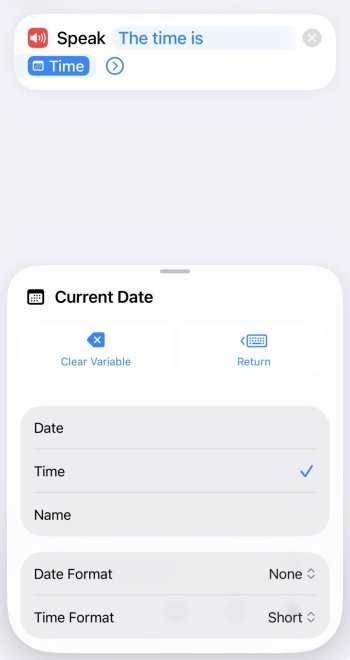
Create a "Speak" action.

In the textbox type "The time is " (without the quotes) and then scroll the variables showing above the keyboard until it says "current date". It should then pop up a format box. If not, then clck on the"Current Data" variable in the Speak text and it'll show.

Click on "Time" and it'll show further down that Date Format is None and Time is Short. That should be all you need to do.

In my case, as I have the system set to the 24 hour clock but I want the time read out for e.g. 7:30pm, I click "Custom" under Date Format and change the long string to a simple "h:mm a" (hour, minutes, am/pm).


IMG_0119.jpeg
 
Last edited:
  • Love
Reactions: happy orchard
Create a "Speak" action.

In the textbox type "The time is " (without the quotes) and then scroll the variables showing above the keyboard until it says "current date". It should then pop up a format box. If not, then clck on the"Current Data" variable in the Speak text and it'll show.

Click on "Time" and it'll show further down that Date Format is None and Time is Short. That should be all you need to do.

In my case, as I have the system set to the 24 hour clock but I want the time read out for e.g. 7:30pm, I click "Custom" under Date Format and change the long string to a simple "h"mm a" (hour, minutes, am/pm).


View attachment 2573142
This was really fun to learn. Thank you for sharing ALL OF THAT! I just want to learn and make all sorts of shortcuts. 🙂
 
  • Like
Reactions: adrianlondon
This was really fun to learn. Thank you for sharing ALL OF THAT! I just want to learn and make all sorts of shortcuts. 🙂
I have so many!

For ages, I couldn't see the point of them, but then I got hooked 😁. For example, I have one which is triggered when the phone is disconnected from power. As long as the phone is unlocked and the time is between 6am and 11am, it tells me the battery percentage (to confirm it's charged), today's weather, and then it trawls my calendar and reminders for anything due today and reads those out before ending with it telling me to have a nice day haha

You can try here to learn about them:

And here for some shortcuts to download and play with.

Most are not useful (imo) but the're still good to install as you can then open them up and see how they work, as you learn how to ask for input, do "if this then that" type stuff etc. It's tantalisingly close to a scripting language (something I'm good at) but crippled in many ways - but if you're not a programmer then this won't bother you.

If you want to see what is, to me, the most complex shortcut that exists, try this one!

I've edited it to cut it right down by removing functions I'm not interested in, but it's a shortcut which can create collages from photos. Let's say you go out to dinner and do the modern thing of taking photos of your food. Great! Except no one (apart from your Mum who's just pretending anyway) wants to see them all, Instead, click on them all and create a collage. So, you now have just one photo with all 3 or 4 pics combined into one. A good summary.

 
I have so many!

For ages, I couldn't see the point of them, but then I got hooked 😁. For example, I have one which is triggered when the phone is disconnected from power. As long as the phone is unlocked and the time is between 6am and 11am, it tells me the battery percentage (to confirm it's charged), today's weather, and then it trawls my calendar and reminders for anything due today and reads those out before ending with it telling me to have a nice day haha

You can try here to learn about them:

And here for some shortcuts to download and play with.

Most are not useful (imo) but the're still good to install as you can then open them up and see how they work, as you learn how to ask for input, do "if this then that" type stuff etc. It's tantalisingly close to a scripting language (something I'm good at) but crippled in many ways - but if you're not a programmer then this won't bother you.

If you want to see what is, to me, the most complex shortcut that exists, try this one!

I've edited it to cut it right down by removing functions I'm not interested in, but it's a shortcut which can create collages from photos. Let's say you go out to dinner and do the modern thing of taking photos of your food. Great! Except no one (apart from your Mum who's just pretending anyway) wants to see them all, Instead, click on them all and create a collage. So, you now have just one photo with all 3 or 4 pics combined into one. A good summary.

This is awesome! The links are super helpful. I'm with you on trying different shortcuts simply to learn how to make shortcuts; I like that kind of learning in many things. It's like an abstract apprentice. Hope you keep having fun creating stuff, and thanks again!
 
  • Like
Reactions: adrianlondon
Register on MacRumors! This sidebar will go away, and you'll see fewer ads.