
Got a tip for us?
Let us know
Become a MacRumors Supporter for $50/year with no ads, ability to filter front page stories, and private forums.
Shortcuts help & discussion
- Thread starter GreyOS
- Start date
- Sort by reaction score
You are using an out of date browser. It may not display this or other websites correctly.
You should upgrade or use an alternative browser.
You should upgrade or use an alternative browser.


Can’t do that as far as I know. Searched the actions and couldn’t see anything for caller ID.hey everyone,
now that we have shortcuts, I am lost in that shortcuts app.
I try to do the following very simple thing:
- on command, disable caller ID.
I have no cloue on what to do.
Anyone here who can help?


gwhizkids
macrumors G5
Can’t do that as far as I know. Searched the actions and couldn’t see anything for caller ID.
All
These are the system actions that Shortcuts has access to right now. If it’s not on this list it’s not possible to do/access these settings
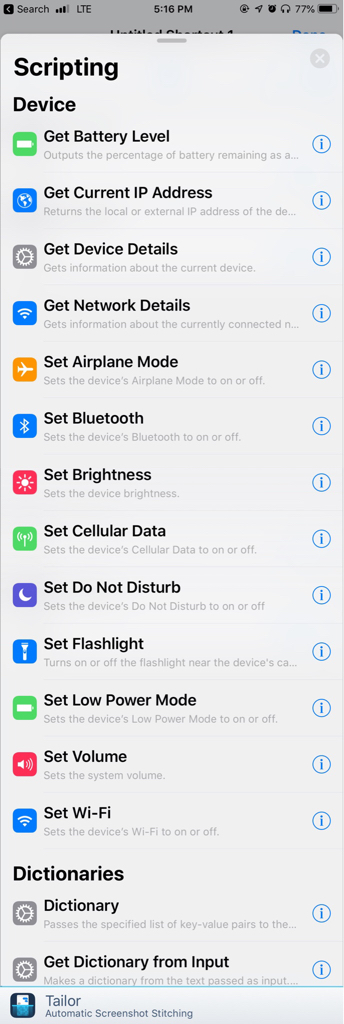

In my limited experience it only seems to ask this the first time.So I choose the 'open app' action and choose a certain app. Then when I click on the shortcut, I’m prompted with a pop up asking if I want to open it. Really?!? Why the hell would it ask me that?
And this popup, when one app tries to open another, has been around long before shortcuts, I guess a security measure in iOS.

redboxcar
macrumors 6502
There’s a ‘Copy Apple Music Link’ shortcut in the gallery which you could use... it’s quite complex!
I tried that, but it doesn't just grab the Apple Music link, it creates a link to all music services. :-/

1983Micky
macrumors newbie
I guess this should be pretty easy... but I can’t get it to work.
I would like to make a scan (with Notes or Office Lens) of an invoice that gets uploaded automatically to a certain Dropbox folder.
(I got it to work with IFTTT but would like to delete as much foreign apps as possible on my phone)
Anyone who likes to help?
I would like to make a scan (with Notes or Office Lens) of an invoice that gets uploaded automatically to a certain Dropbox folder.
(I got it to work with IFTTT but would like to delete as much foreign apps as possible on my phone)
Anyone who likes to help?

sjinsjca
macrumors 68020
If you’re viewing the page in reader mode and share to Mail, you get the reader copy in the email. I’m guessing that’s what you were trying to replicate in a shortcut.
Thanks for trying. Yes, that is what I want to do: automate sending an email with the Reader Mode version of a web page, including the filled-in Subject line and source URL up top, as mail.app on iOS and macOS does so brilliantly. But Shortcuts doesn't seem to be able to access Reader Mode at all, even if the page is already in Reader Mode in Safari.
Intriguingly, since a fairly recent update to iOS 11, switching to Reader Mode in Safari before sharing via email is often no longer necessary. It used to be that if you were in non-Reader Mode and shared on iOS, you'd share only the URL. Now, most of the time the full Reader Mode version is shared even if you're not in Reader Mode when you invoke the sharing (complete with nice link up top, Subject field all filled-in, etc). This is the way macOS has been for a while. On iOS, it's not as reliable yet as on macOS; sometimes Reader Mode must still be manually invoked. And it doesn't do anything of the sort when Shortcuts (née Workflow) is used.
Last edited:

Jessica Lares
macrumors G3
Have you tried the "Get Diffbot Article from Web Page"/"Get Details of Diffbot Article" actions?

Pug72
macrumors 68040
I'm trying to make a shortcut that will send my last photo to my wife. She's always asking me to send her a photo I just took.
I can get it to do it but it shows me the image that I have to confirm and then it brings the message app up with the image ready to send, but I have to tap the send button.
I want it to do it without any confirmations.
I've unchecked Show When Run but it still wants me to send myself.
I can get it to do it but it shows me the image that I have to confirm and then it brings the message app up with the image ready to send, but I have to tap the send button.
I want it to do it without any confirmations.
I've unchecked Show When Run but it still wants me to send myself.
What app you sending the message with? Edit: sorry just saw you did Saunders message app. Not sure then. The following be of interest to others...I'm trying to make a shortcut that will send my last photo to my wife. She's always asking me to send her a photo I just took.
I can get it to do it but it shows me the image that I have to confirm and then it brings the message app up with the image ready to send, but I have to tap the send button.
I want it to do it without any confirmations.
I've unchecked Show When Run but it still wants me to send myself.
WhatsApp does this and I think it’s a bug. Either in Shortcuts or the general Siri shortcuts framework.
The WhatsApp shortcuts surfaced by Siri are using a pre-iOS 12 framework. I think either that Show When Run option shouldn’t be there because it can’t support background execution until WhatsApp explicitly update to support that, or it’s a bug with executing it according to the setting.
Last edited:
gwhizkids
macrumors G5
Hey guys,
Is there a way I can trigger the audio/Output or AirPlay controlls via Shortcuts ?
So I can start a Podcast and then let it play on the HomePod instead of on the phone ?
Thanks
No. Directing audio output is not currently supported by Shortcuts.
Thanks.No. Directing audio output is not currently supported by Shortcuts.
What a pity.
I could swear that I heard somebody say it in ATP on last weeks episode. But I may be wrong.
I’ve downloaded a couple of ready shortcuts from the Gallery to Log Water and one for Caffeine.
When I run them they appear not to work correctly or at all.
The water app adds an entry to Health for 0 and the Caffeine one I cannot find an entry for.
Looking at the ‘script’ it looks like they should both be asking me how many ml or size the drink was first, which they are not doing.
Should I be adding additional config in these? I assumed these were ready to go.
When I run them they appear not to work correctly or at all.
The water app adds an entry to Health for 0 and the Caffeine one I cannot find an entry for.
Looking at the ‘script’ it looks like they should both be asking me how many ml or size the drink was first, which they are not doing.
Should I be adding additional config in these? I assumed these were ready to go.
Yep several from the galley are buggy as hell. Missing bits. I think @gwhizkids said the gallery contents date back to the workflow app...I’ve downloaded a couple of ready shortcuts from the Gallery to Log Water and one for Caffeine.
When I run them they appear not to work correctly or at all.
The water app adds an entry to Health for 0 and the Caffeine one I cannot find an entry for.
Looking at the ‘script’ it looks like they should both be asking me how many ml or size the drink was first, which they are not doing.
Should I be adding additional config in these? I assumed these were ready to go.

adrianlondon
macrumors 604
What you think is simple and what Shortcuts think is simple are two very different things 🙂I try to do the following very simple thing:
- on command, disable caller ID.
You may be able to work around it by making calls to GSM codes that activate/deactivate caller-id. I know *#31# gives the status, but I think different providers have different codes for turning caller-id on and off.
sjinsjca
macrumors 68020
Have you tried the "Get Diffbot Article from Web Page"/"Get Details of Diffbot Article" actions?
Thanks for posting. I was unfamiliar with those functions! Unfortunately they work no better.
To recap: Sharing via email in Reader Mode in Safari, for most websites, yields a filled-in email form with subject derived from the web page's title, and a body composed of the URL, a vertical space, and then a nicely rendered rich text version of the article that maintains block indents, italics, links and so on.
Trying this in Shortcuts (with steps to add the URL to a variable, then add a carriage return, then add either the Diffbot Article or the Rich Text Diffbot Detail) yields:
- Diffbot Article: Plaintext with basically no formatting
- Diffbot Rich Text Detail: the text is appended as an attachment, and does not flow under the URL as it does when shared manually from Safari in Reader Mode.
adrianlondon
macrumors 604
So the steps you want to do are simply (1) open the app and (2) do stuff in the app, right?Having some difficulties understanding all this new stuff but is it possible to open Runkeeper and start an activity in a shortcut?
If so, (1) is easy and (2) needs the app to support shortcut automation. You'll need to wait for Runkeeper to be updated.
Having some difficulties understanding all this new stuff but is it possible to open Runkeeper and start an activity in a shortcut?
So the steps you want to do are simply (1) open the app and (2) do stuff in the app, right?
If so, (1) is easy and (2) needs the app to support shortcut automation. You'll need to wait for Runkeeper to be updated.
I could be wrong but I thought workouts was one of the original SiriKit domains back in iOS 10, meaning RunKeeper has had the potential to start activities from Siri for 2 years. If it isn’t even supporting that then I’m not sure it bodes well for shortcuts support... fingers crossed though
So the steps you want to do are simply (1) open the app and (2) do stuff in the app, right?
If so, (1) is easy and (2) needs the app to support shortcut automation. You'll need to wait for Runkeeper to be updated.
Yes, I have an idea of a shortcut workflow involving; play overcast playlist and trigger a runkeeper walk, but ill try to explore the APIs a bit more, seems a bit overwhelming atm.
Another setback is that I am swedish and the APIs is both in english and Swedish, seems they rushed the translation.
I had a similar problem when asking to send my location with a pic of the map. I think it's something to do with sending an image. ETA with a map--prompt comes up. Share location with a map--prompt comes up. When I just send an ETA with text then there's no problem.I'm trying to make a shortcut that will send my last photo to my wife. She's always asking me to send her a photo I just took.
I can get it to do it but it shows me the image that I have to confirm and then it brings the message app up with the image ready to send, but I have to tap the send button.
I want it to do it without any confirmations.
I've unchecked Show When Run but it still wants me to send myself.

Rob_R
macrumors member
Wondering if anyone else has encountered this problem: various apps of mine are updating and supposedly adding Siri shortcuts. But when I look in the Shortcuts app, I can’t find actions for any of those apps. It doesn’t seem to be registering their new actions with the Shortcuts app somehow. Has anyone else seen this or have ideas? By the way I’m on the iOS 12.1 beta. Thanks for help!