
Got a tip for us?
Let us know
Become a MacRumors Supporter for $50/year with no ads, ability to filter front page stories, and private forums.
Should I switch to from Android to iPhone?
- Thread starter wmurphy1975
- Start date
- Sort by reaction score
You are using an out of date browser. It may not display this or other websites correctly.
You should upgrade or use an alternative browser.
You should upgrade or use an alternative browser.
The iPhone 4S is the best mobile device in photography, videos, security, updates, audio, navigation, games, voice commands, syncing with your computer/iPad, hardware integration and accessories.
If those things are not important to you, there's nothing wrong with considering an Android device.
If those things are not important to you, there's nothing wrong with considering an Android device.
The iPhone 4S is the best mobile device in photography, videos, security, updates, audio, navigation, games, voice commands, syncing with your computer/iPad, hardware integration and accessories.
If those things are not important to you, there's nothing wrong with considering an Android device.
Photography - nope.
Videos - nope.
Security - yep (at the cost of features).
Updates - yep.
Audio - nope.
Navigation - nope.
Games - yep (although having a larger screen to play games on is useful).
Voice commands - yep.
Syncing - yep, but syncing is a PAIN in the ass. I prefer manually managing my stuff.
Hardware integration - yep.
Accessories - yep.
Photography - nope.
Videos - nope.
Security - yep (at the cost of features).
Updates - yep.
Audio - nope.
Navigation - nope.
Games - yep (although having a larger screen to play games on is useful).
Voice commands - yep.
Syncing - yep, but syncing is a PAIN in the ass. I prefer manually managing my stuff.
Hardware integration - yep.
Accessories - yep.
https://forums.macrumors.com/threads/1369342/
Unless there are some new arguments, it has been decided that the quality of what is possible on the iPhone 4S in terms of Photography, Videos, Audio and Navigation is higher than on Android.
The only question is if that higher quality is worth not having the Android exclusive features like widgets and customizability.
Laidbackal
macrumors regular
https://forums.macrumors.com/threads/1369342/
Unless there are some new arguments, it has been decided that the quality of what is possible on the iPhone 4S in terms of Photography, Videos, Audio and Navigation is higher than on Android.
The only question is if that higher quality is worth not having the Android exclusive features like widgets and customizability.
Decided by you, in your alternative reality.
Photography - the Galaxy S3 and HTC One X are capable of shooting photos that are as good as if not better than the iPhone in some situations. There are a number of reviews supporting this assertion. Let me know if your googling skills aren't up to scratch. The Galaxy S3 has the same camera sensor as the 4S, but different software with features such as burst mode (take up to 20 photos in 6 seconds) which helps you get a decent shot.
Videos - the Galaxy S3 has a massive 4.8" 720p screen. I don't think it needs any further explanation as to why this is better for videos?
Audio - Galaxy S3 has the Wolfson DAC audio codec, is capable of storing a massive amount of music using the built-in storage, MicroSD slot and 50GB free Dropbox storage you get with it. It's also able to stream and store Extreme quality (320kbps) music on Spotify. The bundled earphones are excellent, but I'm sure they're no match for audiophile earphones.
Navigation - Galaxy S3 has Google Maps and turn-by-turn navigation built in, which is soon to get a bunch of new features including 3D maps and the ability to download maps so you don't need to download them using a data connection whilst driving.

Jordan921
macrumors 603
I can't understand why people want to do that. It's actually childish and demonstrates ones insecurity. They feel the need to justify their purchase and prove to everyone that their choice of a phone is the "right" one.
That's the only reasonable explanation for this type of behavior. If this isn't the right explanation, I'd like to hear the reasoning behind why someone who doesn't own an iPhone or other Apple product and has no interest in owning one, would come to a site like this and trash it. It makes no sense at all.
Guess they have too much time on their hands. Even when you let people on this site know they the iPhone is perfect for your needs you'll be called an iSheep.
DroidConvert
macrumors regular
Guess they have too much time on their hands. Even when you let people on this site know they the iPhone is perfect for your needs you'll be called an iSheep.
Well I've been there and done that with Android for three years. I just LOVE when some around here try to tell me what I can and can't do with Android.

lordofthereef
macrumors G5
Reason #398475 why current Android devices > iPhone:
Honestly, having used LTE on my GNex, while things do load faster, it often isn;t a night and day difference for me. I honestly suspect LTE to be on the next iPhone, but in the slim chance it is not, I certainly wouldn't mind. Going from 2G to 3G was huge. It actually made the internet truly mobile and usable. 3G to 4G (LTE) just isn;t as huge IMO.
Dangerous Theory
macrumors 68000
I agree with you mostly there, I love my new GS3, however the stereo speaker did seem a little weaker than my iPhone 4 one (sort of more tinny sound). The headphones i used briefly but haven't really compared to the apple ones. Syncing music is a little more of a pain but not too bad. Is there any way you've improved the sound quality, or is that just your opinion on the standard speaker?Decided by you, in your alternative reality.
Photography - the Galaxy S3 and HTC One X are capable of shooting photos that are as good as if not better than the iPhone in some situations. There are a number of reviews supporting this assertion. Let me know if your googling skills aren't up to scratch. The Galaxy S3 has the same camera sensor as the 4S, but different software with features such as burst mode (take up to 20 photos in 6 seconds) which helps you get a decent shot.
Videos - the Galaxy S3 has a massive 4.8" 720p screen. I don't think it needs any further explanation as to why this is better for videos?
Audio - Galaxy S3 has the Wolfson DAC audio codec, is capable of storing a massive amount of music using the built-in storage, MicroSD slot and 50GB free Dropbox storage you get with it. It's also able to stream and store Extreme quality (320kbps) music on Spotify. The bundled earphones are excellent, but I'm sure they're no match for audiophile earphones.
Navigation - Galaxy S3 has Google Maps and turn-by-turn navigation built in, which is soon to get a bunch of new features including 3D maps and the ability to download maps so you don't need to download them using a data connection whilst driving.
Jordan921
macrumors 603
I would like you to list off the other 398474 reasons why android is better then the iPhone. I'm enjoying the HSPA+ service on my At&t 4S tho.
Decided by you, in your alternative reality.
Photography - the Galaxy S3 and HTC One X are capable of shooting photos that are as good as if not better than the iPhone in some situations. There are a number of reviews supporting this assertion. Let me know if your googling skills aren't up to scratch. The Galaxy S3 has the same camera sensor as the 4S, but different software with features such as burst mode (take up to 20 photos in 6 seconds) which helps you get a decent shot.
Videos - the Galaxy S3 has a massive 4.8" 720p screen. I don't think it needs any further explanation as to why this is better for videos?
Audio - Galaxy S3 has the Wolfson DAC audio codec, is capable of storing a massive amount of music using the built-in storage, MicroSD slot and 50GB free Dropbox storage you get with it. It's also able to stream and store Extreme quality (320kbps) music on Spotify. The bundled earphones are excellent, but I'm sure they're no match for audiophile earphones.
Navigation - Galaxy S3 has Google Maps and turn-by-turn navigation built in, which is soon to get a bunch of new features including 3D maps and the ability to download maps so you don't need to download them using a data connection whilst driving.
Photography
Anyone familiar with DSLRs will know that it is not uncommon for two cameras to have the same sensor, but due to the equipment around it, see one camera with drastically better image quality. Let's see how the HTC One X and the Samsung Galaxy S3 fare against the iPhone 4S.
The HTC One X is actually quite bad at taking photos. This is the best comparison of the HTC One X camera vs the iPhone 4S camera. It simply shows you the results and lets you form your own conclusions:
http://www.techradar.com/videos/htc-one-x-vs-iphone-4s-camera-test-aJ2D7rM1i3OVz
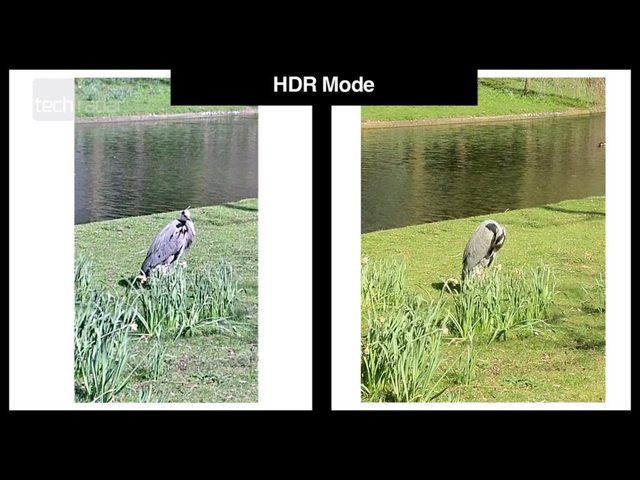
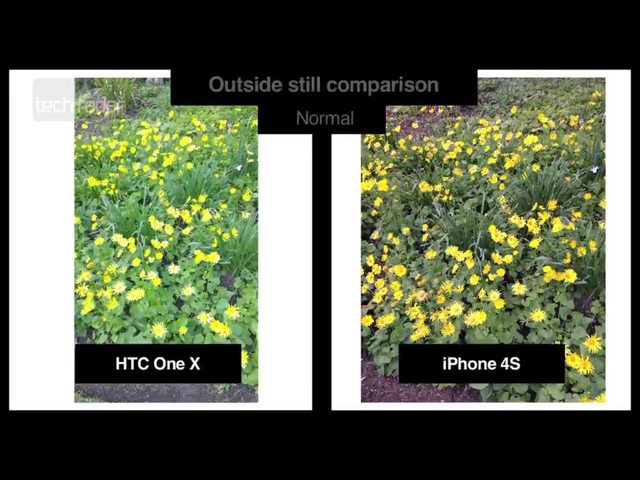
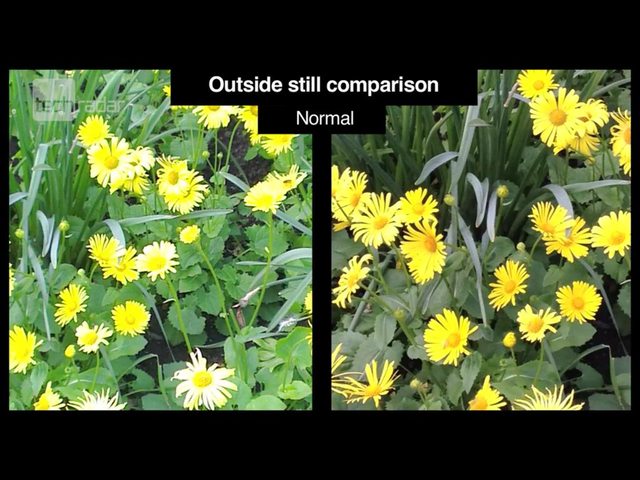
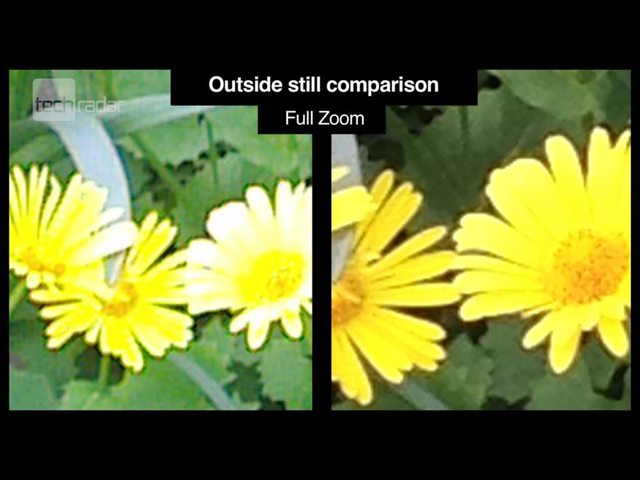
The dynamic range is very bad, with highlights consistently blown out, where the iPhone 4S shows additional detail in those areas. The Samsung Galaxy S3 actually looks worse than the HTC X in this area:
http://www.youtube.com/watch?v=hDnk82G0mzY
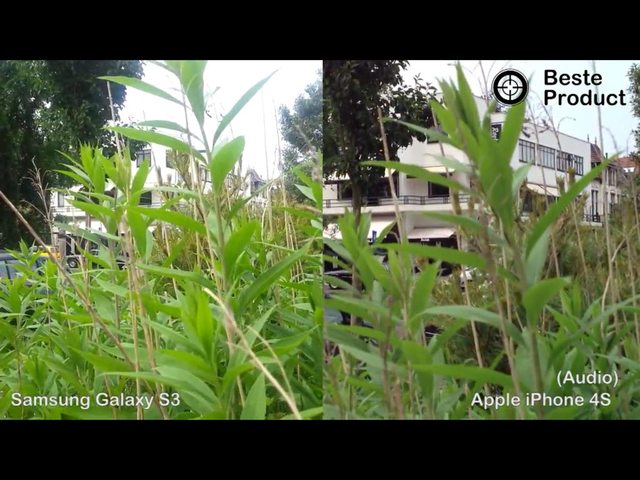
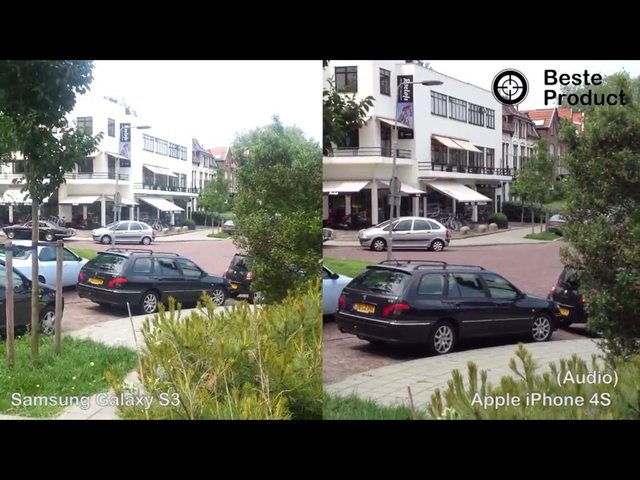
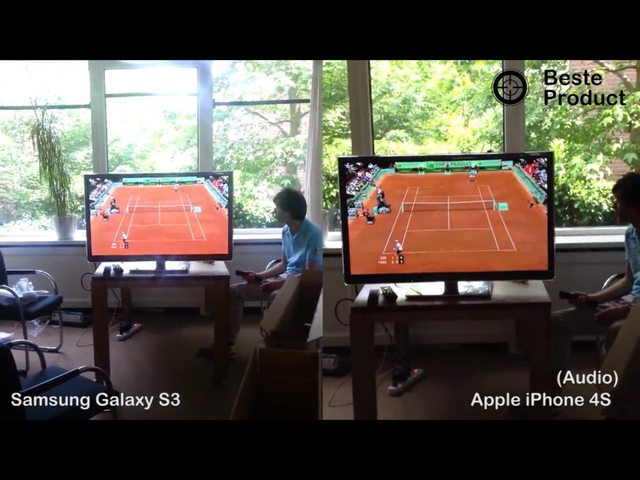
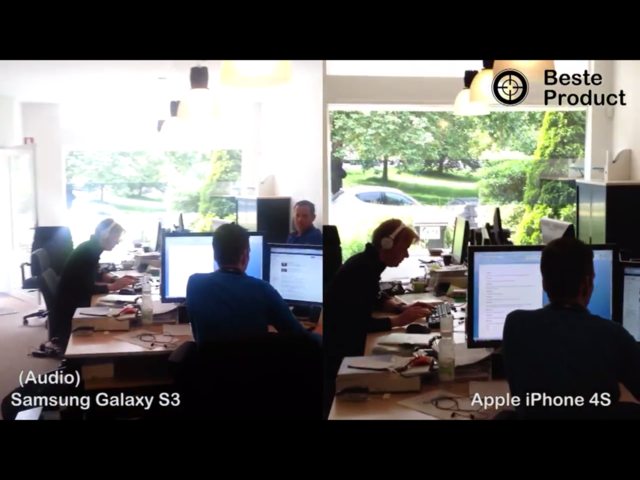
The video also highlights how much better the audio quality is on the iPhone 4S.
All of my photos automatically sync with all of my devices and computers, and with the push of one button I can sync all new photos and videos (since the last sync) to DropBox, a remote FTP server for backup, and my Smugmug account (unlimited storage space for originals). This is huge, as I currently have 30gigs of photos/videos on my device, so an easy backup solution is crucial.
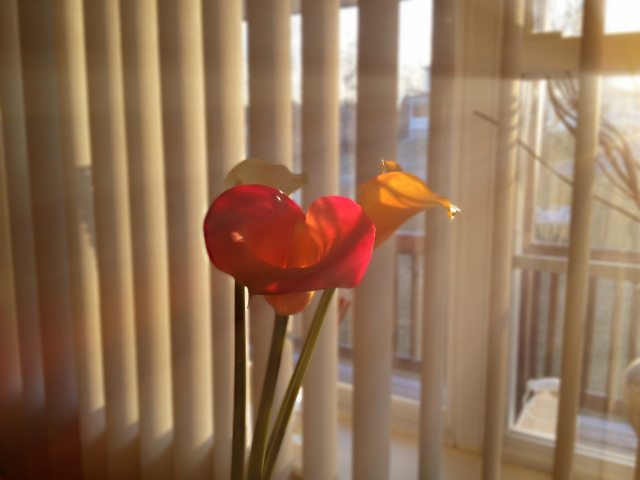
When it's time to edit the photos, the iPhone 4S excels here as well. Android simply doesn't have the apps. It's not that iOS does this better, it's that Android doesn't do it at all. Here are some of my shots, edited in about a minute for each iteration:
Original (normal Camera app)

Added DOF

Cropped

Original
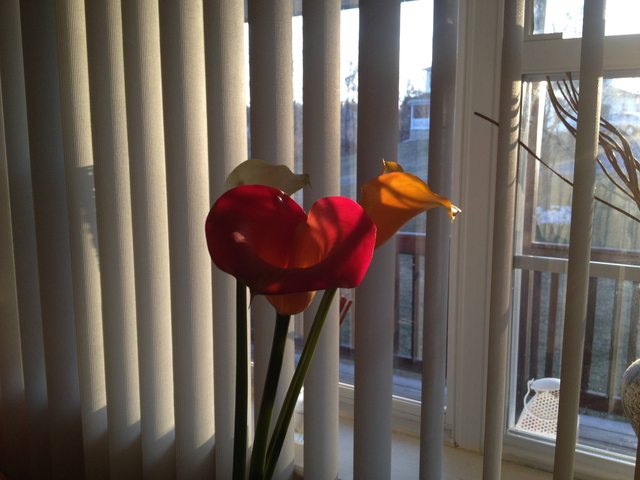
I added DOF and some sunrays through the window:
Here's one from someone much better than me:

and here's another before and after example from iphoneography.com

Videos
I can capture videos in 60fps HD, retroactively add smooth slow motion effects (can't really do this without 60fps), edit the video in apps like iMovie, or use Magisto and let the phone edit the video for me, then push a button and wirelessly play the video back on my HDTV.
If I choose, I can use VideoGrade to edit the brightness, saturation (turn it black and white), or recover shadows from the video, then have Cinemagram to turn it into an interesting cinemagraph:

When I'm done, I can upload to YouTube or Vimeo, use Stillshot to extract a photo frame from the video, or transfer it wirelessly to any of my home or remote computers.
Using Goodplayer I can both download videos from the web, and playback pretty much any codec out there.
When it comes to watching videos, yes, the bigger screen is better, but that's like complaining about the screen on your video camera being too small. It's not made to watch movies for hours at a time. 🙂 I would argue that watching a movie on any size phone isn't a pleasant experience.
In any case, I give you that point, but overall, I believe the iPhone 4S wins the video category.
Audio
Spotify 320kbs bitrate, not available on Android (let me know when Spotify can get this feature stable and out of beta).
I can go for a walk, say "Play Iris", where the phone will search through all my music for that song, and if it doesn't find it, search through all the songs on my home computers (iTunes Match) and seamlessly stream the song to me if it finds a match. Then when I get home, press one button and the song seamlessly starts playing on my home surround sound system.
It syncs playlists between me and my girlfriend's phone.
The weak link in our phones is not the DAC, it's the AMP. In any case, the reviews on head-fi.org (an audiophile headphone website) are mixed at best and "no match for the iPhone" at worst, here are some reviews:
Can't say much as this stage, it's certainly not bad but it is easily apparent that it's no match for the iPhone (was A/B'ing them last night with my Senn HD-251-IIs, will have a listen with my ACS-T15s tomorrow probably, doubt there is any point in trying with my GS1000s or LCD-2s with either phone).
Relative to the iPhone the I'd say this of the S3: lower volume output, less resolving, bass not as tight and well controlled, mids/highs muffled in comparison, less dynamic and so less engaging to listen to (bear in mind that was listening to predominantly rock and metal, will break out some jazz/hip hop/other stuff soon). So, to my ear at any rate on my brief listening so far it doesn't come close to unseating the iPhone. That's why I'm investing some time and energy into the possibility of DACs, and also waiting for what Supercurio can do for us.
It seems that iPhone will remain one more season as the king of headphone outputs. Certainly it's very tough to beat the numbers of iPhones' headphone outs (Output impedance, noise floor, distortin and crosstalk are impressive).
Lastly, due to an Android limitation (and another example of fragmentation making things difficult on developers) popular apps like PowerAmp do not support Volume Normalization, a basic iOS feature:
The problem with normalization in app is that apps on Android has no access to low level Android sound subsystem (i.e. mixer), thus, it can't manipulate volume so freely.
Btw, it looks like each android release has unique sound subsystem and also OEMs adds their varieties, thus they all differ.
http://forum.powerampapp.com/index.php?/topic/1263-dynamic-normalization/
I had to get a professional-level audio quality recording for work, and used the iRig Mic and corresponding app with great results. The developer said these apps are not possible on Android, because of latency issues.

http://www.ikmultimedia.com/products/irigmic/
The entire ikmultimedia.com line is absent on Android, not because they don't want it on Android, but because of the inherent technical audio limitations of the platform. With apps like Multitrack DAW from HarmonicDog, you can record two tracks simultaneously, important for recording two people talking during an interview, as it lets you go back and edit each speaker's feed (volume...etc.) individually.
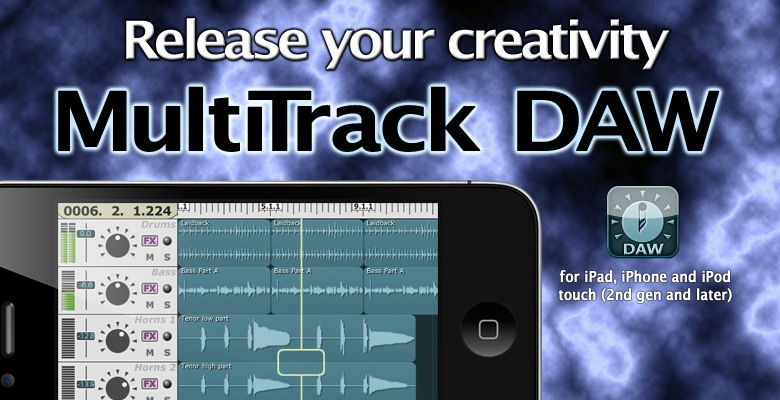
We can't talk about audio without mentioning GarageBand! Their Jam Session feature is possibly the most fun audio app on a moble device 🙂
Unfortunately, the audio latency issue on Android affects games as well, as the music/rhythm ports to Android devices cannot work as intended, due to the near-perfect audio timing required for such games to work well. The few such games that exist on Android have very large timing windows to compensate, which takes away from the fun.
Navigation
The TomTom iPhone app is the best gps navigation. Last time I tested TomTom vs Google Nav, Google took the wrong exit, it ended up taking 30 minutes longer than it should have. TomTom's IQ routes + HD Traffic are unlike anything on the market right now. The only thing that came close is the now defunct Dash Express.
The other day it had me get off the highway litterally just before traffic started, getting me there in half the time as my friend who stayed on the highway. Despite having to route around traffic, it's original arrival time estimate was accurate to the minute.
Last edited:

Hastings101
macrumors 68020
If you want a good experience with Android you need to get a decent Android phone that's made by Samsung (such as Galaxy SIII or Galaxy Note) or Sony. Never ever buy an LG phone. HTC can be just as bad as LG sometimes.

JMG
macrumors 6502a
If u want to stand out maybe get an android.
No one is going to stand out. If you are relying on your phone brand to make you stand out then something is seriously wrong with your personality, because it must be excruciatingly average to be overshadowed by the small electronic device in your pocket. This is a lame argument. Brand loyalty is lame, and "being different" purely for it's own sake isn't admirable. It's petty and shallow. It's just the other side of the coin of conformity, still influenced and played by the same rules you so eagerly want to ignore and rebel against. In some ways it's worse, because you expose yourself to deny the truth because of it's popularity rather than it's own merits.
Photography
Anyone familiar with DSLRs will know that it is not uncommon for two cameras to have the same sensor, but due to the equipment around it, see one camera with drastically better image quality. Let's see how the HTC One X and the Samsung Galaxy S3 fare against the iPhone 4S.
The HTC One X is actually quite bad at taking photos. This is the best comparison of the HTC One X camera vs the iPhone 4S camera. It simply shows you the results and lets you form your own conclusions:
*snip*
The dynamic range is very bad, with highlights consistently blown out, where the iPhone 4S shows additional detail in those areas. The Samsung Galaxy S3 actually looks worse than the HTC X in this area:
*snip*
The video also highlights how much better the audio quality is on the iPhone 4S.
Simply posting some photos where the iPhone 4S wins does nothing to bolster your argument, it simply means you've chosen the photos that help what you're trying to say. There are equally as many photos where the Galaxy S3 and One X comes out on top. I'm not going to post them, because they're easily findable in most of the tech reviews on the three smartphones and their camera abilities.
All of my photos automatically sync with all of my devices and computers, and with the push of one button I can sync all new photos and videos (since the last sync) to DropBox, a remote FTP server for backup, and my Smugmug account (unlimited storage space for originals). This is huge, as I currently have 30gigs of photos/videos on my device, so an easy backup solution is crucial.
iCloud only works with iOS devices (and PCs). Android has the option to automatically upload all pictures and videos taken to Dropbox, so the only button you have to press is the "take picture" button. You can do this only over WiFi or you have the option to do this using the mobile network, for those with unlimited data.
Android can also automatically upload all photos to Google+, which offers unlimited storage space. I don't know anything about Smugmug, but Google+ is free.
When it's time to edit the photos, the iPhone 4S excels here as well. Android simply doesn't have the apps. It's not that iOS does this better, it's that Android doesn't do it at all. Here are some of my shots, edited in about a minute for each iteration:
Original (normal Camera app)
*snip*
Added DOF
*snip*
Cropped
*snip*
Original
*snip*
I added DOF and some sunrays through the window:
*snip*
Here's one from someone much better than me:
*snip*
and here's another before and after example from iphoneography.com
*snip*
Videos
I can pretty much just regurgitate what I said in my first response here. Simply posting some photos with edits that you like does not strengthen your argument. It just means that the iPhone is capable of making those specific edits. It doesn't mean the iPhone is better at photo editing. There are apps for Android that can edit photos, some of which I bet have effects that aren't available for iOS devices.
All you are doing is posting photos and edits that the iPhone (possibly) wins at. You're not providing an objective review of the software and features available for both devices, you're just saying "the iPhone was better at this photo, that photo and editing this photo, therefore it must be the best." No. That's a poor argument.
I can capture videos in 60fps HD, retroactively add smooth slow motion effects (can't really do this without 60fps), edit the video in apps like iMovie, or use Magisto and let the phone edit the video for me, then push a button and wirelessly play the video back on my HDTV.
The iPhone records 720p at 60fps and 1080p at 30fps, the same as the Galaxy S3. Galaxy S3 can record in 1080p at 60fps when rooted, so it's definitely capable. Not sure why Samsung didn't include that feature by default.
Android again has video editing apps. They may or may not come with the exact adjustments you like on iOS, but that doesn't make them any less capable.
I can also press a button to get video to stream to my HDTV (well, I could if I had the Allshare Play dongle by Samsung, but I don't). This is also built into Samsung's Smart TVs.
If I choose, I can use VideoGrade to edit the brightness, saturation (turn it black and white), or recover shadows from the video, then have Cinemagram to turn it into an interesting cinemagraph:
*snip*
See above comment as it covers this.
When I'm done, I can upload to YouTube or Vimeo, use Stillshot to extract a photo frame from the video, or transfer it wirelessly to any of my home or remote computers.
Android can also upload to YouTube or Vimeo, and can also transfer videos wirelessly to home or remote computers. The Galaxy S3 has something called "Allshare Play" which is built for that very purpose.
I can access anything on my Galaxy S3 using a web browser on my PC using "Kies Air," which basically allows me to access the entire file system on my phone wirelessly. I can also create files and copy files onto my phone using this app. This works as long as the PC and phone are on the same WiFi network.
When it comes to watching videos, yes, the bigger screen is better, but that's like complaining about the screen on your video camera being too small. It's not made to watch movies for hours at a time. 🙂 I would argue that watching a movie on any size phone isn't a pleasant experience.
It is a perfectly pleasant experience on the S3. I wouldn't watch full length movies on it when larger screens are available, but watching TV shows, YouTube videos and videos you've taken is great. If I was on a train with only my phone on me, I would watch a movie on it no problem.
I can also pop the video out into a small window to continue watching it whilst I do other things, like respond to a text message. When I'm done, I simply tap the video and it resumes in full screen.
I'm a little flabbergasted that you would say that smartphones aren't meant to be used for watching movies for hours at a time, but you think that it's okay to edit photos and videos on there, something which, arguably, requires more screen real estate, as you not only need to view the photo and the video but also all of the tools to actually edit them. I don't think you thought through this part of your argument very well at all.
Audio
Spotify 320kbs bitrate, not available on Android (let me know when Spotify can get this feature stable and out of beta).
It is available on Android. I'm running the Spotify beta on my phone right now. I didn't use any trickery to get it, I just disabled the "block non-market applications" option, went to the Spotify website and downloaded it to my phone. This version of Spotify, although in beta, is more stable than the stable version of Spotify on Ice Cream Sandwich phones as it was built with ICS in mind.
If the fact that it's in beta bothers you, then any pros you've posted for Siri don't count in the iPhone's favour either.
Spotify for Android lets you also put your own tracks in your Spotify playlists. So if there's a song that's not available on Spotify, I can buy it in iTunes and put it in my Spotify playlists.
I can go for a walk, say "Play Iris", where the phone will search through all my music for that song, and if it doesn't find it, search through all the songs on my home computers (iTunes Match) and seamlessly stream the song to me if it finds a match. Then when I get home, press one button and the song seamlessly starts playing on my home surround sound system.
I can go for a walk, say "Play Iris", and if it doesn't find the song on my phone, I can go into allshare play and play it from there if it's on any of the computers I've decided to share.. or Spotify, or Google Music (when it comes to the UK), or DropBox.
I can use two taps to seamlessly start playing it on my wireless speakers.
If your idea of a good feature is one less button tap, then perhaps the fact that I can place music player widgets right on the lock screen and home screens will impress you. How about the fact that I can resume music and change tracks from the notification bar? How about the fact that I can simply say "Spotify" and it will open Spotify for me?
It syncs playlists between me and my girlfriend's phone.
Spotify can do that. You can subscribe to playlists.
I can also send a playlist or individual song over Bluetooth or WiFi Direct. It probably works using Android Beam/S-Beam too (where you simply hold the two phones back to back), but I don't have anybody to test this with at the moment.
The weak link in our phones is not the DAC, it's the AMP. In any case, the reviews on head-fi.org (an audiophile headphone website) are mixed at best and "no match for the iPhone" at worst, here are some reviews:
Lastly, due to an Android limitation (and another example of fragmentation making things difficult on developers) popular apps like PowerAmp do not support Volume Normalization, a basic iOS feature:
http://forum.powerampapp.com/index.php?/topic/1263-dynamic-normalization/
I had to get a professional-level audio quality recording for work, and used the iRig Mic and corresponding app with great results. The developer said these apps are not possible on Android, because of latency issues.
*snip*
The entire ikmultimedia.com line is absent on Android, not because they don't want it on Android, but because of the inherent technical audio limitations of the platform. With apps like Multitrack DAW from HarmonicDog, you can record two tracks simultaneously, important for recording two people talking during an interview, as it lets you go back and edit each speaker's feed (volume...etc.) individually.
*snip*
We can't talk about audio without mentioning GarageBand! Their Jam Session feature is possibly the most fun audio app on a moble device 🙂
Unfortunately, the audio latency issue on Android affects games as well, as the music/rhythm ports to Android devices cannot work as intended, due to the near-perfect audio timing required for such games to work well. The few such games that exist on Android have very large timing windows to compensate, which takes away from the fun.
I don't know much about this so it's pointless for me to try and refute any of your claims. All I'll say is that my songs sound awesome on the GS3, and with the more fully featured Spotify app, it's great.
Navigation
The TomTom iPhone app is the best gps navigation. Last time I tested TomTom vs Google Nav, Google took the wrong exit, it ended up taking 30 minutes longer than it should have. TomTom's IQ routes + HD Traffic are unlike anything on the market right now. The only thing that came close is the now defunct Dash Express.
The other day it had me get off the highway litterally just before traffic started, getting me there in half the time as my friend who stayed on the highway. Despite having to route around traffic, it's original arrival time estimate was accurate to the minute.
You have to buy TomTom... Google Maps is free. Posting an experience where a navigation app sent you the wrong way doesn't prove anything.. we've all had those. My TomTom has sent me down a dead end road before. It also took me down a number of treacherous back roads with 60mph limits, but because of how narrow the roads were and all of the tight bends, I couldn't do 60mph on hardly any of it. It ended up taking me about 30 minutes longer than it would've done if I had gone the main road way.
TomTom's IQ routes is clever marketing, there's nothing special about it. I have a dedicated TomTom GPS unit right now but as soon as offline mapping comes to Google Navigation I'll be getting rid of it.
I always end up beating my TomTom's initial estimated arrival by about 10 minutes.
Google Navigation is tied in with S-Voice on my Galaxy S3, so I can press the button on my Bluetooth hands free kit, say "Navigate home" or "Navigate to (location)" and it will do this for me automatically. This is all legal in the UK, and a lot safer than trying to program a sat nav while you're driving, or even pressing a voice input key on a touch screen. 🙂
Google Navigation is also integrated with the contacts app. I can go into contacts and navigate to my contacts' addresses from there. This can also be done by going into Google Navigation itself and browsing to the "contacts" tab, where a list of addresses is available to tap on. Not decided on which one is more useful, but at least they both work, so you don't have to remember which "route" to take.
We could go on all day about this. It's probably safe to say that the iPhone suits your needs, and the Galaxy S3 suits mine.
Last edited:

I do just want to throw in that once you buy an iPhone and get tied up into Apples iOS ecosystem the move out again is awkward at best.
That's the problem. I bought my iPad and starting buying things in iBooks as I like some of the features, but I suddenly thought that none of those books are going to be available on my other devices, and if I ever decide to sell my iPad and get something else, I'll lose those books.
Whenever possible now I try to use the multi-platform alternatives like the Amazon Kindle app.

Jessica Lares
macrumors G3
Take photography out of the picture. Honestly. One of the most amazing things about switching over to Android for me was that there were hardly any photography apps for me to mess around with. And because of that, it felt like using a real camera again. Especially when you pretty much have the same type of settings as like a typical Canon/Nikon point-and-shoot. Something you just don't get to have on the iPhone. All the iOS apps just do them in a pretty pathetic fake way that you have to sit there for a bit and play with to get the look you want. Want a Macro? Set it to Macro. Want it to have DOF? Just set it up for that.
Truth be told, if there were no apps to take advantage of, the iPhone's camera wouldn't be as revolutionary as it is today.
Truth be told, if there were no apps to take advantage of, the iPhone's camera wouldn't be as revolutionary as it is today.

Six8
macrumors 65816
I’ve been a fan of Android phones since the very first HTC G1 came out. Since then I’ve had a Motorola Cliq, an HTC Nexus One, an LG G2x, and now an HTC Sensation. And I have to say that for the most part I’ve been very happy with my Android experience. But recently I’ve become more intrigued by Apple’s products. And my own recent experience with the G2X and even some shortcomings with the Sensation have gotten me thinking that I may consider making the switch to the iPhone this year. A lot is going to depend on the iPhone 5. Here is my wish list:
- At least 4" screen
- Aluminum unibody construction
- Smaller dock connector
- NFC
Ideally I'd love for it to be designed like a smaller more compact iPad but a lot of the rumors I've seen make it appear more like a stretched out version of the iPhone 4. I'm not sure how I feel about that. What do you think? Do you have any advice for someone considering making the switch?
Yes
Ive been a fan of Android phones since the very first HTC G1 came out. Since then Ive had a Motorola Cliq, an HTC Nexus One, an LG G2x, and now an HTC Sensation. And I have to say that for the most part Ive been very happy with my Android experience. But recently Ive become more intrigued by Apples products. And my own recent experience with the G2X and even some shortcomings with the Sensation have gotten me thinking that I may consider making the switch to the iPhone this year. A lot is going to depend on the iPhone 5. Here is my wish list:
- At least 4" screen
- Aluminum unibody construction
- Smaller dock connector
- NFC
Ideally I'd love for it to be designed like a smaller more compact iPad but a lot of the rumors I've seen make it appear more like a stretched out version of the iPhone 4. I'm not sure how I feel about that. What do you think? Do you have any advice for someone considering making the switch?
There are already some great posts on here but I'll share my personal experience. I used an HTC Evo for a year and Rooted my Nook Color to run cyanogenmod. So I had 2 devices that used the Android OS. I loved them both. They were my introduction to smart phones. My Evo screen was huge, Google Maps navigation was great, and I loved how all my Google synced to work, home & phone.
I decided to go with the iPhone at my next upgrade to see what the fuss was about. I've been pleased with the switch. I thought I would hate the smaller screen but I actually prefer it now. The entire phone is much smaller and fits better in your hand. The audio quality is amazing (speakers & headphones). The camera seems better too. As for the dock connector difference I actually prefer the one they have now. All 6 Android devices in my family that use the micro USB can't take a charge now (not even a year old) without holding/taping the cord in the that "perfect" spot. I have also been happy with the App Store. The design and function of these apps just seem better than the Android counterparts & I got sick of waiting for releases & updates for the Android version.
The negatives of my switch were Google Maps & Google Integration. Google Maps was the huge bummer with the switch but if rumors are right we should see a revamped Apple Maps & navigation system so it shouldn't stop you from buying one. For Google Tasks, Docs ect. I use DropBox and never really alter documents on my phone & I use the Reminders app which has been rumored of being added to iCloud.com in the near future.
As for the NFC I don't know how much of a "must" that is for you because I would be very surprised if this iPhone had it. Also, back in May there were reports that Apple will use Bluetooth 4.0 instead of NFC for their future devices. An interesting speculation as to why, can be read here http://www.cultofmac.com/167758/why-apples-iwallet-wont-have-anything-to-do-with-nfc/
I would say switch but be sure its what you want because once you are in, you are stuck. I used to switch my phone every few months because i got bored. But I have had iPhones since the 3G and I have NEVER looked back. It just works for me.
I am so tied into apple now that I can never dig myself out. I am more than happy here though 🙂
I am so tied into apple now that I can never dig myself out. I am more than happy here though 🙂
seanpercival01
macrumors member
I agree with you mostly there, I love my new GS3, however the stereo speaker did seem a little weaker than my iPhone 4 one (sort of more tinny sound). The headphones i used briefly but haven't really compared to the apple ones. Syncing music is a little more of a pain but not too bad. Is there any way you've improved the sound quality, or is that just your opinion on the standard speaker?
That's my opinion on the standard speaker. It could be that the iPhone I've heard isn't that great I guess.
I don't bother syncing, especially not using Kies. I just copy/paste music onto my phone from my pc or using Kies Air (let's you wirelessly access your phones file system, copy things to/from your phone etc)
Simply posting some photos where the iPhone 4S wins does nothing to bolster your argument, it simply means you've chosen the photos that help what you're trying to say. There are equally as many photos where the Galaxy S3 and One X comes out on top. I'm not going to post them, because they're easily findable in most of the tech reviews on the three smartphones and their camera abilities.
iCloud only works with iOS devices (and PCs). Android has the option to automatically upload all pictures and videos taken to Dropbox, so the only button you have to press is the "take picture" button. You can do this only over WiFi or you have the option to do this using the mobile network, for those with unlimited data.
Android can also automatically upload all photos to Google+, which offers unlimited storage space. I don't know anything about Smugmug, but Google+ is free.
I can pretty much just regurgitate what I said in my first response here. Simply posting some photos with edits that you like does not strengthen your argument. It just means that the iPhone is capable of making those specific edits. It doesn't mean the iPhone is better at photo editing. There are apps for Android that can edit photos, some of which I bet have effects that aren't available for iOS devices.
All you are doing is posting photos and edits that the iPhone (possibly) wins at. You're not providing an objective review of the software and features available for both devices, you're just saying "the iPhone was better at this photo, that photo and editing this photo, therefore it must be the best." No. That's a poor argument.
The iPhone records 720p at 60fps and 1080p at 30fps, the same as the Galaxy S3. Galaxy S3 can record in 1080p at 60fps when rooted, so it's definitely capable. Not sure why Samsung didn't include that feature by default.
Android again has video editing apps. They may or may not come with the exact adjustments you like on iOS, but that doesn't make them any less capable.
I can also press a button to get video to stream to my HDTV (well, I could if I had the Allshare Play dongle by Samsung, but I don't). This is also built into Samsung's Smart TVs.
See above comment as it covers this.
Android can also upload to YouTube or Vimeo, and can also transfer videos wirelessly to home or remote computers. The Galaxy S3 has something called "Allshare Play" which is built for that very purpose.
I can access anything on my Galaxy S3 using a web browser on my PC using "Kies Air," which basically allows me to access the entire file system on my phone wirelessly. I can also create files and copy files onto my phone using this app. This works as long as the PC and phone are on the same WiFi network.
It is a perfectly pleasant experience on the S3. I wouldn't watch full length movies on it when larger screens are available, but watching TV shows, YouTube videos and videos you've taken is great. If I was on a train with only my phone on me, I would watch a movie on it no problem.
I can also pop the video out into a small window to continue watching it whilst I do other things, like respond to a text message. When I'm done, I simply tap the video and it resumes in full screen.
I'm a little flabbergasted that you would say that smartphones aren't meant to be used for watching movies for hours at a time, but you think that it's okay to edit photos and videos on there, something which, arguably, requires more screen real estate, as you not only need to view the photo and the video but also all of the tools to actually edit them. I don't think you thought through this part of your argument very well at all.
It is available on Android. I'm running the Spotify beta on my phone right now. I didn't use any trickery to get it, I just disabled the "block non-market applications" option, went to the Spotify website and downloaded it to my phone. This version of Spotify, although in beta, is more stable than the stable version of Spotify on Ice Cream Sandwich phones as it was built with ICS in mind.
If the fact that it's in beta bothers you, then any pros you've posted for Siri don't count in the iPhone's favour either.
Spotify for Android lets you also put your own tracks in your Spotify playlists. So if there's a song that's not available on Spotify, I can buy it in iTunes and put it in my Spotify playlists.
I can go for a walk, say "Play Iris", and if it doesn't find the song on my phone, I can go into allshare play and play it from there if it's on any of the computers I've decided to share.. or Spotify, or Google Music (when it comes to the UK), or DropBox.
I can use two taps to seamlessly start playing it on my wireless speakers.
If your idea of a good feature is one less button tap, then perhaps the fact that I can place music player widgets right on the lock screen and home screens will impress you. How about the fact that I can resume music and change tracks from the notification bar? How about the fact that I can simply say "Spotify" and it will open Spotify for me?
Spotify can do that. You can subscribe to playlists.
I can also send a playlist or individual song over Bluetooth or WiFi Direct. It probably works using Android Beam/S-Beam too (where you simply hold the two phones back to back), but I don't have anybody to test this with at the moment.
I don't know much about this so it's pointless for me to try and refute any of your claims. All I'll say is that my songs sound awesome on the GS3, and with the more fully featured Spotify app, it's great.
You have to buy TomTom... Google Maps is free. Posting an experience where a navigation app sent you the wrong way doesn't prove anything.. we've all had those. My TomTom has sent me down a dead end road before. It also took me down a number of treacherous back roads with 60mph limits, but because of how narrow the roads were and all of the tight bends, I couldn't do 60mph on hardly any of it. It ended up taking me about 30 minutes longer than it would've done if I had gone the main road way.
TomTom's IQ routes is clever marketing, there's nothing special about it. I have a dedicated TomTom GPS unit right now but as soon as offline mapping comes to Google Navigation I'll be getting rid of it.
I always end up beating my TomTom's initial estimated arrival by about 10 minutes.
Google Navigation is tied in with S-Voice on my Galaxy S3, so I can press the button on my Bluetooth hands free kit, say "Navigate home" or "Navigate to (location)" and it will do this for me automatically. This is all legal in the UK, and a lot safer than trying to program a sat nav while you're driving, or even pressing a voice input key on a touch screen. 🙂
Google Navigation is also integrated with the contacts app. I can go into contacts and navigate to my contacts' addresses from there. This can also be done by going into Google Navigation itself and browsing to the "contacts" tab, where a list of addresses is available to tap on. Not decided on which one is more useful, but at least they both work, so you don't have to remember which "route" to take.
We could go on all day about this. It's probably safe to say that the iPhone suits your needs, and the Galaxy S3 suits mine.
You have not shown any reasons why you believe the iPhone is not the best in photography, videos, audio or navigation.
I showed proof of the horrible photo and video quality on the HTC One X and the S3 compared to the iPhone 4S.
I gave examples of how you can use iOS exclusive photo editing apps to create photos that are almost indistinguishable from that of a DSLR.
I gave examples of how you can use iOS exclusive video editing apps to create videos that look like they were edited in a fully featured desktop video editor.
I provided examples of people on an audiophile headphone website, who compared both phones with audiophile headphones, and concluded the S3 is "no match for the iPhone".
I provided links to audio recording functionalities not available on Android.
The iPhone TomTom app is their top of the line offering. You likely do not have their $400 top of the line standalone offering with all the associated monthly fees.
None of my main claims have been refuted.
You have not shown any reasons why you believe the iPhone is not the best in photography, videos, audio or navigation.
I showed proof of the horrible photo and video quality on the HTC One X and the S3 compared to the iPhone 4S.
I gave examples of how you can use iOS exclusive photo editing apps to create photos that are almost indistinguishable from that of a DSLR.
I gave examples of how you can use iOS exclusive video editing apps to create videos that look like they were edited in a fully featured desktop video editor.
I provided examples of people on an audiophile headphone website, who compared both phones with audiophile headphones, and concluded the S3 is "no match for the iPhone".
I provided links to audio recording functionalities not available on Android.*
The iPhone TomTom app is their top of the line offering. You likely do not have their $400 top of the line standalone offering with all the associated monthly fees.
None of my main claims have been refuted.
Read my post again. I think you failed to read a lot of it, as I provided reasons why my phone is better in audio and navigation.