Become a MacRumors Supporter for $50/year with no ads, ability to filter front page stories, and private forums.

Grunze

macrumors regular
Original poster
Hi,

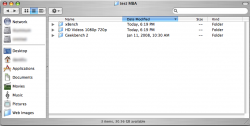
Whenever I open a second or third etc. Finder window, it comes without a sidebar... I'm using leopard.

How do I make it always appear?????

Thanks!
 
OS X saves the states of the last window you close, thus,

Close all windows (except 1) without sidebars.
On the last window click the gray button on the upper right corner to toggle sidebar.
Close that window. New windows opened should have sidebars now.
 
That didn't work... now I have no windows with the sidebar...
I'm fully sidebarless. I feel very naked.
 
Open new window, (should look like first picture, on the left), click button on upper-right.

Result = second picture. Close that window. All new windows should open with sidebars now.
 

Attachments

  • Consultant1.png
    Consultant1.png
    28.5 KB · Views: 122
  • Consultant2.png
    Consultant2.png
    82.9 KB · Views: 117
Delete your com.apple.finder.plist file in your user/library/preference folder. "user" is your login name. Basically, your home folder.

Then, relaunch finder.
 
Register on MacRumors! This sidebar will go away, and you'll see fewer ads.