

Become a MacRumors Supporter for $50/year with no ads, ability to filter front page stories, and private forums.

Hergesheimer

macrumors member
Original poster
Dec 29, 2014
94
37
The Netherlands
Dear all,

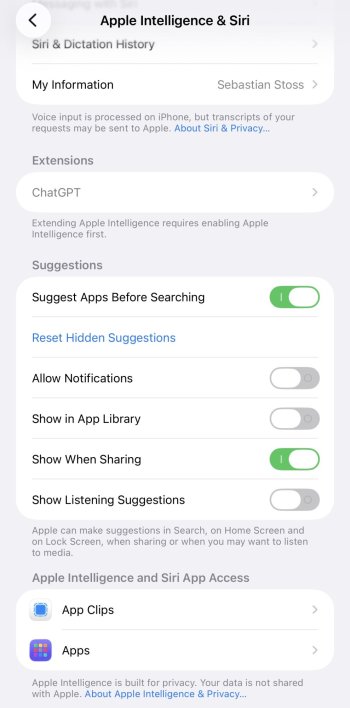
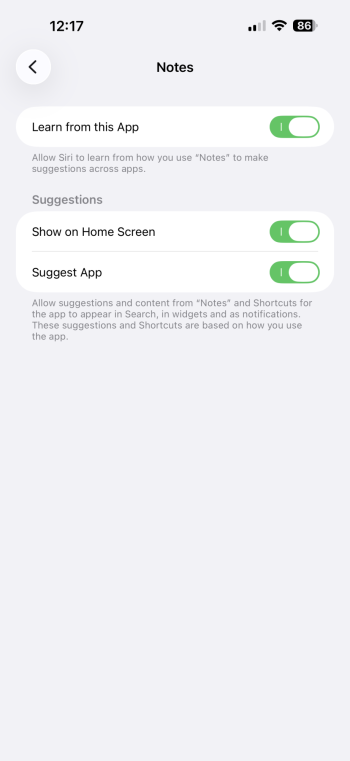
Can someone please explain to me :rolleyes: all the possibilities we have under Siri Suggestions in iOS? I only understood I can switch them all off at once, but that is not what I want. Kindly explain each of those eight available switches? Please see attached photos. Thanks a lot!!
 

Attachments

  • IMG_9295.jpeg
    IMG_9295.jpeg
    154.3 KB · Views: 1
  • IMG_9297.PNG
    IMG_9297.PNG
    145.1 KB · Views: 2
When thou dost grant to Siri leave to guess,
She learns thy ways from taps and words once said;
From habits formed, she humbly doth confess
What app or task thou next shalt likely tread.

In Search she whispers hints before thou’rt asked,
In Look Up shows what aid may fit thy need;
On Lock Screen’s face her proffers may be masked,
Soft signs of paths she thinks thou soon shalt heed.

Within each app her counsel may appear,
Suggesting acts ere thou hast formed the thought;
In Notifications too she draweth near,
To time her cues when most they may be sought.

Yet all these gifts thou may’st command or stay:
Grant leave, or bid her hold her tongue and sway.
 
When thou dost grant to Siri leave to guess,
She learns thy ways from taps and words once said;
From habits formed, she humbly doth confess
What app or task thou next shalt likely tread.

In Search she whispers hints before thou’rt asked,
In Look Up shows what aid may fit thy need;
On Lock Screen’s face her proffers may be masked,
Soft signs of paths she thinks thou soon shalt heed.

Within each app her counsel may appear,
Suggesting acts ere thou hast formed the thought;
In Notifications too she draweth near,
To time her cues when most they may be sought.

Yet all these gifts thou may’st command or stay:
Grant leave, or bid her hold her tongue and sway
Oh how lovely, a Shakespearean/Marlovian AI answer. Guess it wasn’t Apple Intelligence though.
 
Okay, if you want a real answer, here's a pretty good tutorial:

The App Library one is my archenemy. Turn that off. It makes an extra folder called Suggestions next to Recents and makes it look like you have double of some of your apps. App Library launched with iOS 14 and is still the worst app drawer experience I have ever had and not improved on once since launch.
 
  • Like
Reactions: Hergesheimer
Okay, if you want a real answer, here's a pretty good tutorial:

The App Library one is my archenemy. Turn that off. It makes an extra folder called Suggestions next to Recents and makes it look like you have double of some of your apps. App Library launched with iOS 14 and is still the worst app drawer experience I have ever had and not improved on once since launch.I will switch that ine off. I saw some other clips already but they all couldn‘t answer very clearly. Might be my stupidity. Will watch your video later today.
I will switch that of for sure. I have watched some other videos alteady but those were not able to answer my questions. Maybe it‘s my stupidity!?

I will watch your clip later tonight. Thanks a lot.
 
Register on MacRumors! This sidebar will go away, and you'll see fewer ads.