Since the update from 10.6.3 to 10.6.4 my macbook pro 13" 2009 (now 2010 modell since today) hangs on the boot process for 8-10 seconds.
After checking with Verbose Mode and the kernel.log I found that the mac is "Waiting for DSMOS" and takes that long until "DSMOS has arrived".
Updating to 10.6.5 Beta didn't help.
After some research I found out that DSMOS (Don't Steal Mac OS X.kext located in System/Library/Extensions/ is responsible for AES Decryption and is preventing OS X to be installed on non-Apple Hardware.
I don't understand why checking this Kext takes so long on a genuine Macintosh.
I can see the same issue on my Macbook Pro 2009 and 2 Macbook Pro 2010.
I tried the following:
- Set Macintosh HD as my startup drive
- Check Harddrive with Diskutility
- Repaired Permissions
- PRAM + NVRAM Reset
- SMC Reset
- Safe Mode
- Verbose Mode
- deleted and restored Kernel + Boot Cache
- 32bit Kernel + 64bit Kernel Boot
Does someone have the same problem ?
My Macbook is booting so slow now even with my SSD.
You can double-check your system by booting into Verbose Mode (hold cmd+V after the startup Chime until you see text scrolling) or you can simply check kernel.log in console.app.
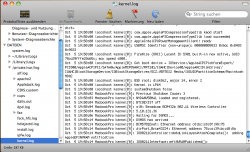
I have attached a screenshot of my kernel.log
I hope someone can help me with this issue.
Thanks
After checking with Verbose Mode and the kernel.log I found that the mac is "Waiting for DSMOS" and takes that long until "DSMOS has arrived".
Updating to 10.6.5 Beta didn't help.
After some research I found out that DSMOS (Don't Steal Mac OS X.kext located in System/Library/Extensions/ is responsible for AES Decryption and is preventing OS X to be installed on non-Apple Hardware.
I don't understand why checking this Kext takes so long on a genuine Macintosh.
I can see the same issue on my Macbook Pro 2009 and 2 Macbook Pro 2010.
I tried the following:
- Set Macintosh HD as my startup drive
- Check Harddrive with Diskutility
- Repaired Permissions
- PRAM + NVRAM Reset
- SMC Reset
- Safe Mode
- Verbose Mode
- deleted and restored Kernel + Boot Cache
- 32bit Kernel + 64bit Kernel Boot
Does someone have the same problem ?
My Macbook is booting so slow now even with my SSD.
You can double-check your system by booting into Verbose Mode (hold cmd+V after the startup Chime until you see text scrolling) or you can simply check kernel.log in console.app.
I have attached a screenshot of my kernel.log
I hope someone can help me with this issue.
Thanks