

I'm the developer, posting as myself. I'm Dominic DiBernardo, Snippy Snip is mine, and it's published under DB Ventures. It's the first Mac app I've shipped. It needs no account and collects no telemetry, and the contact address is on my profile.
The problem
I spent over two decades on Windows-based machines until switching over to macOS for all my devices this year. Almost all of it was better. The one thing I kept reaching for and couldn't find was the Snipping Tool.
macOS gives you Shift-Command-5 and Markup, and for a quick arrow that's honestly enough. It falls apart the second you want more. What I wanted was to grab a region, drop an arrow and a highlight on it, black out the thing that shouldn't be in the shot, and have it already sitting on my clipboard by the time I switched windows. The built-in flow leaves you a file on your desktop and a trip through Preview. That's not a workflow. That's homework.
So I built the one I wanted.
What it does
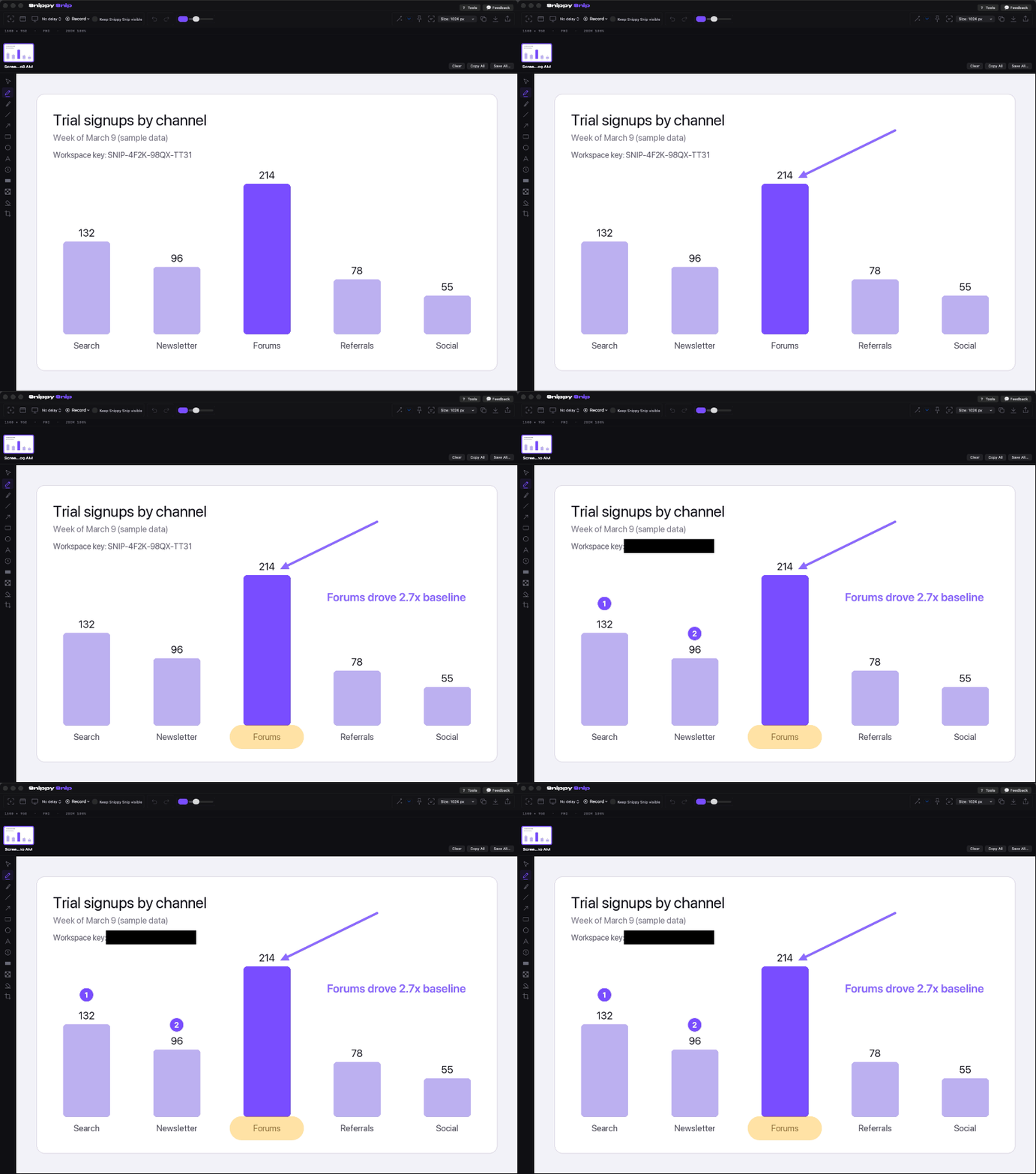
Screenshots: region, window and full screen, with an annotation editor built around speed. Arrows, text, highlighter, numbered and lettered step badges, blur, black-out, crop. The shot is on your clipboard the instant you capture it, and a session carousel keeps captures in one strip instead of piling up on your desktop.
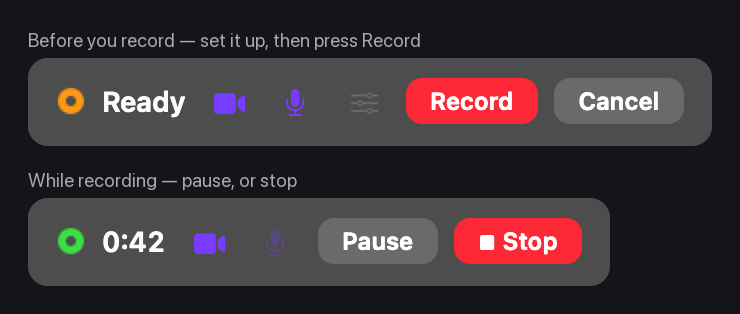
Recording is where the recent releases went. Your camera can sit in the frame as a picture-in-picture bubble. You place it and size it before the take, and it's burned into the recording itself, so your face and your voice can never drift out of sync. You can pause and resume mid-recording. Clicks are highlighted so viewers can follow the mouse. And when the clip is done, one click exports it as a GIF and puts it on your clipboard, so it plays inline when you paste it into an email.
How it compares
CleanShot X is the one most people here recommend, and it has earned that. It's excellent and I'm not going to pretend otherwise. It's $35 once, which buys a year of updates, with an optional $19 a year renewal after. Mine includes every update forever, minor and major, no window and no renewal. That's the real difference between us.
Shottr is the other one worth naming. Fast, light, and generous with its free tier. The main thing I do that it doesn't is screen recording. Both are good software. If one of them already fits how you work, stay put. I wanted a different deal.
Pricing
Free, forever. No trial clock, no email wall, no nag screen:
- Every capture mode (region, window, full screen)
- The whole annotation editor: arrows, text, highlighter, numbered and lettered step badges, blur, black-out, crop
- Auto-copy to the clipboard the instant you capture
- A session carousel, so shots stop piling up on your desktop
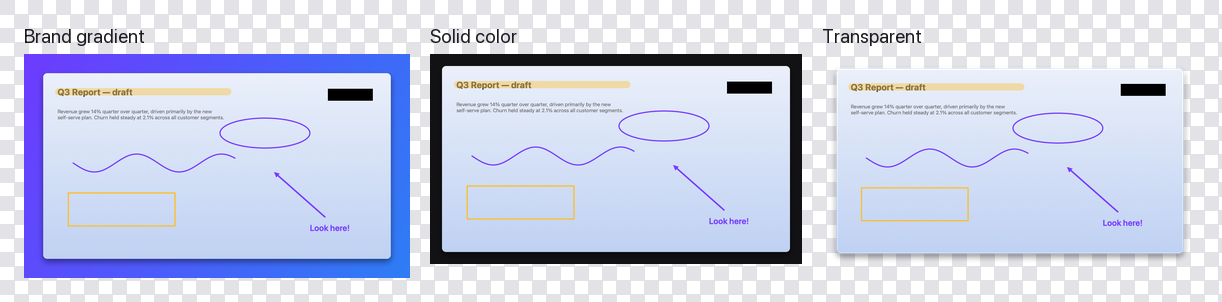
Pro adds screen recording (with the camera bubble, mic audio, pause and GIF export), full-page web capture, grab-text OCR, pinned floating shots, backdrops, and a capture delay timer. Pro is $19, paid once, and one license covers up to 3 Macs. Every update is included forever. No subscription, ever.
macOS 13 or later, universal (Apple Silicon and Intel), 3.7 MB, notarized by Apple, updates through Sparkle. https://snippysnip.com/?ref=macrumors
Feature requests are welcome and I mean that literally. The GIF export shipped the day after a user asked for it, and in the beta, lettered step badges and the resizable editor window both went out within a day of a tester asking. That's how I want to keep working.
There's also a giveaway thread running in Code Sharing and Software Promos with a free Pro license code: https://forums.macrumors.com/thread...-and-annotation-free-license-no-card.2487187/
The problem
I spent over two decades on Windows-based machines until switching over to macOS for all my devices this year. Almost all of it was better. The one thing I kept reaching for and couldn't find was the Snipping Tool.
macOS gives you Shift-Command-5 and Markup, and for a quick arrow that's honestly enough. It falls apart the second you want more. What I wanted was to grab a region, drop an arrow and a highlight on it, black out the thing that shouldn't be in the shot, and have it already sitting on my clipboard by the time I switched windows. The built-in flow leaves you a file on your desktop and a trip through Preview. That's not a workflow. That's homework.
So I built the one I wanted.
What it does
Screenshots: region, window and full screen, with an annotation editor built around speed. Arrows, text, highlighter, numbered and lettered step badges, blur, black-out, crop. The shot is on your clipboard the instant you capture it, and a session carousel keeps captures in one strip instead of piling up on your desktop.
Recording is where the recent releases went. Your camera can sit in the frame as a picture-in-picture bubble. You place it and size it before the take, and it's burned into the recording itself, so your face and your voice can never drift out of sync. You can pause and resume mid-recording. Clicks are highlighted so viewers can follow the mouse. And when the clip is done, one click exports it as a GIF and puts it on your clipboard, so it plays inline when you paste it into an email.
How it compares
CleanShot X is the one most people here recommend, and it has earned that. It's excellent and I'm not going to pretend otherwise. It's $35 once, which buys a year of updates, with an optional $19 a year renewal after. Mine includes every update forever, minor and major, no window and no renewal. That's the real difference between us.
Shottr is the other one worth naming. Fast, light, and generous with its free tier. The main thing I do that it doesn't is screen recording. Both are good software. If one of them already fits how you work, stay put. I wanted a different deal.
Pricing
Free, forever. No trial clock, no email wall, no nag screen:
- Every capture mode (region, window, full screen)
- The whole annotation editor: arrows, text, highlighter, numbered and lettered step badges, blur, black-out, crop
- Auto-copy to the clipboard the instant you capture
- A session carousel, so shots stop piling up on your desktop
Pro adds screen recording (with the camera bubble, mic audio, pause and GIF export), full-page web capture, grab-text OCR, pinned floating shots, backdrops, and a capture delay timer. Pro is $19, paid once, and one license covers up to 3 Macs. Every update is included forever. No subscription, ever.
macOS 13 or later, universal (Apple Silicon and Intel), 3.7 MB, notarized by Apple, updates through Sparkle. https://snippysnip.com/?ref=macrumors
Feature requests are welcome and I mean that literally. The GIF export shipped the day after a user asked for it, and in the beta, lettered step badges and the resizable editor window both went out within a day of a tester asking. That's how I want to keep working.
There's also a giveaway thread running in Code Sharing and Software Promos with a free Pro license code: https://forums.macrumors.com/thread...-and-annotation-free-license-no-card.2487187/