
Help!
After installing Snow Leopard 10.6.1 on my 2.16 GHz Core Duo MacBook Pro running OS 10.5, I can no longer connect to the WPA2 Enterprise network at the University of Ottawa. I can still connect to other encrypted networks, such as my home WEP encrypted network. Before the installation I was able to connect to the WPA2 enterprise network.
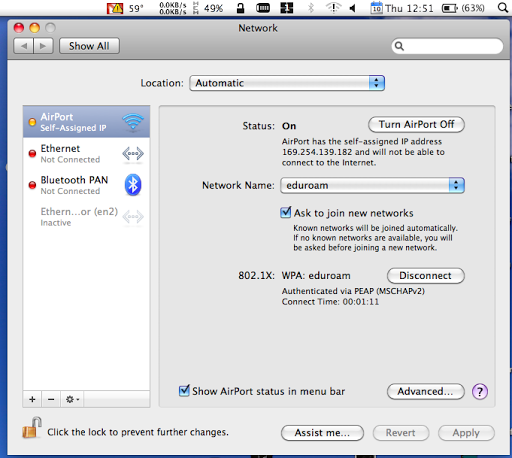
When attempting to connect, under network preferences I can see that my computer is Authenticated via PEAP(MSCHAPv2) and a timer showing my time connected is running. However under status, it says that I have a self assigned IP and that I cannot connect to the internet. As a result I cannot connect to the internet.
I have included a picture that describes my problem exactly:
Does anyone have this problem? Can anyone help me?
Thanks!
After installing Snow Leopard 10.6.1 on my 2.16 GHz Core Duo MacBook Pro running OS 10.5, I can no longer connect to the WPA2 Enterprise network at the University of Ottawa. I can still connect to other encrypted networks, such as my home WEP encrypted network. Before the installation I was able to connect to the WPA2 enterprise network.
When attempting to connect, under network preferences I can see that my computer is Authenticated via PEAP(MSCHAPv2) and a timer showing my time connected is running. However under status, it says that I have a self assigned IP and that I cannot connect to the internet. As a result I cannot connect to the internet.
I have included a picture that describes my problem exactly:
Does anyone have this problem? Can anyone help me?
Thanks!
