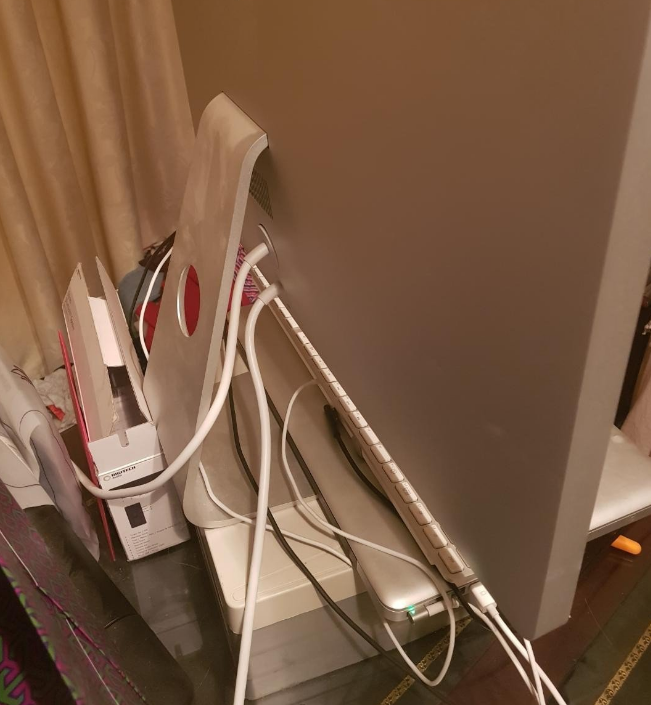
I'm really hoping to possible to use this with a modern Windows PC, via HDMI or Displayport (mini is fine)
Please don't tell me it's TB 🙁 ? Anyone know.
So can I confirm - how can the user I'm helping out, use a MacBook and a PC with this monitor? Would I imagine they need to unplug the cable from one, into the other? Since it doesn't appear to have multiple inputs?
Buy ALOGIC DPMDP-15MF 20cm DisplayPort (Male) to Mini DisplayPort(Female) Adapter from CPL- computer store specialize in PC, gaming PC & gaming laptop, computer parts, fast delivery
Buy StarTech MDPEXT3 3ft Mini DisplayPort Extension Cable M/F from CPL- a computer store stocks full range of hdmi cable, lightning, usb c, ethernet cable, usb c to hdmi
I'm really hoping to possible to use this with a modern Windows PC, via HDMI or Displayport (mini is fine)
Please don't tell me it's TB 🙁 ? Anyone know.
Ok, so the Apple LED Cinema Display (Mini DisplayPort) and Apple Thunderbolt Display are very similar. Key give-away is that the cable on the TB display splits into 2 Plugs - TB (lightning bolt icon) and MagSafe, while the Cinema Display cable splits into 3 - MiniDP (screen icon), MagSafe and USB.
First picture looks like a Cinema Display - TB has more ports on the back - Can’t see if that USB plug in the photo goes to the display, but you can just about make out the DisplayPort icon on the display plug.
Display should work on a PC. Sound might work if you set the PC sound output to DisplayPort. Don’t know about the webcam.
The display only has a single input so you can’t connect two computers and switch - but you can buy DisplayPort switch boxes.