
Got a tip for us?
Let us know
Become a MacRumors Supporter for $50/year with no ads, ability to filter front page stories, and private forums.
ssd swap - high usage of Terabytes Written
- Thread starter Forti
- WikiPost WikiPost
- Start date
- Sort by reaction score
You are using an out of date browser. It may not display this or other websites correctly.
You should upgrade or use an alternative browser.
You should upgrade or use an alternative browser.
- Status
- The first post of this thread is a WikiPost and can be edited by anyone with the appropiate permissions. Your edits will be public.


Dockland
macrumors 6502a
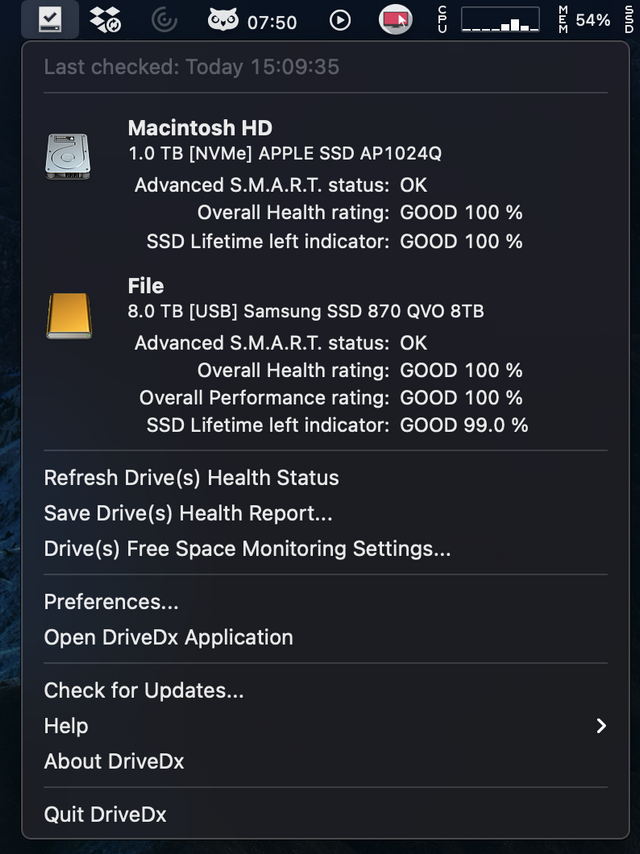
You most likely installed the driver version (0.10.2) that was included with the current version of DriveDx, and this is the Intel-only version. This is generally a very strange unexpected feature of macOS for M1, which allows you to install incompatible drivers for an incompatible architecture - for some reason (bug, indifference?) macOS does not check the type of driver architecture.
So at the moment for M1 you need to separately download a special version (0.10.3) of the driver from the website. Then everything should work.
Thanks, it worked out of the box.

VitoBotta
macrumors 65816
native driver for M1 (Apple Silicon) in January
Thanks, I installed this. However it shows SMART only for the spinning disks connected to USB A. It says that SMART is not supported for the Samsung T5 connected to USB C. What am I missing? Thanks!
killerovsky
macrumors newbie
Most likely during the installation of Samsung utilities for T5, you have installed the Samsung driver. macOS supports/allows only one driver per device. So you need to uninstall the Samsung driver to allow SAT SMART Driver to work. This is both mentioned on the DriveDx FAQ and in the Samsung manual for T5 (see page 6).Thanks, I installed this. However it shows SMART only for the spinning disks connected to USB A. It says that SMART is not supported for the Samsung T5 connected to USB C. What am I missing? Thanks!
VitoBotta
macrumors 65816
I haven't installed any Samsung utilities though 🙂Most likely during the installation of Samsung utilities for T5, you have installed the Samsung driver. macOS supports/allows only one driver per device. So you need to uninstall the Samsung driver to allow SAT SMART Driver to work. This is both mentioned on the DriveDx FAQ and in the Samsung manual for T5 (see page 6).
ItWasNotMe
macrumors 6502
It was updated to 22.2 (Intel) using the Creative Cloud app 27 days agoThere must be something different with your PS install. I can't get mine to write anything with Launchd. I worked with the non-beta version this morning on very large files. After 4 hours Launchd wrote only 381MB (not related to PS).
Do you use any plugins?
Did you do a fresh install?
How many files do you open at once?
There is one Photoshop plugin - this is Adobe's Camera Raw - Version 13.10.658 - the Intel Version
There is one Lightroom Classic plug-in - Jeffrey Friedl's Folder publisher, the the Adobe supplied ones are disabled
I have one image open at a time, usually opened from Lightroom. These start as raw images, approx 132MB .NEF files. By the time I've finished, the resulting Tif that its written is typically around 350MB
I'm cleaning up digitised images of 40 to 60 year old photo negatives and positives.
- The main use in PS is Healing Brush in various forms, Tone and Colour correction - amazing how much crud and scratches there are on something that old. Plus the dyes fade/degrade at different rates and these rates differ by film manufacturer as well
- I largely use Camera Raw for Geometry, sometimes for auto colour/white balance to get a basis for further adjustments
- I usually end up with two of three layers

thadoggfather
macrumors P6
Dockland
macrumors 6502a
I have been casually looking through this thread but any ideas what the main culprit it if its a specific activity?
Time Machine backups?
intensive intel app specific creative productivity suites like photo or video editing?
Safari tab junkies?
There doesn't seem to be anything specific. Very random.
Last edited:

inversed
macrumors newbie
I spend a couple hours this afternoon cleaning a Large Format scan. The picture was around 150Mpix (14'000px long edge) on 8 layers (.psb file). Absolutely nothing written to disk via Launchd.I'm cleaning up digitised images of 40 to 60 year old photo negatives and positives.
- The main use in PS is Healing Brush in various forms, Tone and Colour correction - amazing how much crud and scratches there are on something that old. Plus the dyes fade/degrade at different rates and these rates differ by film manufacturer as well
- I largely use Camera Raw for Geometry, sometimes for auto colour/white balance to get a basis for further adjustments
- I usually end up with two of three layers
Do you have a 16 RAM M1?
ItWasNotMe
macrumors 6502
Yes, and at the moment memory used is c11.5 and swap is zero. PS itself is about 3.5 and LR just over 1I spend a couple hours this afternoon cleaning a Large Format scan. The picture was around 150Mpix (14'000px long edge) on 8 layers (.psb file). Absolutely nothing written to disk via Launchd.
Do you have a 16 RAM M1?
launchd is writing about 1GB every 10 minutes as I sit here using the Healing Brush in PS on a 130MB raw image with a single layer.
[Edit, the image itself is 5782x3946 but cropped by LR to 5252x3502 before being passed by LR to PS]
Kraizelburg
macrumors 6502
The biggest culprit in my case is Kernel_task writing more than 1GB per hour even with just browsing and writing documents in Word.
thadoggfather
macrumors P6
The biggest culprit in my case is Kernel_task writing more than 1GB per hour even with just browsing and writing documents in Word.
does a reboot temporarily fix it or it’s back to writing like crazy?
Kraizelburg
macrumors 6502
Nothing changes even after rebooting, kernel_task is way too active and I dunno why, I dont have any secondary services running, no time machine, not any cloud services other than stock icloud.does a reboot temporarily fix it or it’s back to writing like crazy?
thadoggfather
macrumors P6
And what macOS version?Nothing changes even after rebooting, kernel_task is way too active and I dunno why, I dont have any secondary services running, no time machine, not any cloud services other than stock icloud.
and what browser ?
That’s so odd and frustrating
have you tried isolating it to ms office maybe ? I don’t have that on my machine
Kraizelburg
macrumors 6502
Latest big Sur version, updated yesterday, and I have tried both safari and Brave which is my main browser. No its not Office as I have seen the same behaviour just browsing the internet.And what macOS version?
and what browser ?
That’s so odd and frustrating
have you tried isolating it to ms office maybe ? I don’t have that on my machine
thadoggfather
macrumors P6
Latest big Sur version, updated yesterday, and I have tried both safari and Brave which is my main browser. No its not Office as I have seen the same behaviour just browsing the internet.
I wonder if it is a mass hardware failure since doesn’t seem to affect everyone like me but
what a frustrating thing since it’s so hard to isolate and radio silence from apple
Kraizelburg
macrumors 6502
In my humble opinion it has to be something related to Mac OS doing some stuff in the background which I think is a bug.I wonder if it is a mass hardware failure since doesn’t seem to affect everyone like me but
what a frustrating thing since it’s so hard to isolate and radio silence from apple
inversed
macrumors newbie
Just a thought, your files are on your OS drive? Mine are all on an external TB3 drive.Yes, and at the moment memory used is c11.5 and swap is zero. PS itself is about 3.5 and LR just over 1
launchd is writing about 1GB every 10 minutes as I sit here using the Healing Brush in PS on a 130MB raw image with a single layer.
[Edit, the image itself is 5782x3946 but cropped by LR to 5252x3502 before being passed by LR to PS]
I have gotten my writes under control by shutting the most memory intensive tabs in Safari. Last week I was doing ~400GB/day. This week I am doing ~30GB/day. I also disabled Parallels Toolbox which was eating a lot of memory without me even using it. Every day I either restart Safari or reboot my Mini.
This is okay as a temporary workaround, but I don't consider it to be a very good long-term solution. I had ~100 tabs open and ran more concurrent apps on my Intel for 6 years. I feel like I have nerfed my computer. I hesitate before I open an app or a new tab. It is constantly annoying, but at least the writes aren't going crazy anymore.
This is okay as a temporary workaround, but I don't consider it to be a very good long-term solution. I had ~100 tabs open and ran more concurrent apps on my Intel for 6 years. I feel like I have nerfed my computer. I hesitate before I open an app or a new tab. It is constantly annoying, but at least the writes aren't going crazy anymore.
I have gotten my writes under control by shutting the most memory intensive tabs in Safari. Last week I was doing ~400GB/day. This week I am doing ~30GB/day. I also disabled Parallels Toolbox which was eating a lot of memory without me even using it. Every day I either restart Safari or reboot my Mini.
This is okay as a temporary workaround, but I don't consider it to be a very good long-term solution. I had ~100 tabs open and ran more concurrent apps on my Intel for 6 years. I feel like I have nerfed my computer. I hesitate before I open an app or a new tab. It is constantly annoying, but at least the writes aren't going crazy anymore.
This is why I'm waiting for a 32 GB or 64 GB model. I want all of my programs in RAM and as many files cached as possible.
We got the 16 GB Air and I have not checked writes but typical RAM usage is 7 GB. My daughter just does web browsing (maybe 3 tabs) and writing on it. Very little usage but we maxed the RAM anyways. This is the first generation - things will get better later this year.
ItWasNotMe
macrumors 6502
Just a thought, your files are on your OS drive? Mine are all on an external TB3 drive.
The images are on an external HDD USB3.0 (I've almost 7TB worth), the Photoshop scratch disk is an external SSD USB-C, loads of free space. Internal boot disk has 400GB free, swap is still zero.
Even so, any i/o should be 'credited' to PS not launchd, file saves certainly are. The only thing launchd should be handling is process start and termination; and maybe it does the Rosetta translations (probably only Apple know that for certain)
I did wonder whether it was the hand-off from LR to PS so I
- Passed a .NEF from LR to PS
- Saved it as a -Edit.Tif having done the geometry in PS and renamed the background layer
- Rebooted the machine to clear any caches and 'temporary' translations
- Opened the .Tif directly in PS without starting LR
inversed
macrumors newbie
That is very very strange as my similar workflow do not produce the same result (at least no Launchd writes).The images are on an external HDD USB3.0 (I've almost 7TB worth), the Photoshop scratch disk is an external SSD USB-C, loads of free space. Internal boot disk has 400GB free, swap is still zero.
Even so, any i/o should be 'credited' to PS not launchd, file saves certainly are. The only thing launchd should be handling is process start and termination; and maybe it does the Rosetta translations (probably only Apple know that for certain)
I did wonder whether it was the hand-off from LR to PS so I
Same result, by the time I'd cleaned all the crud with Healing Brush, launchd had written an extra 7GB or thereabouts. Hadn't even touch Camera Raw this time
- Passed a .NEF from LR to PS
- Saved it as a -Edit.Tif having done the geometry in PS and renamed the background layer
- Rebooted the machine to clear any caches and 'temporary' translations
- Opened the .Tif directly in PS without starting LR
Can you try to set the scratch disk to the OS drive (i noticed mine was on the OS drive).
Do you have the same problem with the beta (healing brush is now available with the last beta)?

tab0reqq
macrumors newbie
With all the respect, but that's just 🤦🏻♂️This is why I'm waiting for a 32 GB or 64 GB model. I want all of my programs in RAM and as many files cached as possible.
I've been using in a similar way my 2014 MBP 13 8/256 for years, and now with Apple Silicone we should opt for RAM Upgrade option which is going to cost more than a base model of MacBook? 🙂
This supposed to be technological progress. Not step back 🙂
inversed
macrumors newbie
@ItWasNotMe I just re-tested. Launching LR Classic resulted in 4MB write with Launchd. Then if i send a file to PS Beta there is no more writes with Launchd (6 MB if i send the file to PS/Rosetta). Memory was around 10G between PS and LR and 680MB swap.
One thing, all my LR Catalogs are project/assignment based so i don't have large catalogs (at most 1000 files).
One thing, all my LR Catalogs are project/assignment based so i don't have large catalogs (at most 1000 files).