

Become a MacRumors Supporter for $50/year with no ads, ability to filter front page stories, and private forums.

WillEH

macrumors 6502a
Original poster
Feb 8, 2011
769
5
United Kingdom
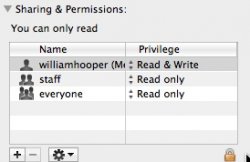
Recently locking a file, and I saw this at the bottom. It has myself, staff, and everyone.

Who is staff? AppleStore staff? they have a special login or something? and can I get rid of that account? Not sure if I want them to access things I've locked, etc.

Thanks. :)
 

Attachments

  • ishot-36.jpg
    ishot-36.jpg
    27.1 KB · Views: 198
:apple: Troubleshooting permissions issues in Mac OS X

Owner, Group, Others

Abbreviations like "rwx" and "r-x" describe the permission for one user or entity. The permissions set for each file or folder defines access for three entities: owner, group, and others.

  • Owner - The owner is most often the user who created the file. Almost all files and folders in your home directory will have your username listed as the owner.
  • Group - Admin users are members of the groups called "staff" and "admin". The super user "root" is a member of these and several other groups. Non-admin users are members of "staff" only. Typically, all files and folders are assigned to either "staff," "admin," or "wheel".
  • Others - Others refers to all other users that are not the owner or part of the group for a file or folder.
Since each entity has its own permission, an example of a complete permission set could look like "-rwxrw-r--". The leading hyphen designates that the item is a file and not a folder. Folder privileges appear with leading "d," such as "drwxrw-r--". The "d" stands for directory, which is what a folder represents. Figure 2, below, depicts how this looks in the Terminal application.​
 
Register on MacRumors! This sidebar will go away, and you'll see fewer ads.