My recommendations if you use Android phone and want to limit the tracking:
Enable Private DNS
This is the easiest option and will only take 60 seconds of you time to perform and you don't have to install any apps or extensions.
DNS is domain name system, which is like a phone book for the internet. All the network queries on your devices go through a DNS server. Depends on the privacy policy, some DNS services may log your activities and use them for marketing purposes. Android version 9.0 and onward have a feature called
Private DNS, which lets you manually set the DNS server for your Android device.
This is where
Adguard DNS come in. Adguard DNS services block known ads and trackers servers. It is like ads blocking, except it work for the whole device, or the whole network if you set it as your router's DNS. If you don't want to use Adguard, there are other
reliable DNS servers to use. It really come down to the privacy policy of the services and who you choose to trust.
Instruction:
The Private DNS setting is located in Settings -> Network & internet -> Advanced -> Private DNS.
Select the option "Private DNS provider hostname", and enter in the field:
dns.adguard.com
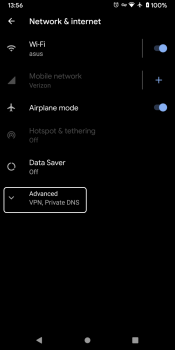
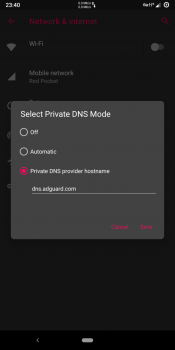
Note said:
The Private DNS feature uses DNS-over-TLS, so you can't just enter the regular IP address of the server, instead use the address: dns.adguard.com
If you decides to use any other DNS service, just remember to use their DNS-over-TLS address, not IP address.
Note said:
For iOS users, give
DNSCloak a try which serves the same function.
Unfortunately using Adguard DNS mean websites and content creators won't receive ads revenue. There are other ways to support them such as Brave Rewards, Patreon/Subscribestar, and regular donations. Maybe you don't want to deny ads revenue to websites you want support, then consider a different DNS service that doesn't block all ads, but you feel is more respectful of privacy than Google or your internet service provider. Some services like Comodo Secure DNS offer more features for a fee.



 protonmail.com


