
Become a MacRumors Supporter for $50/year with no ads, ability to filter front page stories, and private forums.

yummysapple

macrumors newbie
Original poster
I’ve been tracking my battery stats religiously on my 17 Pro Max (iOS 26), and I’ve discovered something that might explain why some of you are seeing "weird" drain or getting that orange "High Usage" warning in settings.


The Background:

Yesterday, I offloaded a few large apps to save space. Since then, my battery performance has taken a massive hit compared to my usual baseline.

My Evidence:

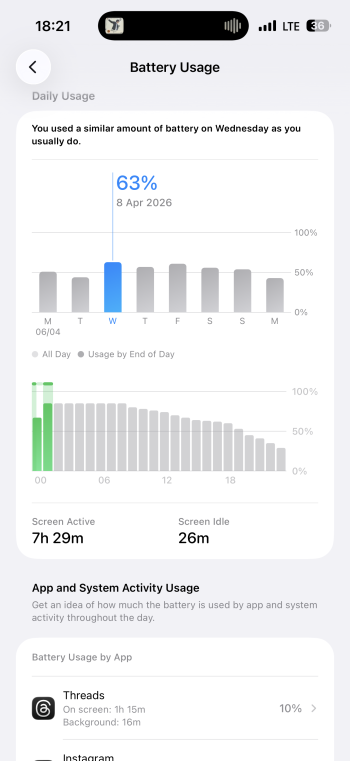
• Wednesday (Normal): 1h 15m on Threads = 10% drain.

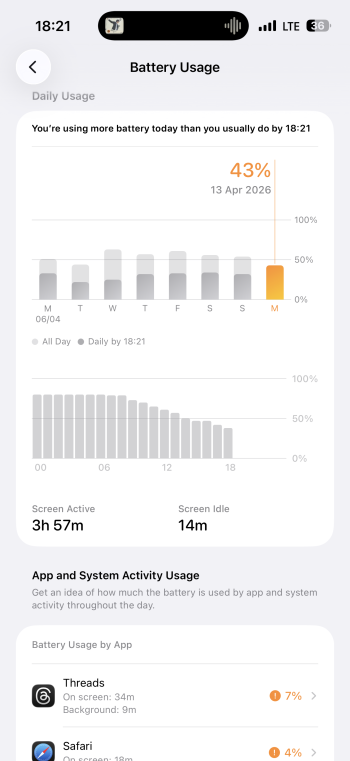
• Today (After Offloading): 34m on Threads = 7% drain (nearly double the intensity!).

• The system literally flagged me with: "You're using more battery today than you usually do."

My Advice:

If you have a 17 Pro Max, you likely have enough storage. Don't use the "Offload Unused Apps" feature. It triggers a wave of background "housekeeping" that can take 24-48 hours to settle down, making your $1,200 flagship feel like it has a mid-range battery.
 

Attachments

  • IMG_0335.png
    IMG_0335.png
    741.6 KB · Views: 41
  • IMG_0336.png
    IMG_0336.png
    656 KB · Views: 26
Surely if space is needed then offloading is the sensible thing to do? It's precisely what it's there for!

And if what you're saying is correct battery life would return to norm after a period of time any way so not really anything to be concerned about.

As for your evidence it doesn't really prove anything other than on 2 separate days your phone used a little more battery. Were the phones at the same starting percent on each given day prior to your test? Do you use auto brightness? Was it in identicaly lit room? What apps were you using prior to said tests? They may have been running background processes when you switched to threads?

My point is that the offloading may have had nothing to do with your battery using a little more battery for similar use.
 
• Wednesday (Normal): 1h 15m on Threads = 10% drain.

• Today (After Offloading): 34m on Threads = 7% drain (nearly double the intensity!).
This could very well just be Meta enhancing their spyware algorithms, they may be trying to identify your emotional state (frustration, probably).
It triggers a wave of background "housekeeping" that can take 24-48 hours to settle down, making your $1,200 flagship feel like it has a mid-range battery.
Any actual evidence? A difference in battery consumption while using one app from a company known to produce malware isn't evidence. Even if it weren't some malicious attempt to e-stalk you, it could very well be poor code, excessive network requests, etc. There's far too many variables in such an app to make any reasonable comparison.
 
If you have a 17 Pro Max, you likely have enough storage. Don't use the "Offload Unused Apps" feature. It triggers a wave of background "housekeeping" that can take 24-48 hours to settle down, making your $1,200 flagship feel like it has a mid-range battery.
WTF would this matter? After whatever time it takes everything will be back to normal, except you have more available storage.
 
  • Like
Reactions: kitKAC
Register on MacRumors! This sidebar will go away, and you'll see fewer ads.