Become a MacRumors Supporter for $50/year with no ads, ability to filter front page stories, and private forums.
(I think now it can only do music), but it will show up under computers on ATV's without a Mac switched on. The other way is the traditional way which means having iTunes open on a computer. In order for iPhones and iPads to access iTunes you can install DS Audio app (from Synology) onto the iOS device or use the traditional method which is iTunes sharing (and I think really the best solution).

As you stated, sharing from the NAS directly will only support Music. If you want to use the Apple TV in the way it is intended, you must be running iTunes on a computer (Mac or PC). There are some work arounds, one of which involves running an app on an iOS device. I did not want to do this. With the Mini running iTunes all the time, the Apple TV can always access my library by going to the "computers" icon on the home screen. You can do the same thing by just letting iTunes run on your PC.

Where you actually store the media (direct attached or network) is sort of a secondary issue.

When I was talking about connecting a disk to the airport extreme, I was referring to directly connecting a disk to the USB 2.0 port on the airport. Of course you can connect a NAS to the airport as well over ethernet. That should give much better performance than connecting a disk to the airport on USB.

Hopefully you'll find a solution that suits your need at a reasonable price. But if you want the full function of the Apple TV the way it was intended to be used, you need to be running iTunes on a computer and have home sharing enabled. I think you'll find that the least expensive way to set this up is just connecting an external USB disk to your PC. There are other advantages to having a NAS of course.

----------

If I did not want to keep my PC on all the time with iTunes open, then I am wondering what I can do instead.

That's the problem, you will have to use one of the work arounds, like an iOS app that accesses the NAS, then uses Airplay to send the movies to the Apple TV. I gather there is an iOS app from one of the NAS vendors that you only need to run once to connect initially to the Apple TV, then it will continue working without the app.

This all seemed kind of kludgy to me, but maybe it would be a good solution for you. As I mentioned above, you could use an old, cheap computer and just let it run iTunes all the time if you don't want to do this on your main PC.
 
I do have an older PC which is running Windows XP. Will this will suffice to use this as a server that has iTunes open all the time. I am still going to be getting a Synology NAS and connecting it to the Extreme as previously mentioned. I am not going to hard wire this PC, but instead I guess I can get a USB wireless adapter. I heard there is also a wake on an feature that will wake up the pc when I use the ATV to access media. I am wondering if this will give me good buffering performance.
 
By the way, does anyone know a way to play video with DTS audio. I know the ATV does not currently support DTS but was wondering if anyone knew of a workaround.
 
As you stated, sharing from the NAS directly will only support Music.

Actually (and I just tested this in the last week), it will support video as well for the Synology, at least. The trouble is for both audio and video is that it treats all audio files as "Music" (even audiobooks, podcasts, ringtones, etc.) and all video files as "Movies". One straight alphabetic sort, too.

It would be a manageable problem for any medium- or large-size library if playlists were usable, but it only supports "smart" playlists with a very limited set of selection criteria, most of which is specific to music.

I'd say it's a couple of facelifts away from being really usable for most people. Until then, the Mini/PC running iTunes still seems like the best bet.

Now, after having set up iTunes pointing to a remote NAS, I have to say that in retrospect, I'd rather have a large external drive directly attached to the Mini, and then have the NAS as a Time Machine backing that disk up. Not for the speed, but for consistency of knowing that mount point is active (which I'm not always guaranteed with a network drive mapping). Now, if the iTunes server on the Synology becomes more usable, I'd re-flip and go back to suggest using the NAS as the primary storage location.
 
Actually (and I just tested this in the last week), it will support video as well for the Synology, at least.

Will it do this directly on the Apple TV without using any iOS apps or hacks? I didn't think that was possible. This thread has covered a lot of territory and contains lots of useful information. However, the OP specifically stated

I am looking to get a 4tb drive that I want to hold my media on so I can stream to ATV.
 
Will it do this directly on the Apple TV without using any iOS apps or hacks? I didn't think that was possible. This thread has covered a lot of territory and contains lots of useful information.

I used my MBP to see the files in iTunes via Home Sharing. If it's available on Home Sharing, it should be visible to the ATV. My tests, however, were not extensive.

Edited to add: However, without a device running an iTunes client (PC/Mac/iOS other than ATV), I have no idea whether you'd be able to view iTunes content that is DRM-protected.
 
Last edited:
I do have an older PC which is running Windows XP. Will this will suffice to use this as a server

Not familiar with iTunes on Windows. But it should be easy to give it a try. As others have said, you don't need a terribly fast network connection to stream video. 802.11ac wifi is pretty fast, but ethernet is better. Slow networks and disks will make things feel less responsive on the Apple TV (high latency). That means it will take awhile for a video to start playing, and if you skip ahead a few chapters there will also be a lag. If the server goes to sleep, or if the disk has to spin up, there will be even a longer lag when you first choose a movie on the Apple TV.

You will have to be the judge of what is acceptable. Personally, I like knowing that everything is as fast as possible, so that the main bottleneck is the speed of the Apple TV itself.
 
I would strongly suggest using wired ethernet whenever practical. Modern WiFi is fast enough for video streaming in and of itself, but if you get into cases where multiple devices are trying to use the same bandwidth, you may have issues.
 
I store the iTunes media files on my Time Capsule and it's been working well so far. Now when I tried to plug my 2TB WD usb drive into the time capsule and play the media files from it, that was a different story. Slow, stuttering occasionally and such. So playing them from the Time Capsule seems to work fine.
 
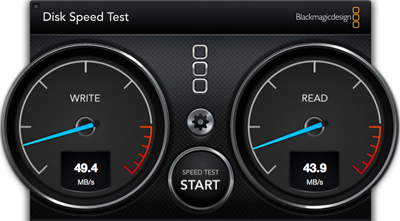
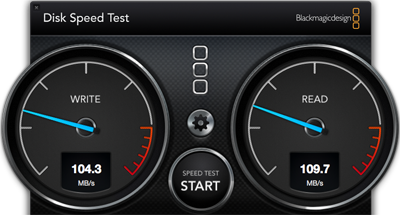
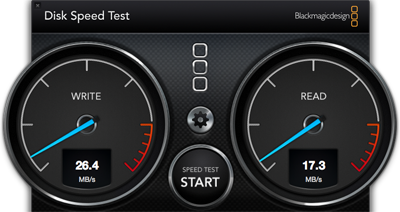
Here are some tests I did last summer with my 2TB Time Capsule. I ran the Blackmagic app on my MacBook Air using a USB 3.0 gigabit ethernet adaptor to connect to the LAN.

External USB drive connected to the Time Capsule

ethernet-TC_external.png


Time Capsule internal drive

ethernet-TC_internal.png


But this is what I got on the MacBook Air when I accessed my Mac Mini over the same LAN. I would expect similar performance from a decent NAS (I don't think the cheap ones are this fast). This is getting close to the limit of gigabit ethernet.

ethernet-mini.png


BTW, one annoyance of the Time Capsule is that the drive goes to sleep really quickly if it isn't used (after something like 30 or 60 seconds of inactivity). I hated the lag waiting for the TC to spin up. There's a little App called "Keep Drive Spinning" than can help with this: http://www.macupdate.com/app/mac/31158/keep-drive-spinning
 
Last edited:
This has been a really awesome experience. Thank you all for your contributions, good advice, and wealth of knowledge. It is a real pleasure posting questions in this forum, because I find there to be a lot of very valuable knowledge that is shared. Thanks again!
 
Look at Synology DS 214 or DS215. You can put whatever HDDs you like inside, expand capacity as you need. Another external can be hung off the USB on the rear and used to backup the Synology (don't forget the backup!).

Software is fantastic, very powerful. Can't recommend Synology strongly enough!

Attonine, I have a question about the synology. I notice this is a 2 bay system. I was going to get one 4TB drive to use and then connect an external drive to the Synology as recommended, but can I do that with the other bay? I guess my question is do I need to fill both bays with hard drives, and should I do it this way?

----------

One other thing for clarification. The external drive I was going to connect to the Synology is strictly for backup purposes.
 
Attonine, I have a question about the synology. I notice this is a 2 bay system. I was going to get one 4TB drive to use and then connect an external drive to the Synology as recommended, but can I do that with the other bay? I guess my question is do I need to fill both bays with hard drives, and should I do it this way?

----------

One other thing for clarification. The external drive I was going to connect to the Synology is strictly for backup purposes.


Synology do make single bay drives if that suits your needs better.

With a 2 or 4 bay drive it all depends on how you configure the NAS, you do not need to fill all the bays. If you opt for a mirrored set up (so 2 x 4 TB for example) one drive will be a duplicate of the other. This will protect you if one of the HDDs goes bad, just swap the bad disc for a new one and let the NAS do it's job and you are up and running in no time. So a good, sensible set up. This is not really backup though, as it will not help you if there is a hardware failure, if the NAS drive decides to go berserk and damage your data, if a power surge fries the NAS etc (not common, but it does happen, and you don't want to be the one it happens to who didn't have a true backup). A true backup would be to add a USB drive to the NAS using the USB on the NAS box.

The Synology website is pretty good. If you spend a few minutes looking around it you will be able to answer most of your questions. I found the reviews for Sinology on Amazon pretty helpful too, some people have put very in depth reviews there.
 
I have to admit that when it comes to storage, I am a bit of a newbie. I do not really understand the world of raid, what the different configurations are, and what the benefits are to each configuration. I am really just storing movies and TV shows on the drive that I want to watch on the Apple TV. I do want a good reliable backup of all of my media, but this is not enterprise critical operations where if one drive immediately goes down then the other drive will be up and running. Attaching an external hard drive to the network drive makes sense. I am just not sure if having to drive set up as a raid configuration would be beneficial or not. If somebody can explain the differences between each configuration and what the benefits are, that would be very helpful to me.
 
RAID is used for two purposes, sometimes at the same time.

1) Striping - because we're talking rotating physical media here, it takes time to read/write data due to waiting for the rotation of the disk. By using multiple disks and timing their spins, you can store data in "stripes" across multiple disks, allowing you to read/write that data faster because it all lines up at the same rotation point.

2) Mirroring - ever bit of data stored is copied to at least one other disk in the array. This reduces your overall capacity, but allows you to recover data in the event that a single drive fails. It is common in these systems to be "hot swap", where you replace the bad disk and the system keeps running, reconstructing the data onto the replaced disk based on a surviving copy.

Normally, we're talking about #2 here. Striping is important for high transaction levels, but home theater doesn't need it. Mirroring is simple, reasonably effective data recovery option, but is a safer system if paired with external backups, preferably stored off-site.

It's all about risk management: (probability x value) vs. cost to mitigate.

Disk failure is common enough that you need some protection to avoid data loss. Mirroring is the simplest and most convenient way to do that, but still keeps a single point of failure at the array level. Additional backups add more cost and bother, but it comes down to how valuable is the data you're protecting?

In the case of a home theater system, you might say the risk of data loss is low - if I own the CDs/DVDs/BDs, or I can re-download purchased content (via iTunes or similar), that Mirroring might very well be enough. I already have an external backup - the original discs and/or the "cloud" - so the only thing an additional backup buys me is less time to restore. Is the cost of that time worth the extra investment? That's a personal call.

For more critical data - irreplaceable photos, scans of physical documents since destroyed, etc. - you should be far more interested in taking stronger precautions and keeping good external (and off-site) backups.
 
I have to admit that when it comes to storage, I am a bit of a newbie. I do not really understand the world of raid, what the different configurations are, and what the benefits are to each configuration. I am really just storing movies and TV shows on the drive that I want to watch on the Apple TV. I do want a good reliable backup of all of my media, but this is not enterprise critical operations where if one drive immediately goes down then the other drive will be up and running. Attaching an external hard drive to the network drive makes sense. I am just not sure if having to drive set up as a raid configuration would be beneficial or not. If somebody can explain the differences between each configuration and what the benefits are, that would be very helpful to me.

For your usage scenario, based on the information you have given, I wouldn't worry too much, your choices are fairly limited.

If you buy a 1 bay NAS, attach a USB external drive to the NAS and use this for backup.

If you buy a 2 bay NAS you can either: Use 2 identical capacity HDDs and;

Use both bays and set the NAS up as 1 large HDD. RAID 0

Use both bays with identical HDDs and mirror 1 drive to the other, this providing tolerance for 1 drive to fail. RAID 1

Use both bays and use Synology Hybrid RAID. In this example this will work like RAID 1 but be easier should you need to increase capacity.

If you have 2 different capacity drives you can use both bays and select Hybrid RAID. This will give you tolerance for 1 drive failure and be more flexible if you want to increase capacity.

You can also use only 1 bay if you wish.

Remember, these examples only allow tolerance for a HDD failure, not a catastrophic hardware failure. For Backup use a USB attached to the NAS.

As this is all new to you, my recommendation would be get either a 1 bay NAS and use the USB backup, or a 2 bay NAS with 2 identical capacity HDDs (or 1 if you want to hold off until you are ready to buy a second disc), use the Synology Hybrid RAID and the USB for backup. This will be a solid system. I think the decision is really financial; how much do you want to spend? In my experience, getting the right solution initially saves money in the long term. If the solution is correct, you can pretty much forget about it and not have to spend any more money until the solution ultimately breaks (after 10 yrs the powers supply fails......) or technology creates a need that your solution no longer fulfils.

You may not need the USB backup immediately. Where is your media currently stored? If you have the media on several externals, these can serve as a backup for the time being, until you start adding to the library and they go out of sync.
 
I am really just storing movies and TV shows on the drive that I want to watch on the Apple TV.

I was seriously considering the Synology myself, but ended getting the Mac Mini instead after much consideration. Not saying this is the best solution for you, but this was my thought process….

These NAS units are really just low powered Linux computers with bays for disk drives. I think you are in the $300+ ballpark for the basic unit vs $500 for the Mini. There aren't any refurb minis on Apple's site now, but if you can catch one, that would be an even better deal.

Both systems require disks drives, so that is pretty much a wash You would use external USB 3 or Thunderbolt drives with the Mini. You could also use some kind of enclosure (DAS), but that will get more expensive. I paid about $100 each for three 3TB Drives. I am using the Seagate Desktop Backup Plus series, which pop into USB docks that are included.

Anyway, it just seemed like a better value to have the Mini, which is a very powerful little computer that can do everything a NAS would do, and more. For example, you can install MacOSX server for $20: http://www.apple.com/osx/server/

It isn't quite as "elegant" as a NAS where everything is in one neat package, but for me it just seemed like a better solution. And as a bonus, you can directly connect it to a TV/stereo system which would give you another screen to use with your iTunes library. A NAS can't do that. 😉
 
I was seriously considering the Synology myself, but ended getting the Mac Mini instead after much consideration. Not saying this is the best solution for you, but this was my thought process….

These NAS units are really just low powered Linux computers with bays for disk drives. I think you are in the $300+ ballpark for the basic unit vs $500 for the Mini. There aren't any refurb minis on Apple's site now, but if you can catch one, that would be an even better deal.

Both systems require disks drives, so that is pretty much a wash You would use external USB 3 or Thunderbolt drives with the Mini. You could also use some kind of enclosure (DAS), but that will get more expensive. I paid about $100 each for three 3TB Drives. I am using the Seagate Desktop Backup Plus series, which pop into USB docks that are included.

Anyway, it just seemed like a better value to have the Mini, which is a very powerful little computer that can do everything a NAS would do, and more. For example, you can install MacOSX server for $20: http://www.apple.com/osx/server/

It isn't quite as "elegant" as a NAS where everything is in one neat package, but for me it just seemed like a better solution. And as a bonus, you can directly connect it to a TV/stereo system which would give you another screen to use with your iTunes library. A NAS can't do that. 😉

The problem is data storage. Even with a dedicated Mini, the data storage problems still exist. You end up constantly chasing your tail increasing capacity, and making sure you can backup that increased capacity. I found, investing in this area, getting the correct solution for the storage, although initially more expensive (than USB external HDDs), saved money in the long term.

For me the journey was initially FW HDDs. I had to keep buying larger ones. Then came Software RAID FW HDDs. Same problem. Then came Drobo with it's ability to dynamically increase capacity, and use unmatched capacity and brands of drives. This lasted me almost 10 years, with only having to buy 2 naked HDDs to increase capacity! Finally, NAS with the same dynamic RAID capabilities as Drobo, but vastly increased capabilities, and leaving my MBP cable free! I should have just bought a NAS years ago, instead of getting scared by the initial financial outlay (they were much more expensive in the past)!
 
The problem is data storage. Even with a dedicated Mini, the data storage problems still exist. You end up constantly chasing your tail increasing capacity, and making sure you can backup that increased capacity.

Isn't that an issue with either approach? When I started down this road, my iTunes library was about 600gb. Now it's a little over 1tb. I made a decision - based on the best deal I could find on disks - that 3tb would meet my needs for awhile. I also limited myself to standard definition movies (mostly).

I have a very large DVD collection, and have ripped most of it now. I also have blu ray but decided against ripping these (at least for now). I have purchased some HD movies on iTunes. But I made a conscious decision for quantity vs quality. Others might not like this approach.

When my library grows beyond 3tb, I will need to get new disks - hopefully they will be cheaper by then. I have 3 identical drives. One is the library, the second mounted drive is a backup. I rotate the third drive for backups regularly and store it separately.

There are lots of different approaches, and prices just keep getting better. So consider all the alternatives then choose whatever works best for you. 🙂
 
Isn't that an issue with either approach? When I started down this road, my iTunes library was about 600gb. Now it's a little over 1tb. I made a decision - based on the best deal I could find on disks - that 3tb would meet my needs for awhile. I also limited myself to standard definition movies (mostly).

I have a very large DVD collection, and have ripped most of it now. I also have blu ray but decided against ripping these (at least for now). I have purchased some HD movies on iTunes. But I made a conscious decision for quantity vs quality. Others might not like this approach.

When my library grows beyond 3tb, I will need to get new disks - hopefully they will be cheaper by then. I have 3 identical drives. One is the library, the second mounted drive is a backup. I rotate the third drive for backups regularly and store it separately.

There are lots of different approaches, and prices just keep getting better. So consider all the alternatives then choose whatever works best for you. 🙂


All I can say is, since I went for the Drobo (at the time this was the best available, NAS was still a little specialised and not as easily available), I've been chasing my tail a lot less, and hence spent a lot less.
 
For me, this is how it all began. I have been a PC user for the last 25+ years and it wasn't until five years ago that I fell in love with Macs and Apple. The only Mac computer I have is a MacBook Pro which is an early 2009 17 inch. I simply love it. The only reason why I am still using a PC is because I am familiar with a couple of applications and software such as editing audio and doing some video editing as a hobby of mine. A lot of people reading this must be laughing right now because Macs are notoriously known for being better than PCs for these types of things. The challenge for me is that I have not been able to take the time to learn the software on the Apple site to do these things with. The software on the Apple side seems to either be one extreme or the other such as pro level software such as Final Cut Pro or begin our software that does not offer a lot of advanced features. I think I am going to cut the cord with my PC very soon because I can run Windows on my Mac and I am sure it will run better then it will on a PC.

Anyway, enough about that. For storage, I have two OWC 2TB external drives connected to my PC via e-SATA. I have everything important to me on both of those drives such as personal photos documents movies music, you name it. The obvious reason of why I have two drives is for extra protection and backup. In iTunes, all of my media is directed on one of the external drives which I named X: and the other external drive is named Y: The X: is the drive I turn on when I am streaming content to my ATV. I only turn on the Y: for copying information from the X: my PC is connected directly to my airport extreme through a cat 5 Ethernet cable. I am running out of space fast on my external drives.

These OWC external enclosures are older technology and do not have USB 3 or thunderbolt. My initial thought process was that when I replace these hard drives with larger ones, I will probably have to spend the money on more updated enclosures that have modern technology. That is why I started this thread in the first place. I am sold on the Synology solution. I am trying to figure out what I am going to do with both of these 2 TB external drives once I get my network drive. I have a question about the difference between a hard drive failure and a catastrophic failure. I have also been avoiding cloud back up because of insecurity and peoples information been hacked into. But maybe I am being too paranoid. So what if somebody hacks into my movie and music collection. That is what takes up the most space anyway. For my personal documents and family photos that are completely irreplaceable, maybe I will put them on a little passport drive and then put that in a safety deposit box and for all of my entertainment media such as movies, music, etc., I will back that up on the cloud. It sounds like what I have been hearing is that the best method of hard drive failure would be to hook up an external hard drive to my network drive. But again, not understanding the difference between hardware failure and catastrophic failure, I am not sure if setting up a raid one configuration as well would be helpful.
 
HDD failure is just that, the HDD craps out, the actual spinny disc HDD. RAID 1 can save you from losing data in this situation.

Catastrophic failure is where the NAS box bursts into flames because of some electronic failure and burns up the discs inside it. Well, not necessarily bursts into flames, but something goes catastrophically wrong with the hardware and totally destroys all the data inside the NAS, the NAS cannot be started again, it's totally dead and the data cannot be retrieved. The failure is catastrophic! Only a duplicate copy of your data in another place (on another HDD, in the cloud....) can save you from losing data in this situation.

Do your OWC HDDs only have eSATA? Do they have USB 2? If you have USB 2, no problem, this will work. If they only have eSATA you have 2 options: get a cheap caddy with USB and just move the HDDs across; or look for a NAS that has eSATA on the back as well as USB, they do exist. I think just getting a caddy is easier though. You could even get a 2 bay caddy, maybe, RAID 0, for backup only?

What I'm thinking here is that you already have 2 external HDDs, these can be used for backup purposes once all the data has been transferred. Saved a bit of cash already! If you really want to splash the cash, get another 2 bay NAS, bung these drives in, RAID 0 for backup only, NAS to NAS!

There are many backup plans. Cloud based (like crash plan), a safety deposit box, on site time machine type incremental...... and any variation of the options available you choose. Just make sure your data, especially your irreplaceable, valuable data is in at least 2 places.

I don't think you need to be overly worried about being hacked. Use a firewall, you probably already have one on your modem from your ISP, the airport Extreme has one, OS X has one, and practice safe and sensible computing. There is greater risk of your personal information being hacked from a bank or online store than from your home. If you think about things, hacking large corporations is much more attractive and has potentially much greater cache or financial reward, than hacking individual home users. If you are concerned, scan the forums here, there is lots of advice about making sure you maximise your security on OS X.
 
Raid is not going to be a complete backup solution because all the drives are in the same box. What if the roof leaks and soaks the NAS? Of a power spike fries all the drives in the NAS? I'm sure you can imagine other scenarios where the whole thing gets destroyed.

Cloud backup might be a good solution, but that is a lot of data (depending on how big your library is). I have rejected that solution because I live in a rather remote location and my only option for internet is slow DSL (1.8 mbit/sec).

Lord Hamsa made a good point above. Most of my library is ripped DVD's that I own, so that is one form of "backup" that I have. Of course, if my house burns down, they could also be lost. 😉 The rest of my library is iTunes purchases and public domain movies from archive.org that could be downloaded again.

My two backup drives are clones of the media drive. So if my media drive fails, I could just pop them in and be back up and running instantly. I keep one of those drives in a waterproof container at the opposite end of my house.

Now that is just my media. My actual computer files have a different backup strategy that includes offsite storage.
 
HDD failure is just that, the HDD craps out, the actual spinny disc HDD. RAID 1 can save you from losing data in this situation.

Catastrophic failure is where the NAS box bursts into flames because of some electronic failure and burns up the discs inside it. Well, not necessarily bursts into flames, but something goes catastrophically wrong with the hardware and totally destroys all the data inside the NAS, the NAS cannot be started again, it's totally dead and the data cannot be retrieved. The failure is catastrophic! Only a duplicate copy of your data in another place (on another HDD, in the cloud....) can save you from losing data in this situation.

Do your OWC HDDs only have eSATA? Do they have USB 2? If you have USB 2, no problem, this will work. If they only have eSATA you have 2 options: get a cheap caddy with USB and just move the HDDs across; or look for a NAS that has eSATA on the back as well as USB, they do exist. I think just getting a caddy is easier though. You could even get a 2 bay caddy, maybe, RAID 0, for backup only?

What I'm thinking here is that you already have 2 external HDDs, these can be used for backup purposes once all the data has been transferred. Saved a bit of cash already! If you really want to splash the cash, get another 2 bay NAS, bung these drives in, RAID 0 for backup only, NAS to NAS!

There are many backup plans. Cloud based (like crash plan), a safety deposit box, on site time machine type incremental...... and any variation of the options available you choose. Just make sure your data, especially your irreplaceable, valuable data is in at least 2 places.

I don't think you need to be overly worried about being hacked. Use a firewall, you probably already have one on your modem from your ISP, the airport Extreme has one, OS X has one, and practice safe and sensible computing. There is greater risk of your personal information being hacked from a bank or online store than from your home. If you think about things, hacking large corporations is much more attractive and has potentially much greater cache or financial reward, than hacking individual home users. If you are concerned, scan the forums here, there is lots of advice about making sure you maximise your security on OS X.

My two OWC drives have USB 2 and FW 800. So what exactly are you suggesting with these drives? Obviously, I can attach one of those drive to the NAS. Are you saying that I attach both external drives to the NAS? Are there enough USB ports on the back of the NAS to do this? The other question I have is that wouldn't transfer speed be slow with USB 2? Then I guess I would not be attaching any external hard drives to my PC and the backup would be more global then just local. I am not concerned about being hacked into my network at home, but rather having my personal data stored by a company on the cloud such as Carbonite.
 
My two OWC drives have USB 2 and FW 800. So what exactly are you suggesting with these drives? Obviously, I can attach one of those drive to the NAS. Are you saying that I attach both external drives to the NAS? Are there enough USB ports on the back of the NAS to do this? The other question I have is that wouldn't transfer speed be slow with USB 2? Then I guess I would not be attaching any external hard drives to my PC and the backup would be more global then just local. I am not concerned about being hacked into my network at home, but rather having my personal data stored by a company on the cloud such as Carbonite.

Check the specs of the NAS, many have 2 USB ports. I don't know the exact model you're looking at, but the Synology 213, 214 and 215 all have 2 USB ports on the back. I think (never done it) that you can direct certain data to be backed up in specific locations.
Could also get a 2 bay USB caddy and use this for the backup? Should be pretty cheap.

USB 2, USB 3, doesn't really matter. The initial back-up would be a complete data transfer. I believe I'm correct in that subsequent backups function like time machine in that they only copy changes, not the whole archive
 
Register on MacRumors! This sidebar will go away, and you'll see fewer ads.