
Got a tip for us?
Let us know
Become a MacRumors Supporter for $50/year with no ads, ability to filter front page stories, and private forums.
Streaming...
- Thread starter MarkW19
- Start date
- Sort by reaction score
You are using an out of date browser. It may not display this or other websites correctly.
You should upgrade or use an alternative browser.
You should upgrade or use an alternative browser.
Can anyone tell me if it's possible to stream video/music from iTunes (or another program) over WiFi to the iPhone - particularly movies (.mp4's etc.)? If so, how?
Google "telekinesis". I think its now called iPhone remote, but those google results should bring you to the right place.
As far as I know, no one has written a "nice" front end for viewing your library as of yet, but if you enable media streaming you can use the "files" app to navigate to your iTunes library and then click to stream.
Works on wifi or edge from anywhere if you open your firewall/router correctly and are willing to wait for streaming on edge.
No hacking needed, the server runs on your computer as a simple application, and you get to it through safari on the iphone.

donlphi
macrumors 6502
Yes... Telekinesis works very well for accessing your files.
Streaming on the other hand is a little more complicated. Although the iPhone supports streaming of mpeg4, it either needs to be an mpeg4 file that is equal or less than 10MB or it needs to be in m4v format (another type of mpeg4). For example you can use Handbrake rip a movie from DVD to mpeg4 format, but you will not get a very good quality movie or TV show for that matter for under 10MB. They usually run about 500+MB for a movie, which is not downloadable in iPhone's Safari. If you convert it to m4v, it can be streamed over wifi, and if you have patience it can even be streamed over the EDGE network.
Movies your buy from iTunes are by nature streamable to the iPhone (with chapter markers, etc.) because they are true m4v files.
So, as I said above, in order to make your mpeg4 movies streamable you need to convert them into m4v. I have been using quicktime pro to convert it. They actually have an iPhone setting. Works like a charm (I am actually looking for a quicker solution though if anybody knows one).
Once telekinesis is up and running, you open up your iTunes Library, Open the Movies Folder, click on your movie in M4V format, and you will be streaming.
Music files open without a problem, but there is nothing currently available to make a "playlist" or multiple songs play back to back. You have to go into the folder and click them individually. I suppose if you really wanted to hear a song that you didn't have on your iPhone, it would be worth doing.
Streaming on the other hand is a little more complicated. Although the iPhone supports streaming of mpeg4, it either needs to be an mpeg4 file that is equal or less than 10MB or it needs to be in m4v format (another type of mpeg4). For example you can use Handbrake rip a movie from DVD to mpeg4 format, but you will not get a very good quality movie or TV show for that matter for under 10MB. They usually run about 500+MB for a movie, which is not downloadable in iPhone's Safari. If you convert it to m4v, it can be streamed over wifi, and if you have patience it can even be streamed over the EDGE network.
Movies your buy from iTunes are by nature streamable to the iPhone (with chapter markers, etc.) because they are true m4v files.
So, as I said above, in order to make your mpeg4 movies streamable you need to convert them into m4v. I have been using quicktime pro to convert it. They actually have an iPhone setting. Works like a charm (I am actually looking for a quicker solution though if anybody knows one).
Once telekinesis is up and running, you open up your iTunes Library, Open the Movies Folder, click on your movie in M4V format, and you will be streaming.
Music files open without a problem, but there is nothing currently available to make a "playlist" or multiple songs play back to back. You have to go into the folder and click them individually. I suppose if you really wanted to hear a song that you didn't have on your iPhone, it would be worth doing.
donlphi
macrumors 6502
No substitute for QTpro that I know of, but I'm sure there is a FREE solution. I got tired of looking, and bought PRO.
The process takes nearly 4 hours per movie on my 933mhz PowerMac G4.
PLUS... there is a way to change the tag to M4V in the Handbrake preferences, but it is not TRUE M4V. It's essentially the same thing as just changing the file name on your own. It will not stream.
The process takes nearly 4 hours per movie on my 933mhz PowerMac G4.
PLUS... there is a way to change the tag to M4V in the Handbrake preferences, but it is not TRUE M4V. It's essentially the same thing as just changing the file name on your own. It will not stream.
I can't get QT Pro to convert well on my MacPro. Anything longer than 10 minutes looses audio video sync very quickly.
I use Handbrake for DVDs and iSquint for other types of video. Both are free, have clear easy iPod settings or allow custom quality choices, and I haven't had any synch problems.
Likely something is set wrong with my QuickTime pro, I just haven't had the patience to figure it out. Nobody else seems to be having such bad recurring synch problems.
Edit: just saw at the bottom of previous post. I havent had any problems streaming with just picking (h.264 ipod/appletv) in handbrake. With a newish basic MacPro dvds are about 20-30 mins until converted and ready to stream.
I use Handbrake for DVDs and iSquint for other types of video. Both are free, have clear easy iPod settings or allow custom quality choices, and I haven't had any synch problems.
Likely something is set wrong with my QuickTime pro, I just haven't had the patience to figure it out. Nobody else seems to be having such bad recurring synch problems.
Edit: just saw at the bottom of previous post. I havent had any problems streaming with just picking (h.264 ipod/appletv) in handbrake. With a newish basic MacPro dvds are about 20-30 mins until converted and ready to stream.
donlphi
macrumors 6502
I havent had any problems streaming with just picking (h.264 ipod/appletv) in handbrake. With a newish basic MacPro dvds are about 20-30 mins until converted and ready to stream.
Is there a setting I am missing in system preferences? You are able to stream to your iPhone using regular mp4 or just to another computer?
Just tried it (using Safari on OS X) and it's great. Not too sure on the usefulness of some of the included apps (for instance, if you're currently using a different user account, the Screen Image app just shows a blank screen), but it's REALLY cool and works a treat.
Once they get everything integrated into a full Remote Access app (instead of having to go into the separate app/screen/remote/typing apps), it'll be awesome.
Once they get everything integrated into a full Remote Access app (instead of having to go into the separate app/screen/remote/typing apps), it'll be awesome.
Is there a setting I am missing in system preferences? You are able to stream to your iPhone using regular mp4 or just to another computer?
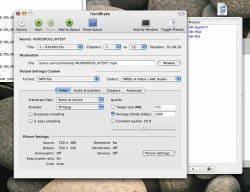
I thought this might be easiest to explain. Attached is a screenshot of the Handbrake settings I'm using. I did make a change from the iPod preset it looks like, oops.
Format: MP4 File
Codecs: MPEG-4 Video / AAC Audio
FPS: Same as source
Encoder: FFmpeg
Average Bitrate: 1000
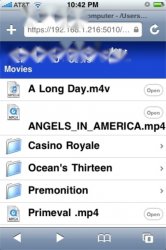
And then I attached a screenshot from my iPhone that shows some movies I have successfully streamed. Angels In America, Primeval, Premonition, and Casino Royale were Handbreak mp4 files with above settings. A Long Day and Ocean's Thirteen were iSquint m4v's.
I tried to take a screenshot of the movie while playing (just to be complete 🙂 ) -- but Erica's screenshot app only captures a black screen when movies are playing it would seem...
The only thing I did with Telekinesis/iPhone Remote was check the "Share Media Insecurely" option in Preferences that you need to check to do any media streaming.
If there's anything else you need to know to figure out why it's working for me and not you, I'd be glad to help just let me know what you want.
Attachments
donlphi
macrumors 6502
I'll have to double check my settings.
I'm already "Sharing Media Insecurely", which was how I was able to watch the M4Vs.
It must be the settings I initially ripped my DVD collection in. Back when the video iPOD was first being rumored, I began ripping my entire DVD collection with the original Handbrake, so I have about 275GB of movies that will sync with my video iPod and iPhone, but will not stream to my iPhone for one reason or another.
I'm going to try and re-rip a movie with the settings you have, but yeah, I'm astonished that you are able to stream full mp4 Movies.
Another interesting "labeling difference" I've noticed after I convert the movies a second time on Quicktime Pro - Under KIND (in the finder) it refers to the file as a MPEG-4 Movie and then after converting it calls it an MPEG-4 Video File.
Regardless, I have a hunch I'll either be re-ripping my library or converting it. It's not something I'm going to be able to fix quickly.
EDIT: You were right. No need to do the double work on that. I just adjusted the ipod settings to match yours and minutes later was streaming to my iPhone. Thanks for the tip. You have saved me well over 500 hours of converting.
It will be so much faster to just re-rip my library with the new settings.
I'm already "Sharing Media Insecurely", which was how I was able to watch the M4Vs.
It must be the settings I initially ripped my DVD collection in. Back when the video iPOD was first being rumored, I began ripping my entire DVD collection with the original Handbrake, so I have about 275GB of movies that will sync with my video iPod and iPhone, but will not stream to my iPhone for one reason or another.
I'm going to try and re-rip a movie with the settings you have, but yeah, I'm astonished that you are able to stream full mp4 Movies.
Another interesting "labeling difference" I've noticed after I convert the movies a second time on Quicktime Pro - Under KIND (in the finder) it refers to the file as a MPEG-4 Movie and then after converting it calls it an MPEG-4 Video File.
Regardless, I have a hunch I'll either be re-ripping my library or converting it. It's not something I'm going to be able to fix quickly.
EDIT: You were right. No need to do the double work on that. I just adjusted the ipod settings to match yours and minutes later was streaming to my iPhone. Thanks for the tip. You have saved me well over 500 hours of converting.
It will be so much faster to just re-rip my library with the new settings.


donlphi
macrumors 6502
If you are talking about Handbrake, it is multiplatform, but I haven't had a lot of luck with it.
If you are talking about Telekinesis or "iPhone Remote", I don't think so. HOWEVER, there are ways of getting access to your home computer and it's files without using 3rd party software.
I'm not an XP guy, but I'm sure there are thousands of websites that show you how to do it step by step in a relatively safe manor.
If you are talking about Telekinesis or "iPhone Remote", I don't think so. HOWEVER, there are ways of getting access to your home computer and it's files without using 3rd party software.
I'm not an XP guy, but I'm sure there are thousands of websites that show you how to do it step by step in a relatively safe manor.

gceo
macrumors 6502a
Thanks a lot guys, I'll give Telekinesis a go.
Is there another (free) option apart from QTPro, to convert my Handbraked .mp4 files into .m4v?
I use iSquint and like it a lot. Drag and drop with a queue works well for me.
Pattycerts
macrumors 6502
I just tried orb on my iphone for the first time and I must say, the audio streaming works great. I didn't try any of my DRM music though. According to orb, the video works, but it has to e in QuickTime format. Can anyone test it?
donlphi
macrumors 6502
I just tried orb on my iphone for the first time and I must say, the audio streaming works great. I didn't try any of my DRM music though. According to orb, the video works, but it has to e in QuickTime format. Can anyone test it?
I am sort of Jealous of PC users because of ORB. I guess some iPhone/PC users are able to log into their sirius radio. Very cool. That's the missing app I'd like to get.
I hear it does just fine for video too.
matznentosh
macrumors regular
What about streaming from the web? You know, those "live360" sites. I listen to David Byrne's music stream. Will the iPhone pick that sort of thing up and play it?
Superman07
macrumors 6502a
This is all very interesting and bringing me one step closer to buying and iPhone. Especially since it circumvents the HD size factor.
Do .m4v files simply denote chapters, therefore allowing the phone to download chunks at a time?
Also, I assume there isn't away around the server file if you're running a NAS setup? You'd still have to have the program running on an active computer?
Do .m4v files simply denote chapters, therefore allowing the phone to download chunks at a time?
Also, I assume there isn't away around the server file if you're running a NAS setup? You'd still have to have the program running on an active computer?
This is all very interesting and bringing me one step closer to buying and iPhone. Especially since it circumvents the HD size factor.
Do .m4v files simply denote chapters, therefore allowing the phone to download chunks at a time?
Also, I assume there isn't away around the server file if you're running a NAS setup? You'd still have to have the program running on an active computer?
I don't remember if it is mp4 or m4v, but one of them will denote chapters. Movies from iTunes let you use them on the phone. I haven't run into a program that let's you put them in your own files, but I haven't tried too hard to look.
If your NAS device will display HTML access to the storage, it should work. The iPhone needs the web server to support byte size requests -- that's how they do streaming without some of the more complex overhead. Most servers these days should support it, if not the consumer NAS devices I have used can have their configuration replaced with a custom apache server that you can make do it.
There is some ongoing work moutijg network shares directly on the phone, but nothing concrete yet as far as I can tell.
Once telekinesis is up and running, you open up your iTunes Library, Open the Movies Folder, click on your movie in M4V format, and you will be streaming.
Uh, I can stream movies with MP4 extension just fine, so long as they are encoded for iPod or iPhone. You can't go over certain bit-rate or resolution for iPhone; it's not file extension that keeps it from streaming, it's how you encoded, either for your computer or for an Apple TV. 1.5kbps max bit-rate, but iPod touch supports 2.5kbps max bit-rate so expect firmware to bring this to iPhone.