Become a MacRumors Supporter for $50/year with no ads, ability to filter front page stories, and private forums.

realLucaR

macrumors regular
Original poster
Hello everyone,

So I just upgraded my 2019 Mac Pro from a 4TB SSD to an 8TB SSD. It was a system pull, and only had 22 TB written to it and under 20 hours of total use which is insane, so I decided to upgrade since the storage on my 4TB was running out anyways. Besides, I got it for completely free, so why wouldn't I upgrade 😅

So I installed the 8TB SSDs in the right order, connected the Mac Pro to my MacBook Pro (M3 Pro, 16") and restored in DFU mode.

All went well. After that, it booted in internet recovery, but absolutely nothing happens. It just stays on the spinning globe, there isn't even a progress bar, just the globe. And I let it run for over an hour, but still nothing. Rebooting didn't help. Booting from a macOS Sequoia USB also did not work as I cannot even get into the boot menu.

I saw @Regulus67 post about his journey back in 2024, but unfortunately my Mac does not magically boot into recovery as of right now, and I am kind of stuck here. I also have to do some work for a few clients tomorrow, so I'm completely stranded at this point.

What can I do??
 
Hello everyone,

So I just upgraded my 2019 Mac Pro from a 4TB SSD to an 8TB SSD. It was a system pull, and only had 22 TB written to it and under 20 hours of total use which is insane, so I decided to upgrade since the storage on my 4TB was running out anyways. Besides, I got it for completely free, so why wouldn't I upgrade 😅

So I installed the 8TB SSDs in the right order, connected the Mac Pro to my MacBook Pro (M3 Pro, 16") and restored in DFU mode.

All went well. After that, it booted in internet recovery, but absolutely nothing happens. It just stays on the spinning globe, there isn't even a progress bar, just the globe. And I let it run for over an hour, but still nothing. Rebooting didn't help. Booting from a macOS Sequoia USB also did not work as I cannot even get into the boot menu.

I saw @Regulus67 post about his journey back in 2024, but unfortunately my Mac does not magically boot into recovery as of right now, and I am kind of stuck here. I also have to do some work for a few clients tomorrow, so I'm completely stranded at this point.

What can I do??

You can restore with DFU mode since the MP7,1 has a T2 chip (need another Mac though, but a Virtual Machine might work haven't tried)

How to revive or restore Mac firmware
 
Use wi-fi. Or an adapter, as @tsialex suggest.

Ethernet will not connect. Causing the spinning globe.

There should be a progress bar under the globe, indicating internet connection.
If there is no progress bar within 5 minutes, restart the machine.
 
  • Like
Reactions: b17777
Use wi-fi. Or an adapter, as @tsialex suggest.

Ethernet will not connect. Causing the spinning globe.
Really.. onboard ethernet will not connect? Fascinating, as onboard ethernet has been the most reliable Internet Recovery network connectivity option on all other Mac hardware in my experience. I will add this to my hardware quirks list. Thanks.
 
Use wi-fi. Or an adapter, as @tsialex suggest.

Ethernet will not connect. Causing the spinning globe.

There should be a progress bar under the globe, indicating internet connection.
If there is no progress bar within 5 minutes, restart the machine.
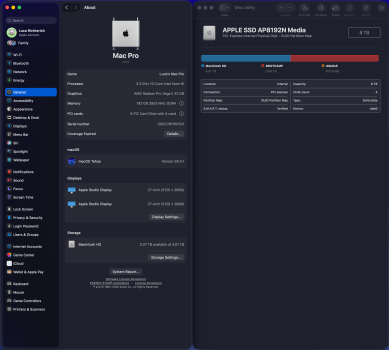
Wow, thank you so much. This seams like such a silly solution, but it worked. I connected a USB-C to Ethernet dongle from "Hama", and would you look at that, it immediately showed a progress bar and installed macOS 26.4.1 within 40 minutes.

Crazy that Apple never mentioned this anywhere.

Now my Mac is back up and running, with 4TB for Windows and 4TB for macOS. Great, thank you so much!
 

Attachments

  • Screenshot 2026-05-05 at 3.48.33 PM.png
    Screenshot 2026-05-05 at 3.48.33 PM.png
    1.1 MB · Views: 57
Wow, thank you so much. This seams like such a silly solution, but it worked. I connected a USB-C to Ethernet dongle from "Hama", and would you look at that, it immediately showed a progress bar and installed macOS 26.4.1 within 40 minutes.

Crazy that Apple never mentioned this anywhere.

Now my Mac is back up and running, with 4TB for Windows and 4TB for macOS. Great, thank you so much!

Presumably, it's because no Mac that Apple bothers to test (or develop) it with has built in ethernet.
 
Presumably, it's because no Mac that Apple bothers to test (or develop) it with has built in ethernet.

So, for you Apple only test with Macbooks? This does not make real sense since all current desktop Macs have Ethernet, even the iMac have one on the power adapter.
 
So, for you Apple only test with Macbooks? This does not make real sense since all current desktop Macs have Ethernet, even the iMac have one on the power adapter.

T2 Macs, I'm willing to bet they only test / support the venn diagram overlap of hardware EVERY device has. Macbooks don't have built-in Ethernet, so it probably isn't even supported in the restore software.
 
  • Like
Reactions: Regulus67
T2 Macs, …
Spot on, I believe.

The issue seems to be changes in BridgeOS on the Intel Macs with T2 chips.

Back in June 2023, I purchased a 4TB SSD kit from Apple.
I used Ethernet connection running Internet Restore.
But later I had to use wi-fi, on other machines.

I have run Internet Restore 5 times on Mac Pro 7,1 machines. And two iMac Pros.

Why do I believe BridgeOS is the culprit?
To run DFU mode, you need either of the last two macOS versions on the machine running Apple Configurator. Older versions will not work. At least in my last couple of restores.

The T2 chip controls the Ethernet port, right?
And Apple must have removed the driver in later versions of BridgeOS
 
Last edited:
  • Like
Reactions: b17777
The last time I ran Apple Configurator, I was forced to update my mac mini m1 to macOS Sequoia*.
Older macOS versions were no longer supported.

I believe you need Sequoia or Tahoe today.
@realLucaR can probably confirm this.

Apple switched away from Intel, and T2 chips.
The M-series don’t use T2 chips. So why would Apple provide Ethernet drivers for our machines?

Realising this, I wonder what will happen to Apple Configurator in later macOS versions?

m-series macs don’t use Apple Configurator. Finder will open a DFU window instead, where you run Internet Restore, or Internet Revive.

*edited to correct macOS version
 
Last edited:
  • Like
Reactions: b17777
m-series macs don’t use Apple Configurator. Finder will open a DFU window instead, where you run Internet Restore, or Internet Revive.

I was under the impression as of (sequoia?) you didn't need configurator at all for DFU restore, regardless of the processor on the mac performing the revive.
 
I was under the impression as of (sequoia?) you didn't need configurator at all for DFU restore, regardless of the processor on the mac performing the revive.
It is possible, I don’t know.

I tried using the Finder in Sonoma, to do Internet Restore on an iMac Pro. It completed the DFU process, but failed upon booting. So I tried running an older Apple Configurator I had installed in Monterey. It warned that I needed macOS Sequoia.

I didn’t think of trying the Finder app after upgrading to Sequoia.
 
  • Like
Reactions: b17777
The last time I ran Apple Configurator, I was forced to update my mac mini m1 to macOS Sequoia*.
Older macOS versions were no longer supported.

I believe you need Sequoia or Tahoe today.
@realLucaR can probably confirm this.

Apple switched away from Intel, and T2 chips.
The M-series don’t use T2 chips. So why would Apple provide Ethernet drivers for our machines?

Realising this, I wonder what will happen to Apple Configurator in later macOS versions?

m-series macs don’t use Apple Configurator. Finder will open a DFU window instead, where you run Internet Restore, or Internet Revive.

*edited to correct macOS version
I couldn't tell you, since my MacBook Pro already had macOS Tahoe 26.4.1 installed, I switched from Sequoia a couple of weeks ago.

Apple Configurator is probably not going anywhere though, since it is still widely used for managing devices in MDM. Besides, Apple is known to provide basic support at least even for ancient devices, so I think we'll also be fine in the future. Although that is still optimistic.

I was under the impression as of (sequoia?) you didn't need configurator at all for DFU restore, regardless of the processor on the mac performing the revive.
The Mac Pro did show up in Finder as well for me, but I didn't give it too much attention since I've been used to Apple Configurator. But I have to restore another Mac Pro very soon, I will test restoring it in Finder!
 
  • Like
Reactions: b17777
Register on MacRumors! This sidebar will go away, and you'll see fewer ads.