
Got a tip for us?
Let us know
Become a MacRumors Supporter for $50/year with no ads, ability to filter front page stories, and private forums.
Studio Display with Lightbar.......
- Thread starter Ifti
- Start date
- Sort by reaction score
You are using an out of date browser. It may not display this or other websites correctly.
You should upgrade or use an alternative browser.
You should upgrade or use an alternative browser.

Bigwaff
Contributor
I'm in the market for one myself... leaning towards the BenQ. Here is an example of the BenQ in use...Looking to mount a lightbar on top of a Studio Display - does anyone else use one?
If so, can I connect the lightbar to one of the spare USB-C ports on the rear of the monitor? ie, does this pass enough power to the lightbar without any issue?

I'm in the market for one myself... leaning towards the BenQ. Here is an example of the BenQ in use...
Yes I considered the Benq, but it seems very expensive for what it is in comparison to some others.
A friend of mine has this one and recommends it....
As an Amazon Associate, MacRumors earns a commission from qualifying purchases made through links in this post.

Lioness~
macrumors 601
I have the BenQ Screen Bar to my ASD - very good, and definitely worth it for me.
I don’t use it every day or night, but it’s so smooth to have and use. No regrets buying it.
Mine have USB-A connector, but I have a USB-A hub behind my Studio for various stuff.
The controller have batteries that drives mine, not the USB-A port.
I don’t use it every day or night, but it’s so smooth to have and use. No regrets buying it.
Mine have USB-A connector, but I have a USB-A hub behind my Studio for various stuff.
The controller have batteries that drives mine, not the USB-A port.
I have the BenQ Screen Bar to my ASD - very good, and definitely worth it for me.
I don’t use it every day or night, but it’s so smooth to have and use. No regrets buying it.
Mine have USB-A connector, but I have a USB-A hub behind my Studio for various stuff.
The controller have batteries that drives mine, not the USB-A port.
Thank you - I would like to connect the lightbar directly to the back of the Studio Display, which could mean I use a small USB-A to USB-C adapter (I have plenty of them already). Just wanted to ensure the monitor would provide enough power etc, which I can't see why not?
Lioness~
macrumors 601
Haven’t tested with adapter into the ASD for the Screen Bar.Thank you - I would like to connect the lightbar directly to the back of the Studio Display, which could mean I use a small USB-A to USB-C adapter (I have plenty of them already). Just wanted to ensure the monitor would provide enough power etc, which I can't see why not?
But generally I don’t like adapters for stuff that are in use all the time. They sit badly on the back of the ASD from my experience. But you might have better adaptors? Or use a A-port into the Mac?

xraydoc
Contributor
I have one. I added a thin layer of foam where it mounts to the top of the display so the lip is lifted enough not to interfere with the camera. And it's powered by the USB-C on the display.Looking to mount a lightbar on top of a Studio Display - does anyone else use one?
If so, can I connect the lightbar to one of the spare USB-C ports on the rear of the monitor? ie, does this pass enough power to the lightbar without any issue?

xraydoc
Contributor
I actually have this very one. It's really nice. The only negative (other than price) is that I actually wish it went a little dimmer. But otherwise I have no qualms recommending it.I'm in the market for one myself... leaning towards the BenQ. Here is an example of the BenQ in use...
Haven’t tested with adapter into the ASD for the Screen Bar.
But generally I don’t like adapters for stuff that are in use all the time. They sit badly on the back of the ASD from my experience. But you might have better adaptors? Or use a A-port into the Mac?
I have these Syntech ones.......
My Studio will be located on the side of my desk alongside all my drives, so I'd have to use a USB extension to reach across to it, which is another trailing cable that I'm trying to avoid, hence why I want to connect it to the rear of the ASD. Just seems 'neater' to me this way......
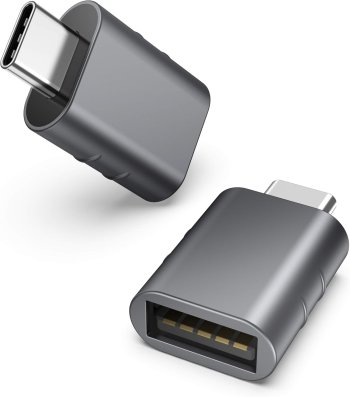
Lioness~
macrumors 601
As long as you're happy with your solutions, I'm happy with you 😁I have these Syntech ones.......
My Studio will be located on the side of my desk alongside all my drives, so I'd have to use a USB extension to reach across to it, which is another trailing cable that I'm trying to avoid, hence why I want to connect it to the rear of the ASD. Just seems 'neater' to me this way......
xraydoc
Contributor
I use these as well, or at least something that look essentially the same. I've never had any issue with them nor speed limitations (as tested with a basic USB SSD). They're currently only supporting my mouse RF dongle and light bar power (both connected to the back of one of my Studio Displays) as everything else I have is native USB-C.I have these Syntech ones.......
My Studio will be located on the side of my desk alongside all my drives, so I'd have to use a USB extension to reach across to it, which is another trailing cable that I'm trying to avoid, hence why I want to connect it to the rear of the ASD. Just seems 'neater' to me this way......
View attachment 2493918

colodane
macrumors 65816
I highly recommend the Benq. It is worth the price.
I've been using it for a couple years with a 27 inch 5K iMac, which should be quite similar to the Studio display. Takes very little power, so no issues with that - use cheap USB A to C adapter if needed.
You will have complete control over light intensity and color,
I've been using it for a couple years with a 27 inch 5K iMac, which should be quite similar to the Studio display. Takes very little power, so no issues with that - use cheap USB A to C adapter if needed.
You will have complete control over light intensity and color,
I highly recommend the Benq. It is worth the price.
I've been using it for a couple years with a 27 inch 5K iMac, which should be quite similar to the Studio display. Takes very little power, so no issues with that - use cheap USB A to C adapter if needed.
You will have complete control over light intensity and color,
What would make the BenQ better then something like this?
It's quite a process difference and seemingly covers pretty much the same functions?
As an Amazon Associate, MacRumors earns a commission from qualifying purchases made through links in this post.

MacGizmo
macrumors 68040
I've had the Benq light bar for several years now and love it. I had previously purchased a much cheaper light bar, and subsequently returned it for various reasons. What I will tell you is that the old cliché "you get what you pay for" is almost always true – and is absolutely true in this case.
Dark-Signature
macrumors 6502a
Instead of buying the expensive Benq lightbar, you can buy the Xiaomi Lightbar. Nearly the same quality, but for a far lower price: https://www.mi.com/us/product/mi-computer-monitor-light-bar/
Lioness~
macrumors 601
I have 2 Air purifiers of that brand, or rather with the name Smartmi, but that is the same brand as Xiaomi, or Mi. They are good for a low price, but the app didn't function for one of them at all, and badly for the other too. So somewhere you get what you pay for.Instead of buying the expensive Benq lightbar, you can buy the Xiaomi Lightbar. Nearly the same quality, but for a far lower price: https://www.mi.com/us/product/mi-computer-monitor-light-bar/
But using the AirPurifyers with the manual controlls on them works fine - but it means they have to be placed within reach. I'm just saying.
Even IKEA make some type of a lightbar today - LAGERGÅNG - for even less price - could be used for other things then on the displays perhaps 😉

vyspirit
macrumors member
I have a Studio Display and used the Yeelight Light Bar Pro for a while until the magnetic contact points started corroding or something, I’m not exactly sure. This caused the light to stop working at certain angles and eventually die completely. I’d recommend avoiding models with a similar magnetic design since they don’t seem to last long.
Recently, I bought the BenQ ScreenBar Pro to replace the broken one, and I absolutely love it. Here are a few points you might find useful:
- It doesn’t block the front camera of the Studio Display (I rarely use the front camera, but it’s a nice bonus).
- It has a fixed, non-detachable design with a hook that secures it to the monitor, yet it still allows for flexible angle adjustments. This should make it more durable over time.
- There’s no clunky controller sitting on your desk—you just use touch buttons right on the light, and they work like a charm. Plus, it keeps my desk less cluttered, which I love since I don’t want some controller always in the way.
- The auto-on/off feature is awesome. It can be a tad sensitive at times, but it’s no big deal. I barely have to think about turning it on when I sit down to work.
So far, I’m very happy with the ScreenBar Pro and would definitely recommend it to anyone looking for a light bar.
Recently, I bought the BenQ ScreenBar Pro to replace the broken one, and I absolutely love it. Here are a few points you might find useful:
- It doesn’t block the front camera of the Studio Display (I rarely use the front camera, but it’s a nice bonus).
- It has a fixed, non-detachable design with a hook that secures it to the monitor, yet it still allows for flexible angle adjustments. This should make it more durable over time.
- There’s no clunky controller sitting on your desk—you just use touch buttons right on the light, and they work like a charm. Plus, it keeps my desk less cluttered, which I love since I don’t want some controller always in the way.
- The auto-on/off feature is awesome. It can be a tad sensitive at times, but it’s no big deal. I barely have to think about turning it on when I sit down to work.
So far, I’m very happy with the ScreenBar Pro and would definitely recommend it to anyone looking for a light bar.