Become a MacRumors Supporter for $50/year with no ads, ability to filter front page stories, and private forums.
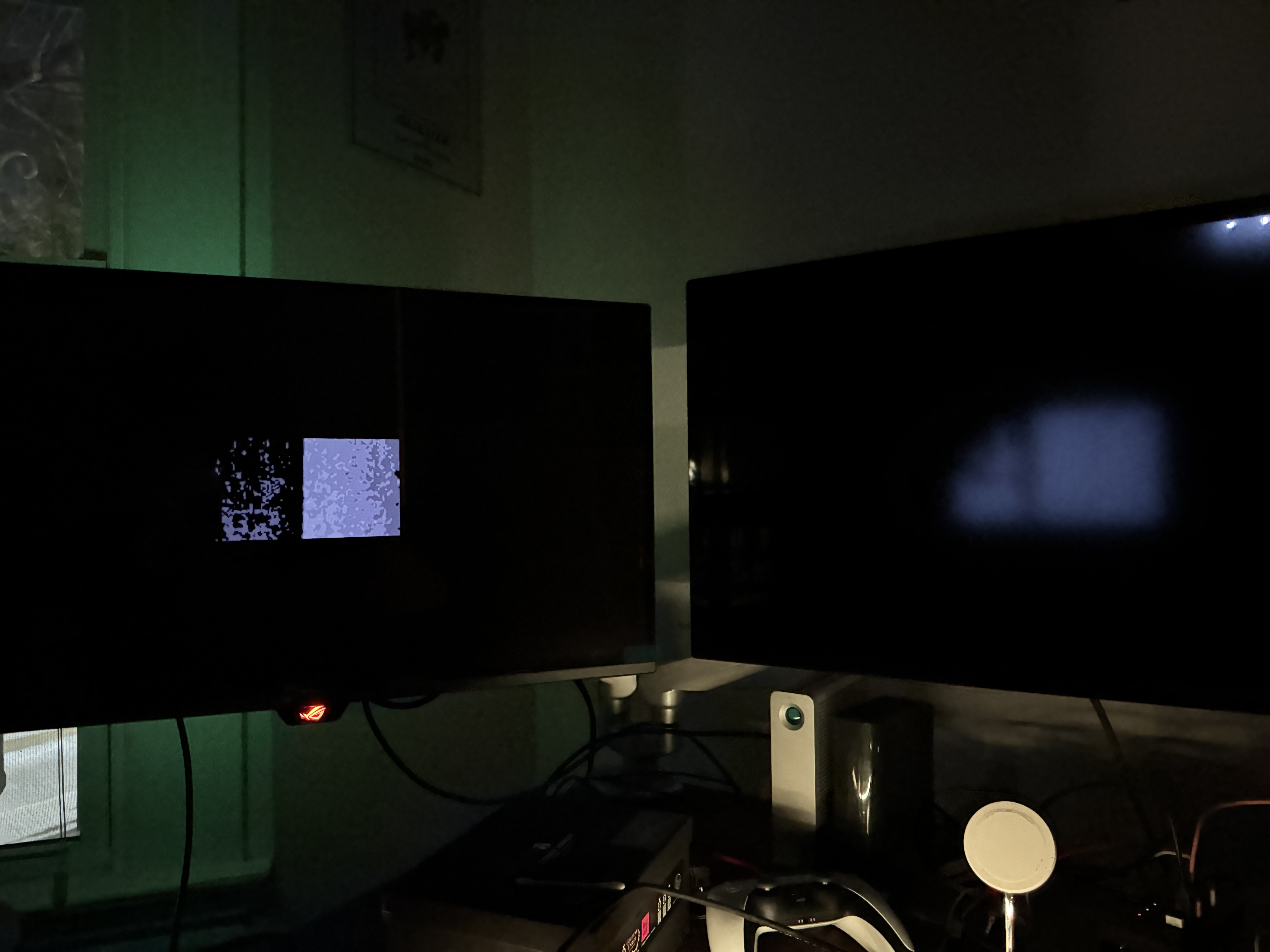
Also — likely the same problem manifesting in a different way — the SDXDR behaves strangely when attempting to display very dark grey patterns. Take the following pattern that's nearly invisible outside a pitch-black room. (I think it's something like #010101.) The OLED on the left shows how it's supposed to look. The SDXDR on the right completely messes it up. If you switch to the cloned profile, the image looks nearly identical to the OLED.

IMG_1175.JPG
 
Last edited:
While watching House of the Dragon (using QuickTime but reproducible in all players), I noticed that the XDR performs poorly if you're watching in a very dark room and the scenes are also very dim. The dimming zones become very obvious and constantly move around. It looks like a glitch:

View attachment 2637372

OLED on left, SDXDR on right. MacBook XDR looks a lot closer to OLED than SDXDR.

With that said, if you clone the default preset and change nothing else, the problem goes away almost completely. The cloned preset shows a dimmer image than the default preset, even with the same 2000 nit HDR peak, but lowering the brightness for the default preset does not actually make the blobbiness go away. So it's not just a case of "image darker, so dimming zones less visible."

I think this has something to do with the adjustable brightness feature, which is incompatible with custom presets. The same behavior and solution reproduces on the MacBook Pro 14" XDR display, though the blobbiness is much less visible there.

I also noticed that with the default preset at max brightness, an HDR clipping test image shows strange results:

View attachment 2637375

Some colors are visible almost up to 4000 nits, while others barely get up to 1000 nits.

Whereas with the cloned preset, everything goes to around 2000 nits, which is what you'd expect based on the display specs:

View attachment 2637376

Any thoughts on what's going on here? To me, it looks like the display thinks that very dark grays are darker than they actually appear when using the default preset and sends the wrong signals to the dimming zones.

Hoping it's a bug that will be fixed in time... switching profiles to watch movies is a bit annoying on a $3000 display.

Strange, I don't have this issue on mine with the standard preset. Is your running the latest firmware?
 
Yes. Here, look at this screenshot full-screen in a dark room. Switch between the default preset and a cloned version of that preset. Does the image look the same? On my SDXDR, the difference is stark. (No pun intended.)

Test Capture.jpg
 
Yes. Here, look at this screenshot full-screen in a dark room. Switch between the default preset and a cloned version of that preset. Does the image look the same? On my SDXDR, the difference is stark. (No pun intended.)

View attachment 2637647
I'm trying to figure out what is happening for you. For me, the screenshot's background is basically just black no matter what brightness I set or if I use a cloned preset or not, it certainly doesn't look like your photo alongside the OLED where there is a visible background. The flames have high brightness, and you can just barely make out the woman figure. I've tried viewing it in Safari and Preview full screen, but something is preventing it from displaying correctly for me to test. Maybe you could say what episode this is and I could check it out, or if you have Apple TV then Invasion S2 E4 has a lot of dark scenes with bright highlights like that, and that looks completely correct for me on the XDR even with the lights fully out.

I will say I have never seen the grey splotchiness with the lights off in the dark on my XDR (I use it most nights), but my 2023 16" MacBook Pro looks exactly like your splotchy photo in the dark when watching any movie whether it's HDR or not and it's very annoying. Before the XDR I always thought it was just a limitation with the Mini-LED, like the LEDs have a minimum brightness so it's obvious in a pitch black room. The Mini-LED iPad Pro did it so bad that I returned it.
 
I'll take some comparison photos with fixed exposure using that screenshot when I get back from vacation.

Gotta say, it would be really strange if different XDRs did different things in this regard... does not seem like a hardware issue! Would love to repro in an Apple store but impossible to do if it's not pitch-black. (I confirmed the differences in the HDR clipping test image, though.)
 
I'll take some comparison photos with fixed exposure using that screenshot when I get back from vacation.

Gotta say, it would be really strange if different XDRs did different things in this regard... does not seem like a hardware issue! Would love to repro in an Apple store but impossible to do if it's not pitch-black. (I confirmed the differences in the HDR clipping test image, though.)
I’ll get around to testing mine when I get a chance.
 
I threw in the towel with trying to get dual Kuycon P27Z's working and picked up a pair of Studio Display XDR's. I updated the firmware on both displays and am running a brand new install of Tahoe 26.5.1. I daisy-chained the displays to my 2026 MacBook Pro 14" with M5 Pro and was able to immediately get 120Hz on both at 5K. However I am only able to enable TrueTone on whichever display is set to "Main display" and not both of them at the same time. I'm wondering if this is a limitation of the M5 Pro processor? Also, even though the displays are set to 120Hz, I definitely see light stuttering when scrolling in Safari with both displays connected. When I disconnect one, the scrolling is buttery smooth. Again, is this a function of the M5 Pro processor where the M5 Max would eliminate it? Don't think I can afford to go to M3 Ultra. Thanks for any advice!
 
However I am only able to enable TrueTone on whichever display is set to "Main display" and not both of them at the same time.

I have the same setup except for an M5 Max instead of Pro. In System Settings the True Tone toggle is only surfaced on the main display's configuration pane, but it applies to both monitors. You can observe by toggling True Tone on and off and seeing the color shift on both displays.
 
  • Like
Reactions: rnb2
I have the same setup except for an M5 Max instead of Pro. In System Settings the True Tone toggle is only surfaced on the main display's configuration pane, but it applies to both monitors. You can observe by toggling True Tone on and off and seeing the color shift on both displays.
@Nugget Thanks for letting me know! Can I ask you to test the following:
Also, even though the displays are set to 120Hz, I definitely see light stuttering when scrolling in Safari with both displays connected. When I disconnect one, the scrolling is buttery smooth.

I just go to macrumors home page and very slowly scroll back and forth with a very light flick, not a big fast scroll. With two displays connected, the page with lots of big images shows some light stuttering when it comes to a stop. When I unplug one display and repeat, the stuttering disappears.
 
Last edited:
I just go to macrumors home page and very slowly scroll back and forth with a very light flick, not a big fast scroll. With two displays connected, the page with lots of big images shows some light stuttering when it comes to a stop. When I unplug one display and repeat, the stuttering disappears.

Sorry, I don't really understand what you're describing and I haven't noticed any specific stuttering with anything. I'm not very sensitive to those sorts of display artifacts in general, so I might not be your best control group.
 
Sorry, I don't really understand what you're describing and I haven't noticed any specific stuttering with anything. I'm not very sensitive to those sorts of display artifacts in general, so I might not be your best control group.
Thanks, I think I figured it out. I was running an ad blocker called "Wipr" as an extension in Safari, and when I removed it, the micro-stuttering seems to have disappeared 🙂
 
  • Like
Reactions: steve217 and Nugget
so as of now the XDR wakes from sleep much slower than the original ASD? I've read people saying it's like 3 seconds to wake as opposed to pretty much instantaneous on the old model. Hopefully this is fixed in a firmware update.
 
so as of now the XDR wakes from sleep much slower than the original ASD? I've read people saying it's like 3 seconds to wake as opposed to pretty much instantaneous on the old model. Hopefully this is fixed in a firmware update.

I don't notice much of a difference with mine; it's most definitely not even 2 seconds.
 
I'm trying to figure out what is happening for you. For me, the screenshot's background is basically just black no matter what brightness I set or if I use a cloned preset or not, it certainly doesn't look like your photo alongside the OLED where there is a visible background. The flames have high brightness, and you can just barely make out the woman figure. I've tried viewing it in Safari and Preview full screen, but something is preventing it from displaying correctly for me to test. Maybe you could say what episode this is and I could check it out, or if you have Apple TV then Invasion S2 E4 has a lot of dark scenes with bright highlights like that, and that looks completely correct for me on the XDR even with the lights fully out.

I will say I have never seen the grey splotchiness with the lights off in the dark on my XDR (I use it most nights), but my 2023 16" MacBook Pro looks exactly like your splotchy photo in the dark when watching any movie whether it's HDR or not and it's very annoying. Before the XDR I always thought it was just a limitation with the Mini-LED, like the LEDs have a minimum brightness so it's obvious in a pitch black room. The Mini-LED iPad Pro did it so bad that I returned it.
OK, took some direct comparison shots.

Here are two captures with the default "Apple XDR Display (P3-2000 nits)" profile at 100% brightness in a very dark room. (Night time, all lights off, the SDXDR is the only light source.) The first is the screenshot I posted above (which is SDR). The second is an HDR video of HotD S01E04, paused at 18:17. The backlight blobs are plainly visible and the overall image has a grey sheen. Details that are very dim are smeared out of existence.

IMG_1812.JPG

IMG_1806.JPG


And here are two captures of the same content, but with a cloned version of the default preset. This preset uses CIE 1931 and does not support adjustable brightness. These images look more or less correct and no backlight blobs are visible.

IMG_1814.JPG

IMG_1808.JPG


Cloning the preset is simple: go to display settings, click on the Preset dropdown, click on Customize Presets, select the "Apple XDR Display (P3-2000 nits)" profile, click the + button, and Save Preset. That's it.

Someone please repro this!
 
Last edited:
I did a search and it seems there is currently no solution to have a switch box that will put out 120HZ at 5K resolution, no TB5 lines exist yet. So it seem the best solution is something like the caldigit TB5 hub and unplugging Ang plugging in cables, or doing the same on the back of the Studio Display XDR directly. Bit annoying.
FWIW I tried connecting my Cable Matters USB-C Switch with my Mac and work laptop to the Studio Display XDR and it did in fact allow both to connect at 5K 120 Hz. TBH I was very surprised this worked!
 
FWIW I tried connecting my Cable Matters USB-C Switch with my Mac and work laptop to the Studio Display XDR and it did in fact allow both to connect at 5K 120 Hz. TBH I was very surprised this worked!

Cheers mate, bit late for me as I got the 2026 Studio Display. It is working fine for me though and I use the little Cable Matters USB C switch box too, stuck it on the back. But when I went to look at the monitors at the Apple Store my works laptop just refused to work when plugged directly into the XDR display at 5K let alone 120HZ. Hence I went with the updated standard model. At least I saved myself £1500 lol.
 
FWIW I tried connecting my Cable Matters USB-C Switch with my Mac and work laptop to the Studio Display XDR and it did in fact allow both to connect at 5K 120 Hz. TBH I was very surprised this worked!
I had some kernel panics with this one. Personally, I've just been using a basic USB4 pigtail cable to switch between my PC and Mac without reaching behind the display: https://www.cablematters.com/pc-182...video-240w-charging-80gbps-data-transfer.aspx

Technically an extender like this is against USB spec, but I've had no issues so far. And it should give you full TB5 compliance. (Though the first one I got was a bit flaky — had to exchange it.)
 
  • Like
Reactions: Citizen45
Can anyone confirm whether the base model MacBook Air M4 can run the Studio Display XDR at 120hz? There’s so much conflicting information online.
 
yes, it can.

that's not true. Any reliable source would say that MacBook Air M4 does support Studio XDR at 120hz. I don't know where did you get the opposite info.
Thanks for the confirmation.


This article threw me off.
 
How about M2 Max Macbook Pro? Also support XDR at 120Hz? Thanks for your info.

All of these "How many displays can be connected to Mac_____" Apple support articles are the most reliable sources that we know.

M2 Max MBP cannot do 5k120, not even just one display.

EDIT: so it turns out I was misled by the Apple support page, the M2 Max in fact CAN output 5k120.
 
Last edited:
Register on MacRumors! This sidebar will go away, and you'll see fewer ads.