Hi guys
I've googled this with a few relevant results but no actual solution as of yet.
I use firefox and have a Macbook Pro running leapord
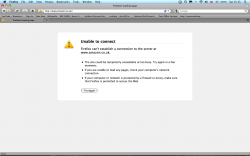
Everything seemed fine until some point in the last week. I can't seem to access amazon at all unless I use one of the tactics below.... also my paypal isnt loading properly. These are the only sites I can seem to find that wont load as they should. I'm able to load amazon via a cached file and a random link (looked like an IP address with http:// preceeding it) but cannot continue to browse if I click any of the links on the homepage.
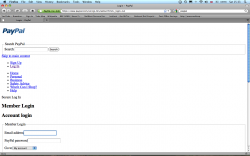
My Paypal loads but isnt loading all the elements.
I have attached pictures so you can see what happens.
I DID install a camtwist trial yesterday and I'm worried it may have brought something virus' like into my system, I scanned with Macscan but only found a few tracking cookies, after removing camtwist and the tracking cookies nothing has changed.
I do not have a time machine back up, is there a way to restore my mac to
an earlier time?
I have also tried accessing the sites on safari and chrome with the same results.
I recently bought a mac pro and accessing the websites is absolutely fine on the new system.
Any goddamn ideas?
Cheers
I've googled this with a few relevant results but no actual solution as of yet.
I use firefox and have a Macbook Pro running leapord
Everything seemed fine until some point in the last week. I can't seem to access amazon at all unless I use one of the tactics below.... also my paypal isnt loading properly. These are the only sites I can seem to find that wont load as they should. I'm able to load amazon via a cached file and a random link (looked like an IP address with http:// preceeding it) but cannot continue to browse if I click any of the links on the homepage.
My Paypal loads but isnt loading all the elements.
I have attached pictures so you can see what happens.
I DID install a camtwist trial yesterday and I'm worried it may have brought something virus' like into my system, I scanned with Macscan but only found a few tracking cookies, after removing camtwist and the tracking cookies nothing has changed.
I do not have a time machine back up, is there a way to restore my mac to
an earlier time?
I have also tried accessing the sites on safari and chrome with the same results.
I recently bought a mac pro and accessing the websites is absolutely fine on the new system.
Any goddamn ideas?
Cheers