
Become a MacRumors Supporter for $50/year with no ads, ability to filter front page stories, and private forums.

Praetorian®

macrumors regular
Original poster
I would like to ask if there is the only "language" version of Mac OS X Leopard. I'm going to buy MacBook in US but I need support of czech special characters (ěščřž). So answer is: Can I set Czech Republic as my locale in Leopard in MacBook bought in US? Or are there any special language versions for Europe which only includes these settings?
If you're not sure about it but you bought your Apple computer with Leopard in US, you can just look in settings and tell me if there is option "Czech Republic" somewhere or not.
Thank you for your response.
(Excuse me for my English. I'm not English native speaker.)
 
(Excuse me for my English. I'm not English native speaker.)
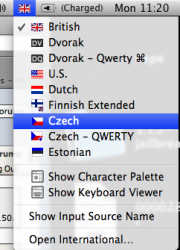
You can set it to Czech, on my keyboard those letters are assigned to the number buttons but I am assuming your keyboard is set out differently.

Picture 1.png
 
You can set it to Czech, on my keyboard those letters are assigned to the number buttons but I am assuming your keyboard is set out differently.

You're right about those keys. If you set your keyboard as Czech, special Czech character are on keys where you got numbers by default. When we need numbers, we just press shift + these keys. So we got numbers there too. But those characters are more important. That's why for numbers "shift must be used". 😉

Thank you very much for your help.
 
I forgot to add that there is only one Leopard apple do not sell country/region specific versions. So the disk you will get will be exactly the same as the disk you will get in another country, apart from maybe the language that is used on the packaging.
 
I forgot to add that there is only one Leopard apple do not sell country/region specific versions. So the disk you will get will be exactly the same as the disk you will get in another country, apart from maybe the language that is used on the packaging.

Yea, I thought it's like that. I'm glad there is at least this support of Czech. It would be nice if Apple have added official Czech translation into Leopard. But I think it's very unlikely.
 
It might be also possible to access Czech special letters on a US layout via a shortcut.

I just looked it up for German Umlauts (öäü), because I'm getting a US Macbook as well and I'm thinking about keeping the layout. But I'm not sure I'll get used to :apple:-U+o/a/u
(and I touch type anyways)
 
Yea, I thought it's like that. I'm glad there is at least this support of Czech. It would be nice if Apple have added official Czech translation into Leopard. But I think it's very unlikely.

I believe these are the only languages in which OS X is localized (meaning the operating system interface is only available in these languages):

Languages

* English
* Japanese
* French
* German
* Spanish
* Italian
* Dutch
* Swedish
* Danish
* Norwegian
* Finnish
* Traditional Chinese
* Simplified Chinese
* Korean
* Brazilian Portuguese
* Portuguese (Portugal)
* Russian
* Polish

But I think that if you set your language as the first priority language in the international tab, any application which has Czech localizations will appear in Czech.
 
Yes, you can write Czech diacritics in a Macbook without changing the USA layout

It might be also possible to access Czech special letters on a US layout via a shortcut.

I just looked it up for German Umlauts (öäü), because I'm getting a US Macbook as well and I'm thinking about keeping the layout. But I'm not sure I'll get used to :apple:-U+o/a/u
(and I touch type anyways)

You are right, it is possible to write also the diacritic czech characters with a mac without changing the layout.

So, these are the key combination for different czech characters:

š = :apple:-Shift-T+s
ž = :apple:-Shift-T+z
ř = :apple:-Shift-T+r
ě = :apple:-Shift-T+e
ť = :apple:-Shift-T+t
ň = :apple:-Shift-T+n​

And for long vowels (with a " ´ " on the top):

á = :apple:-E+a
é = :apple:-E+e
í = :apple:-E+i
ó = :apple:-E+o
ú = :apple:-E+u
ý = :apple:-E+y

Hope that this helped!

Cheers,

Carlos

A Happy Venezuela living in Brno, Czech Republic. 😀


--
 
You are right, it is possible to write also the diacritic czech characters with a mac without changing the layout.

So, these are the key combination for different czech characters:

š = :apple:-Shift-T+s
ž = :apple:-Shift-T+z
ř = :apple:-Shift-T+r
ě = :apple:-Shift-T+e
ť = :apple:-Shift-T+t
ň = :apple:-Shift-T+n​

And for long vowels (with a " ´ " on the top):

á = :apple:-E+a
é = :apple:-E+e
í = :apple:-E+i
ó = :apple:-E+o
ú = :apple:-E+u
ý = :apple:-E+y

Hope that this helped!

Cheers,

Carlos

A Happy Venezuela living in Brno, Czech Republic. 😀


--

That does not work for me?!
 
Found the real way to add diacritics for Czech in Mac OS X

That does not work for me?!

Hello Huddini,

I'm sorry, you are right... in fact, those keys combinations that I was using do work... but if you are using a Mac computer with Linux (Ubuntu) installed in it... I by mistake took for granted that this same combinations of letters would work from Mac OS X.

Now... I went back to Mac OS X, and found the real way to write diacritics without changing the language of your keyboard (well, partially...) I will now explain bellow (but you can also see the page where I found out the information)

1) Change the language of your keyboard from "U.S." to "U.S. Extended"

You actually will need to do this change, anyway, having the extended version of U.S. keyboard will just help, it will not bring you a negative impact.

To do this, just go to "System Preferences" -> Language & Text -> "Input Sources" and scroll down in the Input method list until you find "U.S. Extended" (it has the icon
USExt.gif
).

After you checked this input method, you can uncheck the original "U.S" so you don't have both.

2) How to type the diacritics

Now I will write bellow the correct list of keyboard shortcuts for the diferent diacritics:


á = option+e a
é = option+e e
í = option+e i
ó = option+e o
ú = option+e u
ý = option+e y

The "haček" ( ̌ ) is written in a different way... you must first type the letter and then the key combination to add the ̌ on the top like:


š = s option+shift+v
ž = z option+shift+v
ř = r option+shift+v
ě = e option+shift+v
ť = t option+shift+v
ď = d option+shift+v
ň = n option+shift+v

And finally, for the special "ů" is also done like the ones before (first the letter "u" then the keyboard combination for " ̊ ") so you get:


ů = u option+shift+k


Hope this helps now! 😀
 
Register on MacRumors! This sidebar will go away, and you'll see fewer ads.