S sk200lc macrumors newbie Original poster Mar 5, 2010 #1 When I swipe on my mouse, a window popup show the following:- "Switch Space Left Your operating system is missing the Switch Space Left keyboard shortcut" And the only icon is [Open Keyboard] What actually I have missing and why it suddenly happen?
When I swipe on my mouse, a window popup show the following:- "Switch Space Left Your operating system is missing the Switch Space Left keyboard shortcut" And the only icon is [Open Keyboard] What actually I have missing and why it suddenly happen?
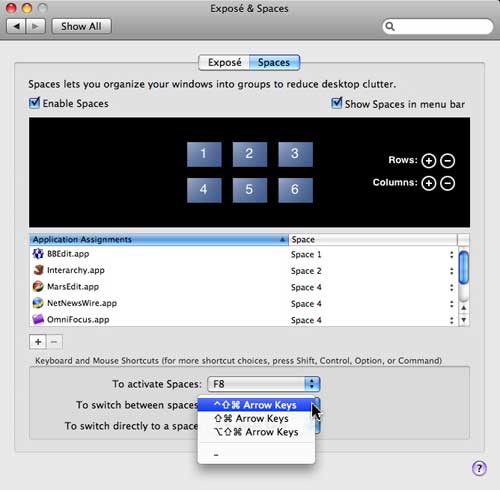
spinnerlys Guest Mar 5, 2010 #2 I presume you use the Magic Mouse and one of those new iMacs and Mac OS X 10.6.2 as you didn't state otherwise. Can you make a screen shot of that message? Have you installed MagicPrefs or BetterTouchTool? Take a look at System Preferences > Exposé & Spaces > Spaces to assign a keyboard shortcut to switching Spaces. How many fingers do you use to swipe?
I presume you use the Magic Mouse and one of those new iMacs and Mac OS X 10.6.2 as you didn't state otherwise. Can you make a screen shot of that message? Have you installed MagicPrefs or BetterTouchTool? Take a look at System Preferences > Exposé & Spaces > Spaces to assign a keyboard shortcut to switching Spaces. How many fingers do you use to swipe?