
Got a tip for us?
Let us know
Become a MacRumors Supporter for $50/year with no ads, ability to filter front page stories, and private forums.
Swollen battery
- Thread starter mcenet
- Start date
-
- Tags
- accu battery
- Sort by reaction score
You are using an out of date browser. It may not display this or other websites correctly.
You should upgrade or use an alternative browser.
You should upgrade or use an alternative browser.
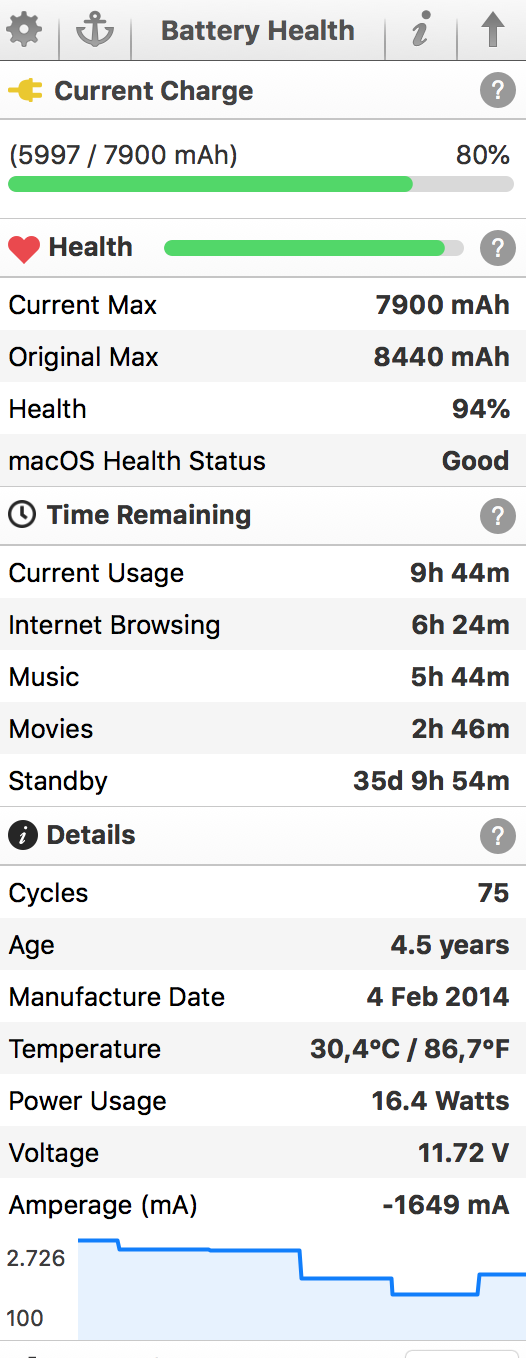
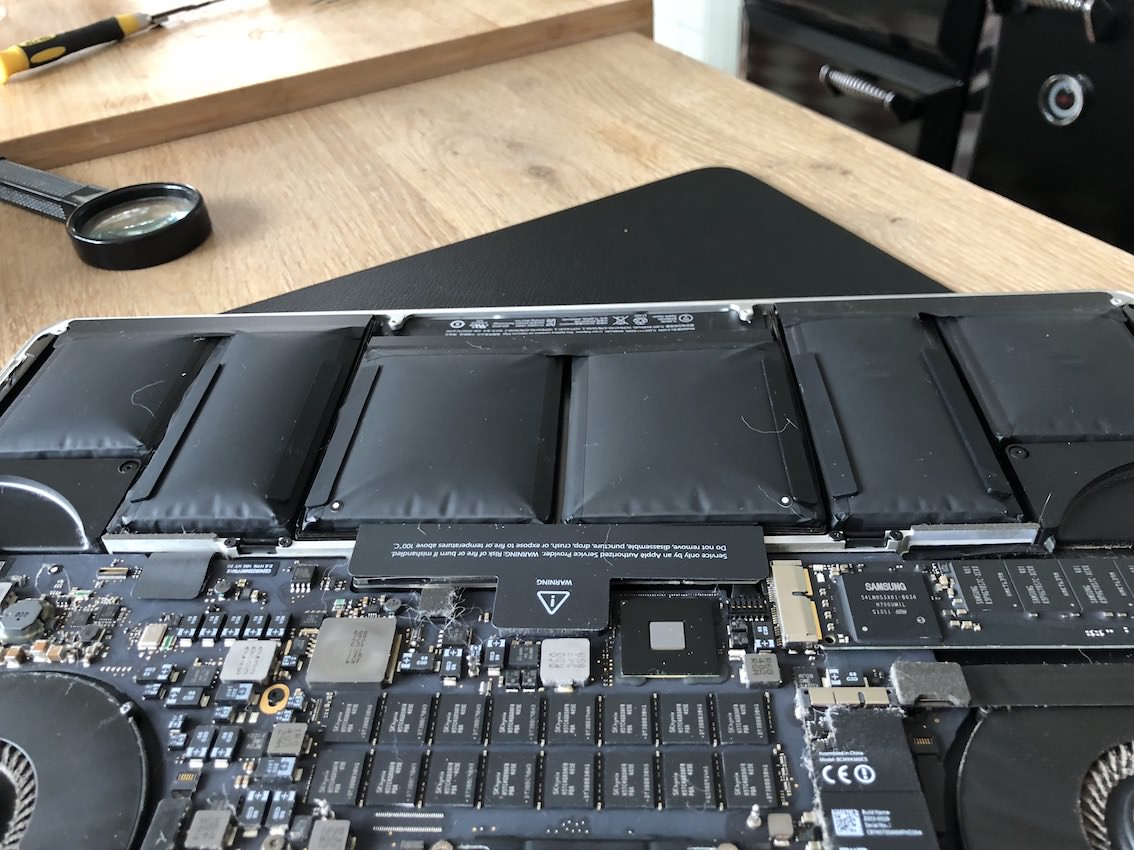
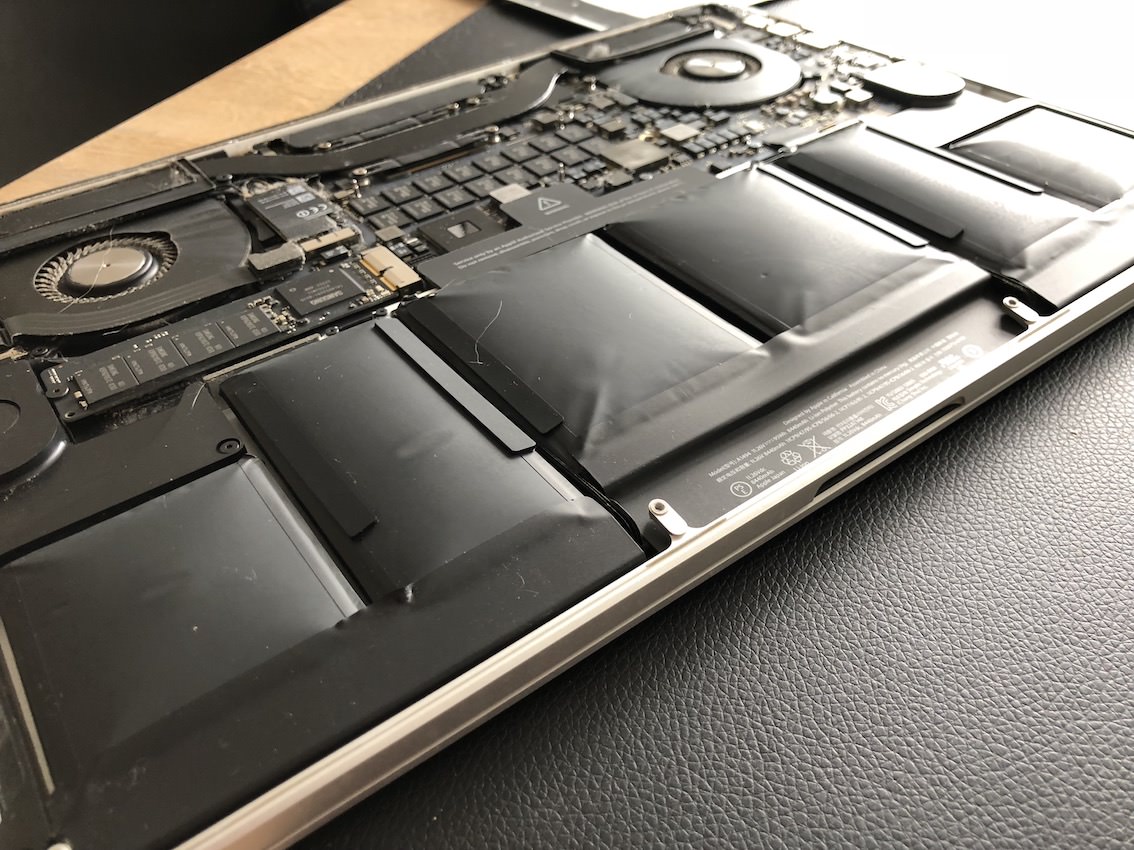


Find it a dangerous situation mainly because this is not indicated in the diagnosis !
I discovered this by accident because my macbook started to wobble, the underside is slightly bent.
Now I have already ordered a new battery pack but it is very difficult to change since it is firmly glued to the housing
I discovered this by accident because my macbook started to wobble, the underside is slightly bent.
Now I have already ordered a new battery pack but it is very difficult to change since it is firmly glued to the housing
Last edited by a moderator:

AppleHaterLover
macrumors 68020
Holy hell. That thing is a fire hazard. Do you use an OEM charger?
Please do yourself (and any airplanes you may catch in the future) and have Apple replace the battery.
Please do yourself (and any airplanes you may catch in the future) and have Apple replace the battery.

Painter2002
macrumors 65816
@mcenet
Normally I would say it's fine to replace the battery on your own, by removing the glue and carefully removing the batteries, but given the state of swelling on those batteries, I personally wouldn't even attempt that repair. Using the iFixit tools to remove the batteries requires using heat to dissolve the glue, and I am not sure that is a great idea as it could cause the battery to explode or it might get punctured accidentally when using tools to separate the battery from the top case.
Personally this is one of those repairs that might be worth the premium to let Apple fix it, and then they can be liable if any damage or accidents happen.
Obviously you already know the danger, but do be careful doing that replacement. Typically when Apple or a third part replaces the batteries, they replace the entire top case.Now I have already ordered a new battery pack but it is very difficult to change since it is firmly glued to the housing
[
Normally I would say it's fine to replace the battery on your own, by removing the glue and carefully removing the batteries, but given the state of swelling on those batteries, I personally wouldn't even attempt that repair. Using the iFixit tools to remove the batteries requires using heat to dissolve the glue, and I am not sure that is a great idea as it could cause the battery to explode or it might get punctured accidentally when using tools to separate the battery from the top case.
Personally this is one of those repairs that might be worth the premium to let Apple fix it, and then they can be liable if any damage or accidents happen.
Last edited:
AppleHaterLover
macrumors 68020
@mcenet
Obviously you already know the danger, but do be careful doing that replacement. Typically when Apple or a third part replaces the batteries, they replace the entire top case.
Normally I would say it's fine to replace the battery on your own, by removing the glue and carefully removing the batteries, but given the state of swelling on those batteries, I personally wouldn't even attempt that repair. Using the iFixit tools to remove the batteries requires using heat to dissolve the glue, and I am not sure that is a great idea as it could cause the battery to explode or it might get punctured accidentally when using tools to separate the battery from the top case.
Personally this is one of those repairs that might be worth the premium to let Apple fix it, and then they can be liable if any damage or accidents happen.
This. I would not attempt to remove adhesive or risk flexing that pack.

AppleHaterLover
macrumors 68020
Wouldn't a battery swollen to the point of almost exploding trigger their "eye-o-meter" test?I don't think Apple will do anything unless their proprietary battery diagnostic test is triggered. Attempting to open the case may only prompt the "genius" to deny service for unauthorized attempt at service.
Painter2002
macrumors 65816
I disagree, this is an obvious defect in battery design, and Apple will replace these if the battery is shown to be swollen. They can not deny service simply because the bottom case was opened.I don't think Apple will do anything unless their proprietary battery diagnostic test is triggered. Attempting to open the case may only prompt the "genius" to deny service for unauthorized attempt at service.
Now whether or not they cover the repair costs is a different story. Many users report that their batteries were replaced for free, others had to pay the repair costs ($200 if there is no other damages that have to be repaired). If you are nice and speak with a manager there is a chance you'll get this replaced for free.
in the meantime I have already removed the battery, in anticipation of the new one
The first thing I did for safety reasons was to completely discharge the battery until the macbook automatically closed.This went easier than I thought in the way with the rope under the battery to pull and thus cut the glue, 10min work! Went much smoother than on the video below, maybe because he was still warm.
Saved money and a lot of time. (mac service in my neighborhood asked 200$)
While waiting for the new battery, my macbook now works on the charger.
I hope to receive the pack tomorrow. 🙂
The first thing I did for safety reasons was to completely discharge the battery until the macbook automatically closed.This went easier than I thought in the way with the rope under the battery to pull and thus cut the glue, 10min work! Went much smoother than on the video below, maybe because he was still warm.
Saved money and a lot of time. (mac service in my neighborhood asked 200$)
While waiting for the new battery, my macbook now works on the charger.
I hope to receive the pack tomorrow. 🙂
Last edited:
No free replacement, checked with serial nr and asked in official apple store.
Therefore I dit it already by myself
Therefore I dit it already by myself

Christian 5G
macrumors 65816

Audit13
macrumors 604
Thanks for the update.No free replacement, checked with serial nr and asked in official apple store.
Therefore I dit it already by myself
Was it difficult to get the battery out? One tech told get a narrow wall scraper, wet the scraper with alcohol, and slowly pry away the battery from the case by moving from one small area to another small area.
I removed the cover from my late 2013 13" to have a look and the battery is fine.
Thanks for the update.
Was it difficult to get the battery out? One tech told get a narrow wall scraper, wet the scraper with alcohol, and slowly pry away the battery from the case by moving from one small area to another small area.
I removed the cover from my late 2013 13" to have a look and the battery is fine.
Good that you have checked your battery this can save you a lot of suffering.
really, never use a scraper ,you can stick through the battery. I know from experience how dangerous a damaged lipo battery is !
Just use a strong thin rope and pull it under the battery so it cuts the glue and it leave de battery in good condition. This worked perfectly for me in about 10 min.
AppleHaterLover
macrumors 68020
really, never use a scraper ,you can stick through the battery. I know from experience how dangerous a damaged lipo battery is !
Just use a strong thin rope and pull it under the battery so it cuts the glue and it leave de battery in good condition. This worked perfectly for me in about 10 min.
I don't know if I'm more scared by the idea of sticking a needle in the battery or throwing alcohol + a scraper at it.

maflynn
macrumors Broadwell
Yes, that's the current consensus on removing these batteries. The youtube videos show that if you take your time, its not difficult. I believe even iFixit also uses this method now.Just use a strong thin rope and pull it under the battery so it cuts the glue and it leave de battery in good condition.
How not to do !!! Idiot replace his macbook battery with a scraper, look what's happen
nerowolfe19
macrumors member
I second using the thread method. I used a thin nylon thread and it took me about 15 minutes to remove the battery. Better wear mitts or use piece of cloth or socks so you wouldn't get chafed hands when pulling against the stickier parts. Also keep a foam FE nearby just in case.
matthewadams
macrumors 6502
Wow, how many people might not know that their battery might look like this...
I'm assuming mine has the same issue as the trackpad stopped working and requires pressure in order to make it work, which is a classic sign of the battery expanding (alongside with the bending). I'm too lazy to even open it as replacing the trackpad requires a top-case replacement anyway so I'll just bring it in.
Also on a Late 2013 machine.


bopajuice
Suspended
How not to do !!! Idiot replace his macbook battery with a scraper, look what's happen
That MacBook is uh... Toast!
Very dangerous. If my MB batteries were that swollen I would not even keep the thing in the house. Could go up in smoke at any moment with no notice.