Become a MacRumors Supporter for $50/year with no ads, ability to filter front page stories, and private forums.
How can I add the System Enabler and Mac OS ROM files to a retail CD to boot it on the Mac mini? I want to try System 7.6.1 and 8.1. Do I need to convert the CD images to writable images on Mac OS 9.2.2? MacOS Sequoia on a modern Mac won't read the images (they won't mount in Disk Utility).

Edit: I found the modified System 7 CD image with the files already added. I’ll have to try making a modified 8.1 image.

Also, this is really neat, but what software runs on System 7 or 8 that doesn’t work on 9.2.2?

The Mac mini G4 sure turned out to be a versatile classic Mac since its OS capability spans from System 7 to Snow Leopard.

Edit 2:

I figured it out. I used Toast 5 on 9.2.2 to mount the images, add the files, and burn to CD. Both 7.6.1 and 8.1 boot from the CDs. 7.6.1 freezes after a while. I haven’t tried to install it to disk to see if that behaviour is the same as on the CD. I made my own boot disc using the retail image. I haven’t tried the smaller pre-modified image.

8.1 works better. It hasn’t froze. Except the second boot I tried failed with an error. The fan goes full speed all the time on 7.6.1 and 8.1. Super neat it can boot the older OSs though.
 
Last edited:
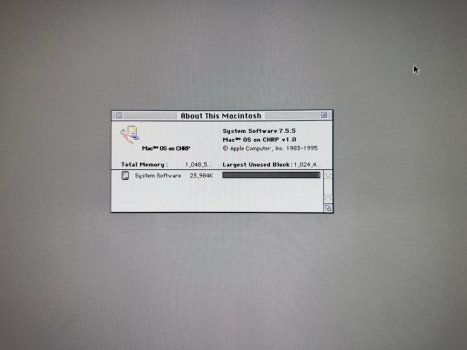
System 7.5.5 boots. 🙂

There isn’t a universal 7.5.5 CD, so I made one from a 7.5.3 CD image. I mounted the image using Toast in Mac OS 9.2.2. Then used ResEdit to spoof the system as 7.5.3 so I could run the 7.5.5 updater. I mounted the three 7.5.5 update floppy images and then installed it to the 7.5.3 image. Then I added the System Enabler and Mac OS ROM files to the System folder on the image. Then burned the disc using Toast.

I searched Google and it thinks 7.5.5 is the best OS version to run alongside 9.2.2 for playing retro games. There were changes with 7.6 that broke compatibility.
 

Attachments

  • IMG_9596r.jpeg
    IMG_9596r.jpeg
    281.8 KB · Views: 22
Last edited by a moderator:
System 7.5.5 works surprisingly well once installed to the hard disk. I couldn't get it to install from the CD so I installed it from within 9.2.2. I held down the option key when opening the 7.5.3 installer and was able to do a custom install to the HFS Standard formatted partition. I had to manually update it to 7.5.5 once installed.

I used iPartition 3 boot CD to shrink the 9.2.2 partition non-destructively and made the maximum size 4,063 MB partition for System 7.

The only issues so far are these:
-Sound does not work
-USB is not supported (need Mac OS 8.5+ for that)
-CD/DVD drive works intermittently
-No graphics acceleration (but it's plenty fast without)

It's good enough for playing old games without sound. The troublesome part is having to restart into 9.2.2 in order to transfer files to the System 7 partition since it can't read HFS+ volumes.
 
I found these drivers someone hacked for a PC Radeon 9250 and I edited them with the mini’s 9200 ID number (5962) and it might be working in 7.5.5. They included instructions on the changes they made to the files.

I can’t get the ATI Resources Manager extension to work. It causes the system to hang on boot. The other ones load.

 
  • Like
Reactions: ks23
I found this audio modification someone mentioned on the 68KMLA forum. It’s an extension that fixes the audio so it comes from the internal speaker on 9.2.2, but apparently it breaks FireWire drives. It looks like you have to build the extension yourself following the instructions and it’s not very clear how to do that. I don’t know why they didn’t just provide the pre-built extension.

I also don’t know if this works on older OSs like 7.5.5. That would be great if it does.

 
Register on MacRumors! This sidebar will go away, and you'll see fewer ads.