
Got a tip for us?
Let us know
Become a MacRumors Supporter for $50/year with no ads, ability to filter front page stories, and private forums.
System Data Overflow Bug - storage full with 170GB of undeletable data!
- Thread starter Rydawg96
- Start date
- Sort by reaction score
You are using an out of date browser. It may not display this or other websites correctly.
You should upgrade or use an alternative browser.
You should upgrade or use an alternative browser.


Cobold
macrumors 65816
You need file system access and navigate to
But even then, you cannot delete it or anything. It's all read only on Apple's file system.
Right now, there's nothing you can do about it. Around 25GB is a pretty common size for "Systen Data" on iOS 26. 🙁
Code:
/private/var/containers/Shared/SystemGroup/systemgroup.com.apple.lsd.iconscacheRight now, there's nothing you can do about it. Around 25GB is a pretty common size for "Systen Data" on iOS 26. 🙁

I have used the System Diagnostic tools as outlined in this post from earlier in the thread. I then had GenAI build me a python script that would analyze the log files and show me a directory tree of the files, with sizes, so I could see how large various directories were.I have 24 GB of system data, which is a decent chunk of my 128 GB storage. I see some have posted about that icon cache file. How do you find that?
What is most challenging is that you can not access the actual files in the icon cache. There's nothing – literally nothing you can do to clean out that cache. The only workaround is to erase and restore your phone from backup. But this does not fix the bug – the storage will continue to increase pathologically until your phone is filled to the brim, again.
I have reported this issue to Apple many, many, many, many times. I have received zero responses back of any kind.
Apple is the ONLY entity capable of resolving this bug. There is no fix until Apple decides to fix it.
Also, to update this ongoing issue – I again am the proud owner of a completely unusable iPhone, filled to the absolute brim with items fillings the `iconscache` directory. I ran another sysdiagnose and it revealed – again – that this directory is taking up all available space on the phone. The `iconscache` directory, alone, accounted for 57 GB of space.
This now marks somewhere around the 20th time I've had to completely wipe and restore my phone from a backup since iOS 26 beta came out last summer. Every single time it has been related to this specific bug about the `iconscache`.
In about three to four weeks, I will be performing the exact same erase and restore again.
This is a profound bug in iOS 26 and nobody but Apple can fix it. I can not express to you, dear reader, how frustrating, demoralizing and disappointing it is that there is nothing I can do to encourage Apple to even listen to or acknowledge this issue.
I will continue to report back to this forum for every remaining year of my life on this beautiful planet if that's what it takes to document and chronicle this ongoing failure.
This now marks somewhere around the 20th time I've had to completely wipe and restore my phone from a backup since iOS 26 beta came out last summer. Every single time it has been related to this specific bug about the `iconscache`.
In about three to four weeks, I will be performing the exact same erase and restore again.
This is a profound bug in iOS 26 and nobody but Apple can fix it. I can not express to you, dear reader, how frustrating, demoralizing and disappointing it is that there is nothing I can do to encourage Apple to even listen to or acknowledge this issue.
I will continue to report back to this forum for every remaining year of my life on this beautiful planet if that's what it takes to document and chronicle this ongoing failure.
By the way, if there is any way that any of the fine readers of this forum have any suggestions on actual, meaningful ways I can connect with an actual person at Apple who can actually do something about this, I'd really appreciate it.
I have a legitimate software flaw – which is completely unrelated to any kind of individual user actions – and nobody seems to care or respond. I honestly don't know what to do. I have called, I have written, I have submitted report after report after report. How can I get in contact with an actual human being at the Apple Corporation?
I have a legitimate software flaw – which is completely unrelated to any kind of individual user actions – and nobody seems to care or respond. I honestly don't know what to do. I have called, I have written, I have submitted report after report after report. How can I get in contact with an actual human being at the Apple Corporation?

FILIPSN007
macrumors regular
skrungemaster
macrumors member

gwang73
macrumors 68030
Was just going to say this. Don't restore and do an erase and start as new. When you restore, whatever is bugged causing the memory issue will stay bugged after restoring. Yes, it sucks big time and you may lose some data but it "should" stop the memory issue from happening again.

How do I access this directory on my iPhone? And is there any way to clear the directory using this method?I've upgraded to iOS 26.4 and I can confirm the bug still exists. The/private/var/containers/Shared/SystemGroup/systemgroup.com.apple.lsd.iconscachedirectory keeps filling up with dozens and dozens of gigabytes of icon cache data, relentlessly and obsessive-compulsively. I have filled out several bug reports and I'll add yet another one for Apple to ignore.
I’m not doing that after having used the same backup since my second gen touch. Apple needs to fix the problem for real. I have apps that have data that can be only be transferred by backup.Was just going to say this. Don't restore and do an erase and start as new. When you restore, whatever is bugged causing the memory issue will stay bugged after restoring. Yes, it sucks big time and you may lose some data but it "should" stop the memory issue from happening again.
Because it’s a pain? It takes a few hours to do it every time, and certain things reset when you do it like Apple Pay card numbers. And the issue keeps on reoccurring after restore so it’s not a solution.I’ve never had this issue, and I’ve never restored from backup. Why not do a completely fresh install.
So I just went back to the public beta with 26.6 because by system data reached 60gb and since updates are the only way to clear it, I wanted to update before it gets too full. Anyways I opened the feedback app for the first time in months and it says this. Well I hope that they actually mean soon because I last made this report in the 26.3 beta and the issue still exists in 26.5 LMFAO


ZebraDude
macrumors 68000
ZebraDude
macrumors 68000


Does that work without having to erase the phone?iMazing has a reinstall OS option that I have used in just this issue.
I'm done with iOS 26. This is the second time I've had a ridiculous amount of System Data on my phone (14 Pro, 512GB). Have already reset it once. Not doing that again.
Post above says there's a fix in a "future" OS update - so I'm going to 27. Enough.
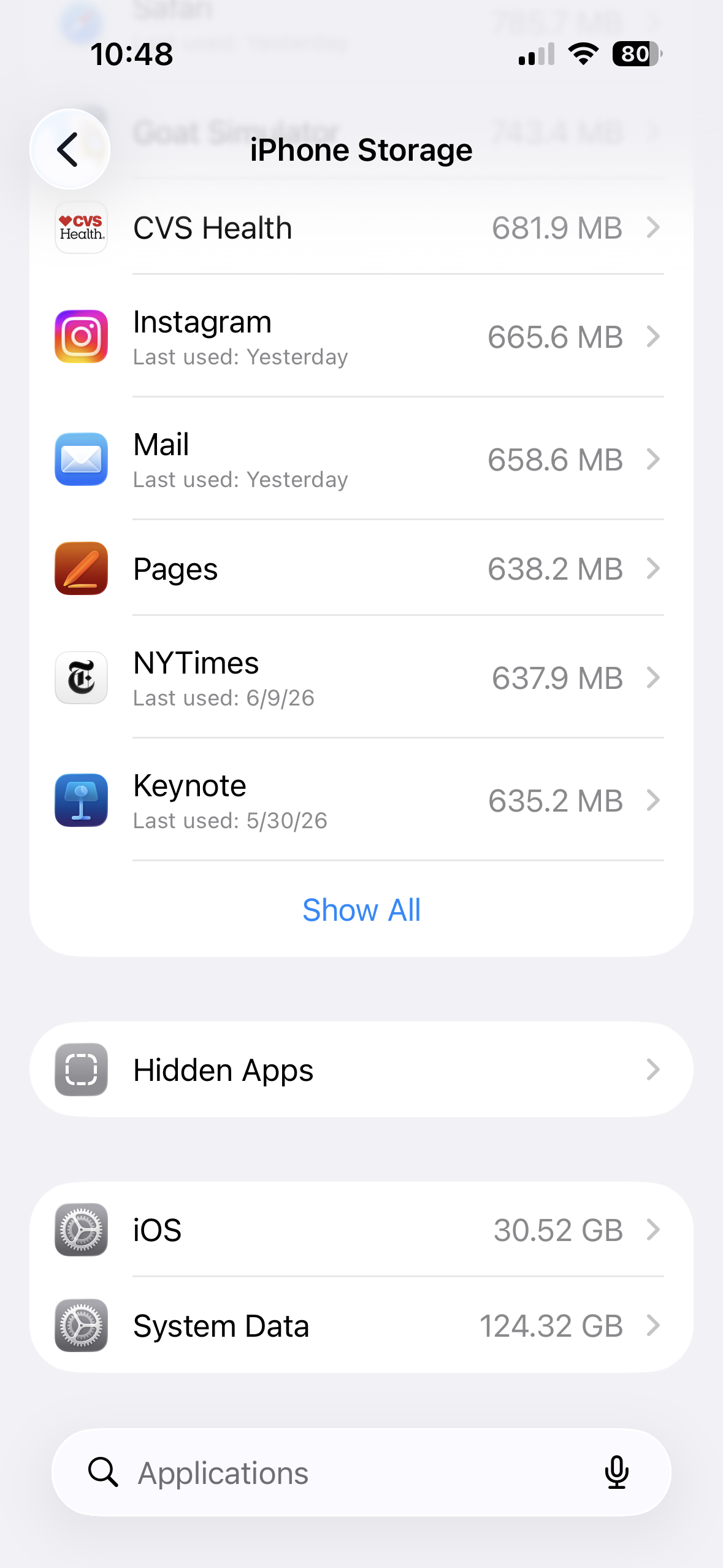
Post above says there's a fix in a "future" OS update - so I'm going to 27. Enough.
If you do use the 27 beta, can you let me know whether or not it’s better or worse? The fact that 27 is an update heavily focused on optimization makes me hopeful that they may have a fix, but the fact they are also adding more Liquid Glass elements to the icons yet again makes me also worried that the system data bloat may also potentially get worse as more icon elements means more things to cache.I'm done with iOS 26. This is the second time I've had a ridiculous amount of System Data on my phone (14 Pro, 512GB). Have already reset it once. Not doing that again.
Post above says there's a fix in a "future" OS update - so I'm going to 27. Enough.
View attachment 2637470
Already updated to it. Will follow up with my findings.If you do use the 27 beta, can you let me know whether or not it’s better or worse? The fact that 27 is an update heavily focused on optimization makes me hopeful that they may have a fix, but the fact they are also adding more Liquid Glass elements to the icons yet again makes me also worried that the system data bloat may also potentially get worse as more icon elements means more things to cache.
ZebraDude
macrumors 68000
yes it does!Does that work without having to erase the phone?
My phone continues to do this – habitually and pathologically. I am trying to leave my house to go on a hiking trip and was going to use my phone for the maps. I can’t now. I can’t because Apple has a clearly documented bug about its “iconscache” and won’t fix it.
For what it’s worth, since my last time trying this, the phone has filled every space at a much faster pace than usual. Also, for diagnostic purposes, I deleted ALL custom focus modes, custom wallpapers, and widgets. So, for all you amateur sleuths out there, it’s not related to those, apparently.
This is getting really. ****ing. Old.
For what it’s worth, since my last time trying this, the phone has filled every space at a much faster pace than usual. Also, for diagnostic purposes, I deleted ALL custom focus modes, custom wallpapers, and widgets. So, for all you amateur sleuths out there, it’s not related to those, apparently.
This is getting really. ****ing. Old.
theuptowner
macrumors newbie
I just tried this and it did nothing to clear the system data issue that we all seem to be experiencing - did you have different results?iMazing has a reinstall OS option that I have used in just this issue.
I didn’t use `iMazing`, but I did use the “Update” option from the Finder, which I think does the same thing. (1. Put the iPhone into Recovery Mode. 2. Look for the phone in the Finder sidebar. 3. Press “Update” 4. iOS downloads and is re-installed over the existing iPhone installation – no reset/delete/restore required.)I just tried this and it did nothing to clear the system data issue that we all seem to be experiencing - did you have different results?
But this didn’t do anything useful – it cleared up a few more GBs of space, but … guess what! The phone pathologically filled all that space with more `iconscache` garbage. So, not much benefit.
ZebraDude
macrumors 68000
Sorry to hear that, I had not used this mode in a couple of years...I just tried this and it did nothing to clear the system data issue that we all seem to be experiencing - did you have different results?
That doesn’t sound promising. Pretty sure that a normal system data cache is below 20Gb, ideally below 10 GB. But if it’s not increasing after hitting that 29 GB then that’s at least a good sign.Reporting in after a week:
System Data on iOS 27 is at 29GB and holding. So far all is well.