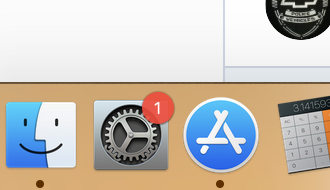
For anybody interested, I found a way to disable the badge on System Preferences icon and to prevent it from coming back without having to mess with file permissions. You may need to disable System Integrity Protection (SIP), tho.
If you want to temporarily turn off the badge (until next reboot) run the following command:
Code:
launchctl unload /System/Library/LaunchAgents/com.apple.softwareupdate_notify_agent.plist
If you want to turn off the badge and you want the setting to persist even after a reboot run:
Code:
launchctl unload -w /System/Library/LaunchAgents/com.apple.softwareupdate_notify_agent.plist
Finally, in both cases, run the commands mentioned above:
Code:
defaults delete com.apple.systempreferences AttentionPrefBundleIDs; killall Dock
If you want to undo the change and go back to normal run:
Code:
launchctl load -w /System/Library/LaunchAgents/com.apple.softwareupdate_notify_agent.plist
The badge will reappear the next time you (or the system) check for updates.