Become a MacRumors Supporter for $50/year with no ads, ability to filter front page stories, and private forums.
I used to use TenFourBird all the time. It is just like Thunderbird and works pretty well. I don't use it anymore but I did discover it on my own.
 
O-o that icon
really?! 🙄

There's not really any point in using a newer email client as email hasn't really changed at all.
 
O-o that icon
really?! 🙄

There's not really any point in using a newer email client as email hasn't really changed at all.

Ahahah yeah the icon is pretty bad.
Btw, it's not "newer" that interests me, it's the whole bunch of features that comes with it, like Twitter and Facebook's chat integration and a new interface.
 
I always used TenFourBird because it is thunderbird an Thunderbird unlike apple mail is cross-platform. My Macs are my primary machines not by choice, but because i have no better computer to replace them with.
 
Hardly. I've never had an issue with it. Apple Mail lacks calendar integration and many other features I need that Entourage has.
I'm with you!

Apple can blame itself for that though. When I started using Macs professionally OS 8 and 9 was the system and Apple had no mail app. Enter Microsoft Outlook.

Later when I needed Exchange compatibility on OS X 10.2.8, where was Apple Mail?

The one time I tried it to use it officially before that was a dismal failure under Jaguar.

So Entourage won out because of it's compatibility. And I was already familiar with it's interface.

Today, on the Mac Pro at work I use Office. But on my PowerPC Macs at home it's Entourage 2008.

Apple makes great products and I own quite a few and use them. And they have improved, but they aren't there yet or I just do not like the way Apple does things.

Word beats TextEdit
Entourage/Office beats Mail
Suitcase beats FontBook
Photoshop beats Preview
InDesign/QuarkXPress beats Pages
 
Yet Apple offers no commercial version of the free apps whereby a comparison could then be equal.

That's true but saying something that's professional level and costs accordingly beats something consumer level and free is just like saying a Powerbook beats a pocket calculator.
 
Word beats TextEdit
Entourage/Office beats Mail
Suitcase beats FontBook
Photoshop beats Preview
InDesign/QuarkXPress beats Pages

Few things that don't make sense with that:

MS Word is a Word processor (I have always liked and Prefered AppleWorks) Text edit is a editor the proper thing to compare would be MS' Notepad to apples TextEdit since they are pretty much the same thing.

Next is Photoshop. That is a image EDITOR; PREVIEW is a document VIEWER not even the same thing
 
That's true but saying something that's professional level and costs accordingly beats something consumer level and free is just like saying a Powerbook beats a pocket calculator.
My original point was that Apple offers nothing comparable in their free versions. They have improved, yes, but still are not where the professional applications are.

In rebutting you the first time, I added the second point that Apple offers no commercial version to compete. I acknowledge your fair point about the comparison.

But in rebutting you again I have to ask. Why is it that Apple does not offer a paid competing application?

Apple offers QuickTime Pro, Final Cut Pro and now touts FontBook as professional grade (in the past they warned against using it in a live production environment).

Why not a competitor to Office?

Well, I cannot answer that, but my speculation is because that's not an area in which they could compete. Which leaves me nothing to legitimately compare things against.

I admit it is an unfair comparison.

----------

Few things that don't make sense with that:

MS Word is a Word processor (I have always liked and Prefered AppleWorks) Text edit is a editor the proper thing to compare would be MS' Notepad to apples TextEdit since they are pretty much the same thing.
Yes. But TextEdit is often touted as the program to use as the alternative to Word on a Mac. It can write .doc, .rtf and .docx. Perhaps it's functions are less than Word (and they are) but you can still use it as a basic word processor. In that capacity it's better than Notepad.

Next is Photoshop. That is a image EDITOR; PREVIEW is a document VIEWER not even the same thing
Hence my argument. Apple offers nothing in comparison. You cannot really edit images on a Mac without Photoshop or some other image editor. That said Preview still can function in a production environment. You can get a PDF out of it by opening a PS or EPS file. You can convert images. You can even crop, apply some basic effects and save.

There are other free image editors (and word processors) online, for free, that beat TextEdit and Preview. And again, Apple offers nothing commercially viable as competition.

 
Well, I cannot answer that, but my speculation is because that's not an area in which they could compete. Which leaves me nothing to legitimately compare things against.

I agree, there are areas Apple knows it can't compete, MS Office being a biggy. I think they definitely had a winner with Quicktime Pro, inexpensive but versatile and competitive.
I had nothing but headaches with Suitcase in a studio environment but Fontbook has been fine as a solo designer, so I'm thankful for that freebie Apple threw in 🙂
 
My original point was that Apple offers nothing comparable in their free versions. They have improved, yes, but still are not where the professional applications are.

In rebutting you the first time, I added the second point that Apple offers no commercial version to compete. I acknowledge your fair point about the comparison.

But in rebutting you again I have to ask. Why is it that Apple does not offer a paid competing application?

Apple offers QuickTime Pro, Final Cut Pro and now touts FontBook as professional grade (in the past they warned against using it in a live production environment).

Why not a competitor to Office?

Well, I cannot answer that, but my speculation is because that's not an area in which they could compete. Which leaves me nothing to legitimately compare things against.

I admit it is an unfair comparison.

----------


Yes. But TextEdit is often touted as the program to use as the alternative to Word on a Mac. It can write .doc, .rtf and .docx. Perhaps it's functions are less than Word (and they are) but you can still use it as a basic word processor. In that capacity it's better than Notepad.


Hence my argument. Apple offers nothing in comparison. You cannot really edit images on a Mac without Photoshop or some other image editor. That said Preview still can function in a production environment. You can get a PDF out of it by opening a PS or EPS file. You can convert images. You can even crop, apply some basic effects and save.

There are other free image editors (and word processors) online, for free, that beat TextEdit and Preview. And again, Apple offers nothing commercially viable as competition.

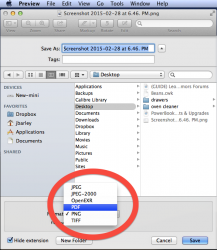
You can convert Images in Preview? 😱 How? It would sure save me time!

and Wasn't Apple's ClarisWorks, AppleWorks and Apple's iWork suppose to be a Comparison with MS Office?
 
You can convert Images in Preview? 😱 How? It would sure save me time!

Just use the 'Save As' menu item under the File menu.
Then select the file type to save.
 

Attachments

  • Screenshot 2015-02-28 at 6.48. PM.png
    Screenshot 2015-02-28 at 6.48. PM.png
    174.4 KB · Views: 130
Just use the 'Save As' menu item under the File menu.
Then select the file type to save.

Thanks! That's why I love MR; Learn new things all the time! I self-tought myself the ins and outs of Panther but Leopard and Tiger I know way less about.
 
You can convert Images in Preview? 😱 How? It would sure save me time!

GraphicConverter is much better for converting image formats and it does a lot of other things as well. Plus, you can register version 6.7 (the newest version to work in Tiger) absolutely free. 🙂
 
GraphicConverter is much better for converting image formats and it does a lot of other things as well. Plus, you can register version 6.7 (the newest version to work in Tiger) absolutely free. 🙂
I would second this. I just mentioned what Preview could do if that's all you had.

I have a headless G4 at work that processes our editorial photos using GraphicConverter. I have two Folder Action Applescripts that call GraphicConverter to process photos as black and white or color. It'll take any image format coming in and spit out a TIF in a different folder on an entirely different share on our server.

Those scripts and GraphicConverter have saved us a lot of time. If I wasn't using them, at least one of us at work would be busy for 20 minutes opening, converting, sizing, color balancing and saving out images.
 
Register on MacRumors! This sidebar will go away, and you'll see fewer ads.