Hi all,
First of all, congrats for all the hard work!
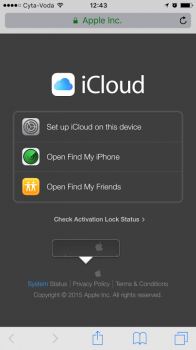
This is my first post and i would like to ask you in regards to a weird issue i have found with the recent iOS update.... Try navigating to google.com or icloud or whatever page you like on Safari and then long tap (tap for 1-2 seconds). In some cases (not all of them), you will notice a text bubble appearing like the one on the screenshots attached. This also happens on iOS apps as well.
Is this a bug or a feature?🙂
Thanks,
G.
First of all, congrats for all the hard work!
This is my first post and i would like to ask you in regards to a weird issue i have found with the recent iOS update.... Try navigating to google.com or icloud or whatever page you like on Safari and then long tap (tap for 1-2 seconds). In some cases (not all of them), you will notice a text bubble appearing like the one on the screenshots attached. This also happens on iOS apps as well.
Is this a bug or a feature?🙂
Thanks,
G.