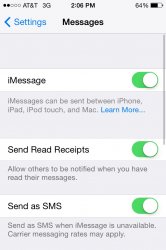
My wife's iPhone died this weekend, so as a temporary fix, I lent her mine and just swapped her sim in. Most things seem to work well except that she's not getting her texts from other iPhone users (the iMessage issue I would imagine).
How can I get the phone to receive her messages? I searched and find lots of people complaining they can't get messages on new android phones, but this is an iPhone to iPhone swap.
Both are iPhone 4s models, running iOS 6. Mine is 16 gig, hers is (was?) 32 gig. I have recent backups of both phones. I don't want to make any changes to my phone that will be hard to undo since this is (hopefully) a temporary arrangement.
Thanks.
How can I get the phone to receive her messages? I searched and find lots of people complaining they can't get messages on new android phones, but this is an iPhone to iPhone swap.
Both are iPhone 4s models, running iOS 6. Mine is 16 gig, hers is (was?) 32 gig. I have recent backups of both phones. I don't want to make any changes to my phone that will be hard to undo since this is (hopefully) a temporary arrangement.
Thanks.