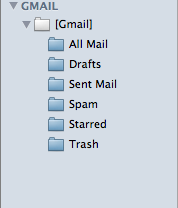
philipxz macrumors regular Original poster Apr 14, 2009 #1 Mac OS X Version 10.5.6 Mail Version 3.5 IMAP for Gmail I wanted to rename my mailbox name to my Gmail username because I think it looks silly when the sub-mailbox "[Gmail]" is already in a folder named "GMAIL". Don't you think?
Mac OS X Version 10.5.6 Mail Version 3.5 IMAP for Gmail I wanted to rename my mailbox name to my Gmail username because I think it looks silly when the sub-mailbox "[Gmail]" is already in a folder named "GMAIL". Don't you think?
r.j.s Moderator emeritus Apr 14, 2009 #2 The error means you cannot rename that folder. It is a folder on the server, and must keep that name in order for your email to work.
The error means you cannot rename that folder. It is a folder on the server, and must keep that name in order for your email to work.
r.j.s Moderator emeritus Apr 14, 2009 #4 philipxz said: So I have no choice? Click to expand... Not really.
philipxz macrumors regular Original poster Apr 14, 2009 #5 If people had multiple Gmail accounts it would just keep saying [Gmail]? Eek.😱
r.j.s Moderator emeritus Apr 14, 2009 #6 philipxz said: If people had multiple Gmail accounts it would just keep saying [Gmail]? Eek.😱 Click to expand... It may, I don't have more than 1 account, so I don't know. Mine says [Gmail].
philipxz said: If people had multiple Gmail accounts it would just keep saying [Gmail]? Eek.😱 Click to expand... It may, I don't have more than 1 account, so I don't know. Mine says [Gmail].
brand Suspended Apr 15, 2009 #7 You can go into Mail.app Preferences and change the description of the email account and it will be reflected on the sidebar.
You can go into Mail.app Preferences and change the description of the email account and it will be reflected on the sidebar.