Become a MacRumors Supporter for $50/year with no ads, ability to filter front page stories, and private forums.

mickbab

macrumors 65816
Original poster
Hi all,

Well as you can see (attachment), this screenshot is obviously not a screenshot.

Taken on a unibody MacBook Pro with shift-command-3, and I'm wondering why this has happened.

Any ideas?

EDIT: thought i should add that the screen didnt actually look like that, incase you were wondering 😀
it was normal windows etc.
 

Attachments

  • Picture 3.png
    Picture 3.png
    25.2 KB · Views: 176
No but it is a cool wallpaper...

Maybe if you were doing something processor/ram intensive at the time it screwed it up...
 
looks fine to me 😛

try it again, does it work now??

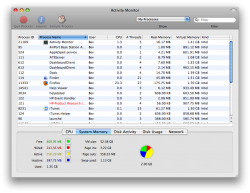
I just went and had another go (it's my mum's laptop, and as tech kid of the house its my job to fix these things). I could do a screenshot of windows (shift-command-4-space, Activity Monitor attached) but couldn't do whole screen (shift-command-3, attached) or part screen (shift-command-4, last attachment).

Has anyone experienced this?
 

Attachments

  • Picture 10.png
    Picture 10.png
    188.6 KB · Views: 92
  • Picture 11.png
    Picture 11.png
    25.2 KB · Views: 102
  • Picture 12.png
    Picture 12.png
    6.2 KB · Views: 548
Can you take a screenshot of your computer so we can see a comparison? 😛

But seriously, have you tried restarting your computer?
 
I just went and had another go (it's my mum's laptop, and as tech kid of the house its my job to fix these things).
Has anyone experienced this?

Same here. I'm the IT support for my house. You're not the only one. 🙂
 
Well a restart seems to have fixed it.

But does anyone have any ideas what might have caused this?
Just interested.
 
Register on MacRumors! This sidebar will go away, and you'll see fewer ads.