Hello. Just got an iPhone 17 pro, but even shortly before that on my 14 pro, TONS of old text message conversations started coming back out of nowhere. It may have been after I updated to 26. Not only are conversations that I deleted months ago reappearing, but when I delete a conversation and start a new one with someone, suddenly there are thousands of past texts in the conversation. Does anyone know why? It’s driving me nuts.

Got a tip for us?
Let us know
Become a MacRumors Supporter for $50/year with no ads, ability to filter front page stories, and private forums.
THOUSANDS of texts coming back!! Why!?
- Thread starter zowenso
- Start date
- Sort by reaction score
You are using an out of date browser. It may not display this or other websites correctly.
You should upgrade or use an alternative browser.
You should upgrade or use an alternative browser.

Fred Zed
macrumors 603
This happened and continues to occur for me since sometime when iOS 18 was released. My deleted messages folder always populates with messagesHello. Just got an iPhone 17 pro, but even shortly before that on my 14 pro, TONS of old text message conversations started coming back out of nowhere. It may have been after I updated to 26. Not only are conversations that I deleted months ago reappearing, but when I delete a conversation and start a new one with someone, suddenly there are thousands of past texts in the conversation. Does anyone know why? It’s driving me nuts.

As these get added back into the messages app, are they eating up iCloud storage? I see it say “syncing to iCloud paused” in the messages app. If I stop the syncing of messsages will that help?This happened and continues to occur for me since sometime when iOS 18 was released. My deleted messages folder always populates with messages

BrianBaughn
macrumors G4
Other threads are reporting this for betas and final release of iOS26. The bigger concern here is that Apple is keeping messages which should have been deleted long ago.
Is this a bug, internal to Apple, that has exposed to users what they have been doing on purpose?
Is this a bug, internal to Apple, that has exposed to users what they have been doing on purpose?

S.B.G
Moderator emeritus
My larger concern is that if the old deleted messages are returning, then they’re really not deleted and they’re still on a server somewhere.
That bothers me because when I delete a message, I wanted it deleted everywhere it may be.
That bothers me because when I delete a message, I wanted it deleted everywhere it may be.
Can you tell me, when you go in to messages is yours saying paused like mine?My larger concern is that if the old deleted messages are returning, then they’re really not deleted and they’re still on a server somewhere.
That bothers me because when I delete a message, I wanted it deleted everywhere it may be.
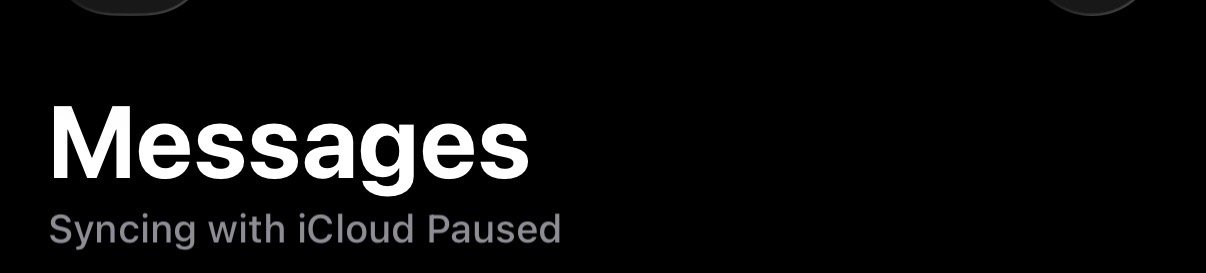
S.B.G
Moderator emeritus
No, mine isn't showing that.Can you tell me, when you go in to messages is yours saying paused like mine?View attachment 2557729
When I initially restored the backup to the new iPhone, some, just a few, old messages from just over 30 days ago reappeared. I use the iCloud setting to delete messages older than 30 days automatically.
I had to manually delete them (again) and then in the iCloud settings for Messages, press the sync messages button. I did this on my other iOS and macOS devices and now things are fine.
Hmm now I’m even more worried. I feel like this has something to do with the syncing based on it being paused. Could this have anything to do with my iMac? I’m not seeing texts pop up there though. I changed that years ago. Is there something I should change in my setting? Mine says forever and you can see how many messages are saved. Should I change it to 30 days? Is that even ok to do? I never save texts and I’m constantly deleting to make space.No, mine isn't showing that.
When I initially restored the backup to the new iPhone, some, just a few, old messages from just over 30 days ago reappeared. I use the iCloud setting to delete messages older than 30 days automatically.
I had to manually delete them (again) and then in the iCloud settings for Messages, press the sync messages button. I did this on my other iOS and macOS devices and now things are fine.
Attachments
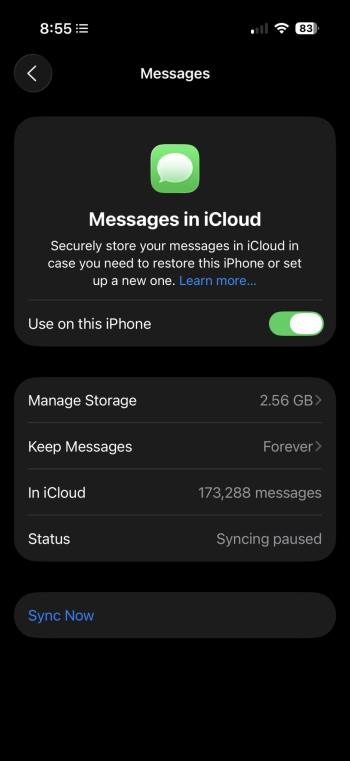
S.B.G
Moderator emeritus
Well, if you never save them, then set it to delete automatically on every device you have. Then press the sync button.Hmm now I’m even more worried. I feel like this has something to do with the syncing based on it being paused. Could this have anything to do with my iMac? I’m not seeing texts pop up there though. I changed that years ago. Is there something I should change in my setting? Mine says forever and you can see how many messages are saved. Should I change it to 30 days? Is that even ok to do? I never save texts and I’m constantly deleting to make space.
Hmm I don’t see delete automatically. I figured maybe saving for 30 days would be good just in case. If I click the 30 days and then hit sync, will it change that 173K messages in iCloud? Is that allWell, if you never save them, then set it to delete automatically on every device you have. Then press the sync button.
I would do? Click the 30 days and then sync? Thanks so much for this. Im
Sorry to take up so much of your time. It’s really appreciated.
Attachments
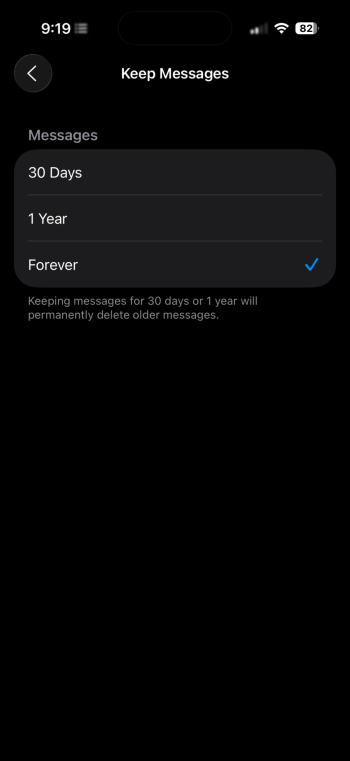
S.B.G
Moderator emeritus
Yep.Is that all
I would do? Click the 30 days and then sync?
it will probably take some time to update since it looks like you have a whole lot of messages. So, be patient with it.
Thank you very much. So, I changed to 30 day and it said it would delete messages older than 30 days in iCloud, I hit ok or whatever. Then I hit sync. The number actually went up from 173,100 to 173,260 lol, so not sure why on that lol. Says the sync is done, but maybe eventually that number will drop because there are so many. Super appreciate your help. Not sure it will solve my old messages coming back, But, it’s cleaning up at least. Thanks. I’ll keep you posted if that’s ok?Yep.
it will probably take some time to update since it looks like you have a whole lot of messages. So, be patient with it.
Did you ever get this resolved regarding messages deleted from iCloud after 30 days?Thank you very much. So, I changed to 30 day and it said it would delete messages older than 30 days in iCloud, I hit ok or whatever. Then I hit sync. The number actually went up from 173,100 to 173,260 lol, so not sure why on that lol. Says the sync is done, but maybe eventually that number will drop because there are so many. Super appreciate your help. Not sure it will solve my old messages coming back, But, it’s cleaning up at least. Thanks. I’ll keep you posted if that’s ok?
robertpatryk
macrumors regular
This has happened to me recently after switching to iPhone 17 Pro Max.
Finally I just switched off Messages in iCloud and I’m currently waiting 20 days for its deletion to make a fresh start
Finally I just switched off Messages in iCloud and I’m currently waiting 20 days for its deletion to make a fresh start
Report back on how it went please. Some people mentioned to wait 32 days just to be sure.This has happened to me recently after switching to iPhone 17 Pro Max.
Finally I just switched off Messages in iCloud and I’m currently waiting 20 days for its deletion to make a fresh start
I’m currently at 0 days so 30 days is up, but I’m planning to wait a few more days just in case iCloud glitches out.
robertpatryk
macrumors regular
Report back on how it went please. Some people mentioned to wait 32 days just to be sure.
I’m currently at 0 days so 30 days is up, but I’m planning to wait a few more days just in case iCloud glitches out.
I’ll let you know in about 25 days 😉