

Become a MacRumors Supporter for $50/year with no ads, ability to filter front page stories, and private forums.

Ghostrelm

macrumors newbie
Original poster
Aug 16, 2010
5
0
I backed up a full hard drive from a macbook pro running 10.6 with time machine to a partitioned 3 TB HD networked to the latest Airport Extreme.

I did a clean install of Snow Leopard from a SnowLeopard install disc, not the 10.6 disc that came with the unibody macbook pro. ( The person im helping out lost the original.) I ran the software updater until everything was current.

I went back to retreive stuff from the time machine backup, and I cannot access the user folder.
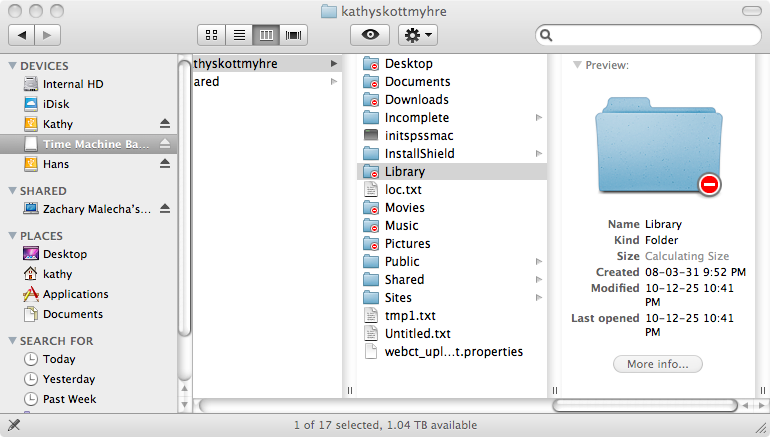
WFzRu.png


However, I CAN access the user folder from MY macbook pro running 10.5.

What can I do to enable access on the unibody macbook pro running 10.6?
Why can I access the folder on my older macbook pro running 10.5?

The HD is partitioned into two even partitions. I have the same problem when trying to access through the network, or directly plugged into the laptop.

Im sure I left out some information, as I just spent a good 45 minutes writing up a detailed post about this problem, but when I hit "submit new thread" it said i wasn't logged in anymore, so I apologize if I left any vital information out.

Thanks in advance.
 
I backed up a full hard drive from a macbook pro running 10.6 with time machine to a partitioned 3 TB HD networked to the latest Airport Extreme.

I did a clean install of Snow Leopard from a SnowLeopard install disc, not the 10.6 disc that came with the unibody macbook pro. ( The person im helping out lost the original.) I ran the software updater until everything was current.

I went back to retreive stuff from the time machine backup, and I cannot access the user folder.
WFzRu.png


However, I CAN access the user folder from MY macbook pro running 10.5.

What can I do to enable access on the unibody macbook pro running 10.6?
Why can I access the folder on my older macbook pro running 10.5?

The HD is partitioned into two even partitions. I have the same problem when trying to access through the network, or directly plugged into the laptop.

Im sure I left out some information, as I just spent a good 45 minutes writing up a detailed post about this problem, but when I hit "submit new thread" it said i wasn't logged in anymore, so I apologize if I left any vital information out.

Thanks in advance.

when you connect to the server, you need to re-input your server username and password. Same thing happened to me.
 
when you connect to the server, you need to re-input your server username and password. Same thing happened to me.

I entered the username and password.

I can access anything on that backup EXCEPT the User folder. I have accessed the networked hard drive after the clean install.
 
I entered the username and password.

I can access anything on that backup EXCEPT the User folder. I have accessed the networked hard drive after the clean install.

The way I've worked around this issue in the past is by opening the folder while loged in as the original user who made the folders, then taking the individual folders within that locked folder and moving them Out of the locked folder and into a new folder. This is a little bit of a hassle, but will allow you to access all of your old information on your new admin account.

make sure your new user has full admin access too.

Sorry I can't think of a better fix other than this workaround.
 
The way I've worked around this issue in the past is by opening the folder while loged in as the original user who made the folders, then taking the individual folders within that locked folder and moving them Out of the locked folder and into a new folder. This is a little bit of a hassle, but will allow you to access all of your old information on your new admin account.

make sure your new user has full admin access too.

Sorry I can't think of a better fix other than this workaround.


How can I log in as the original user after I did a full clean installation of Snow Leopard? I wiped the hard drive. :rolleyes:
 
Try this, you may need to reinstall again.

The whole purpose of a clean install was to get rid of everything, and only put selected things back on the hard drive.

I don't want to put all 480GB back on the 500GB hard drive, or I would have just restored from the backup.
 
Register on MacRumors! This sidebar will go away, and you'll see fewer ads.