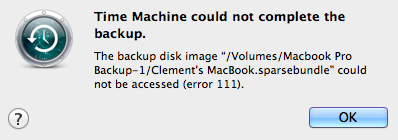
iThink Apple macrumors 6502a Original poster Apr 15, 2012 #1 Hi, When Time Machine tries to backup it gives me this error. Please help. TY
simsaladimbamba Guest Apr 15, 2012 #2 I guess you backup to some HDD connected to your network and not some HDD connected directly to your Mac? Can you be more specific about your setup? "How to maximise your MacRumors troubleshooting experience" created by mad jew in 2006 Time Machine FAQ Have you looked for similar problems others had?
I guess you backup to some HDD connected to your network and not some HDD connected directly to your Mac? Can you be more specific about your setup? "How to maximise your MacRumors troubleshooting experience" created by mad jew in 2006 Time Machine FAQ Have you looked for similar problems others had?
iThink Apple macrumors 6502a Original poster Apr 15, 2012 #3 simsaladimbamba said: I guess you backup to some HDD connected to your network and not some HDD connected directly to your Mac? Can you be more specific about your setup? "How to maximise your MacRumors troubleshooting experience" created by mad jew in 2006 Time Machine FAQ Have you looked for similar problems others had? Click to expand... I have it hooked to to my Airport Extreme. I tired to plug in in directly and same thing....
simsaladimbamba said: I guess you backup to some HDD connected to your network and not some HDD connected directly to your Mac? Can you be more specific about your setup? "How to maximise your MacRumors troubleshooting experience" created by mad jew in 2006 Time Machine FAQ Have you looked for similar problems others had? Click to expand... I have it hooked to to my Airport Extreme. I tired to plug in in directly and same thing....
iThink Apple macrumors 6502a Original poster Apr 15, 2012 #5 throAU said: Check time machine disk for errors. Click to expand... How?
U /user/me macrumors 6502 Apr 15, 2012 #6 Apple9to5 said: How? Click to expand... Run a check in disk utility like you would with your hard drive.
Apple9to5 said: How? Click to expand... Run a check in disk utility like you would with your hard drive.
I iforbes macrumors 6502 Apr 15, 2012 #7 Have you tried restarting your notebook and see if the error goes away?
iThink Apple macrumors 6502a Original poster Apr 15, 2012 #8 iforbes said: Have you tried restarting your notebook and see if the error goes away? Click to expand... Yes i have....🙁
iforbes said: Have you tried restarting your notebook and see if the error goes away? Click to expand... Yes i have....🙁
throAU macrumors G4 Apr 15, 2012 #9 Apple9to5 said: How? Click to expand... Unplug disk from your airport, plug into your mac, fire up disk utility and verify the disk. I had some really annoying issues with time machine a while back - every couple of months it would corrupt itself Turns out, it was the external USB drive i had plugged into my airport extreme - it was failing when the disk got to ~500gb of 750gb full. RMA'd the disk and no problems since.
Apple9to5 said: How? Click to expand... Unplug disk from your airport, plug into your mac, fire up disk utility and verify the disk. I had some really annoying issues with time machine a while back - every couple of months it would corrupt itself Turns out, it was the external USB drive i had plugged into my airport extreme - it was failing when the disk got to ~500gb of 750gb full. RMA'd the disk and no problems since.