
Become a MacRumors Supporter for $50/year with no ads, ability to filter front page stories, and private forums.

.adam

macrumors regular
Original poster
Hi,

I think I'm having a bit of a problem with Time Machine. I backed up my Macbook yesterday and today decided to run another backup, after deleting a couple of movies on my HDD to test that it works.

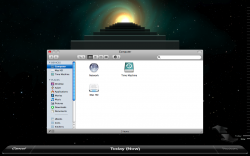
When I now visit Time Machine I am met with the normal time machine view but I can only select "Today" i.e. I cannot go back in time to view my Finder as it was yesterday, with the movies intact.

I've attached a couple of screenshots to show what I mean, one of my preferences to show that at least one backup has been made and the other showing only "Today" as an option in Time Machine.

Any help would be greatly appreciated, if you should require any further information then feel free to ask.

Rgds,

.adam
 

Attachments

  • Picture 1.png
    Picture 1.png
    238.5 KB · Views: 110
  • Prefs.png
    Prefs.png
    113.1 KB · Views: 123
The screen shows that you had a backup yesterday at 00:04, so it should be there. How come the available is blank though? It should say something like "xxxGB out of zzzGB available".

Can you see your green time machine disk icon on your desktop?

How about ejecting the drive, and remounting it and then checking again?
 
No luck, amigo.

Green Time Machine drive is visible on desktop, when I go into it I have the backup archive (see screenshot) it just seems that the UI of Time Machine cannot read it?

EDIT: I've just added a bunch of files to my desktop (new files) and added a movie to my Movie folder. When I go to Time Machine I can still only see what's currently on my Mac, there is no way to go back to see what was on there previously. When I back up, Time Machine panel in Sys Prefs tell me that the data is being written (over 700MB last backup) but I cannot see it in the Time machine UI.

Does the Ext. HDD need to be formatted a certain way?

The "Image" on the HDD, according to Disk Utility is Mac OS Extended (Journaled) whilst the "Base" drive itself is MS-DOS (FAT)
 

Attachments

  • new.png
    new.png
    109 KB · Views: 101
  • Picture 1.png
    Picture 1.png
    53.3 KB · Views: 77
My disk is formated for "Mac OS Extended (Journaled)". I would think you would want that for Time Machine...
 
No luck, amigo.

Green Time Machine drive is visible on desktop, when I go into it I have the backup archive (see screenshot) it just seems that the UI of Time Machine cannot read it?

EDIT: I've just added a bunch of files to my desktop (new files) and added a movie to my Movie folder. When I go to Time Machine I can still only see what's currently on my Mac, there is no way to go back to see what was on there previously. When I back up, Time Machine panel in Sys Prefs tell me that the data is being written (over 700MB last backup) but I cannot see it in the Time machine UI.

Does the Ext. HDD need to be formatted a certain way?

The "Image" on the HDD, according to Disk Utility is Mac OS Extended (Journaled) whilst the "Base" drive itself is MS-DOS (FAT)


Time Machine drive format needs to be GUID ..


Time Machine Help
 
Adam, you can take care of this in Disk Utility. There is an advanced section where you can change the partition type to GUID, and make the file system "Mac OS Extended (Journaled)".

Just realize that you won't be able to use that drive on a PC (or from Boot Camp?) once it has the Mac OS Format...

I am away from my mac right now, so I can't give you the specifics in Disk Utility. Let me know if you need help with this, and I will check back later when I am at my machine.

When you format the drive, you will lose everything that is on it, so make sure there isn't anything you need...
 
Thank you to those who replied. I visited my local Apple Store today as I was in the area. They were stumped by the issue (it persisted even after I'd formatted the HDD to GUID and Mac OS Journaled.

Turns out, after much fiddling, that I had to call my computer "Macintosh" in the "Computer Name" section in "Sharing". Why? I don't know... it's fixed the issue though!

Thanks again.
 
Turns out, after much fiddling, that I had to call my computer "Macintosh" in the "Computer Name" section in "Sharing". Why? I don't know... it's fixed the issue though!

Thanks again.

That is interesting... as TM uses your computer name (as specified Sharing Prefs) in your backup drive structure, so therefore if you change your computer name then it might lose the path to the backup area.

As I have not changed the computer name since backing up I never had this problem, but that sounds likely. Anyone else changed their computer name while using Time Machine?
 
Register on MacRumors! This sidebar will go away, and you'll see fewer ads.