
Got a tip for us?
Let us know
Become a MacRumors Supporter for $50/year with no ads, ability to filter front page stories, and private forums.
Transfer Apps from Phone to Phone
- Thread starter thomamon
- Start date
- Sort by reaction score
You are using an out of date browser. It may not display this or other websites correctly.
You should upgrade or use an alternative browser.
You should upgrade or use an alternative browser.

HobeSoundDarryl
macrumors G5
Backup to Mac, restore to new iPhone? (though I'm not sure what happens with apps no longer available in store).
iPhone to iPhone
Next option if those don't work: third party app like iMazing?
Move to the EU or similar (AltStore) and side-load?
iPhone to iPhone
- Make sure both phones are updated to latest iOS
- Connect both to power source
- Backup old iPhone to iCloud
- Restore you new iPhone from iCloud
- Wait for the restore to complete.
Next option if those don't work: third party app like iMazing?
Move to the EU or similar (AltStore) and side-load?
Last edited:

Apple_Robert
Contributor


Bigwaff
Contributor
Back in the day one could sync app bundles to disk with iTunes (or third-party utilities) but those days are over. Today, when you "transfer" to a new iPhone, your personal data gets transferred to the new iPhone but apps are downloaded from the App Store on the new iPhone. If an app is no longer available in the App Store, you're out of luck.Is there a way to copy all my apps from phone to phone so I don't lose TikTok or is my time up?
When you have both iPhones at the same time, you can do iPhone-to-iPhone: https://support.apple.com/en-us/102659

WarmWinterHat
Suspended
When you have both iPhones at the same time, you can do iPhone-to-iPhone: https://support.apple.com/en-us/102659
It transfers the data, but not the apps. They are re-downloaded from the app store.
oh, sure, but the app data itself does transfer over, seems to be similar to as when you offload an app and redownload it later, all the data is still there... 🤷♂️It transfers the data, but not the apps. They are re-downloaded from the app store.
update: used this method to update some iPhones of relatives and esp. some teenagers. The teenagers didn't complain about any loss of data in their apps (which I assume they'd notice right away on there new iPhones) ;-)

@BBDDVV
@WarmWinterHat etal are correct, not an option as OP's main issue is wanting to keep their TikTok app which is no longer in the App Store. Can(?) transfer the TikTok data but will be useless as can't re-download the app.
("Can(?)" as not sure if the app data will transfer if app is no longer in the Store: does data transfer first or does it first check to see if app available and then transfers? Have not run into a situation where I'm using an app no longer in App Store and looking to preserve said data)
@WarmWinterHat etal are correct, not an option as OP's main issue is wanting to keep their TikTok app which is no longer in the App Store. Can(?) transfer the TikTok data but will be useless as can't re-download the app.
("Can(?)" as not sure if the app data will transfer if app is no longer in the Store: does data transfer first or does it first check to see if app available and then transfers? Have not run into a situation where I'm using an app no longer in App Store and looking to preserve said data)
Never look a gift-horse in the mouth. This is the chance to start a whole new better life.Getting a replacement phone for my iPhone 16pro max.
Is there a way to copy all my apps from phone to phone so I don't lose TikTok or is my time up? LOL
HobeSoundDarryl
macrumors G5
iMazing specifically references being able to move apps on their website.
FAQ page "What are the key features of iMazing?" check marked bullet 9...
FAQ page "What are the key features of iMazing?" check marked bullet 9...
Install and manage apps previously purchased from the Apple Store, even if they are no longer available in the store.
Caveat with iMazing is that it has to have been downloaded from the App Store first. And since Apple stopped backups of apps long time ago, not going to be on a computer unless made the effort via iMazing or similar.
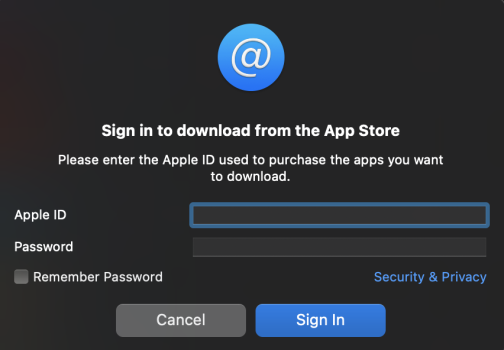
If you dig through the details, need to sign into App Store and download and or update app through iMazing interface.
Been using iMazing forever and none of my apps are in the apps backup folder. Last backups were 02/01/2025.
 imazing.com
 imazing.com
If you dig through the details, need to sign into App Store and download and or update app through iMazing interface.
Been using iMazing forever and none of my apps are in the apps backup folder. Last backups were 02/01/2025.
Code:
% ls -1
Icons
% pwd
Library/Application Support/iMazing/Library/Apps
%
Download your apps with iMazing
imazing.com
Manage and Download Apps (.ipa) without iTunes
imazing.com
Since iOS 9, apps are re-downloaded from the App Store when you restore a backup. If you have many apps and/or a poor internet connection, iOS will take sometimes entire days to re-download all your apps, potentially causing major inconveniences.
When you restore a backup with iMazing, or when you use the Transfer to another device wizard, you'll have the option to Install apps from local library if available.
- Apps that have been on the device at one time. These apps display a cloud icon in the Download column; you can click this icon to quickly download an app.
- Apps that iMazing has downloaded. If you've already downloaded any apps with iMazing, they are stored on your computer so you can re-install them,
Why download apps in the first place?
[...]
Hang on to the goners
Developers sometimes pull their apps from the App Store, often because they simply cannot maintain them anymore. If you have a copy on your computer, you can always reinstall that old indie game you enjoyed a couple of years back...
HobeSoundDarryl
macrumors G5
Well that's bad news for the OP. But good that you know before OP might have spent the money for it.
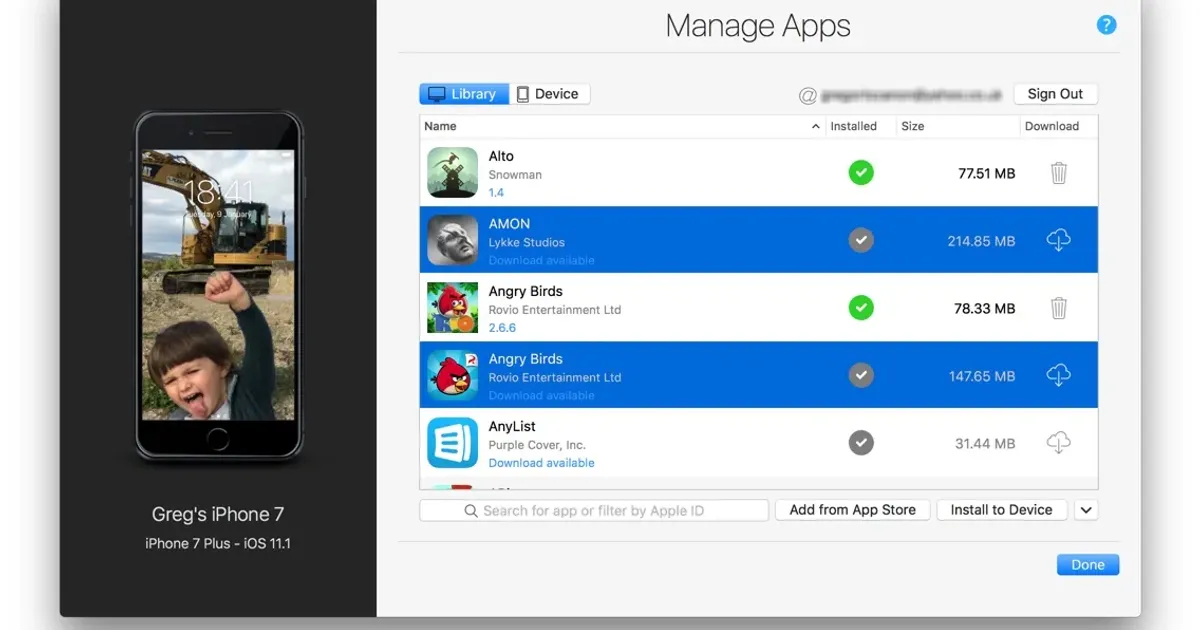
I did one more search for this option and found this... with an answer from iMazing saying it CAN get the apps from the device instead of downloading from the store or needing to be pre-downloaded from the store into iMazing. The picture in the step-by-step shows the option of download from store or Device (tab). So are you "double dog dare" sure about that?
I did one more search for this option and found this... with an answer from iMazing saying it CAN get the apps from the device instead of downloading from the store or needing to be pre-downloaded from the store into iMazing. The picture in the step-by-step shows the option of download from store or Device (tab). So are you "double dog dare" sure about that?
Last edited:
100% sure.
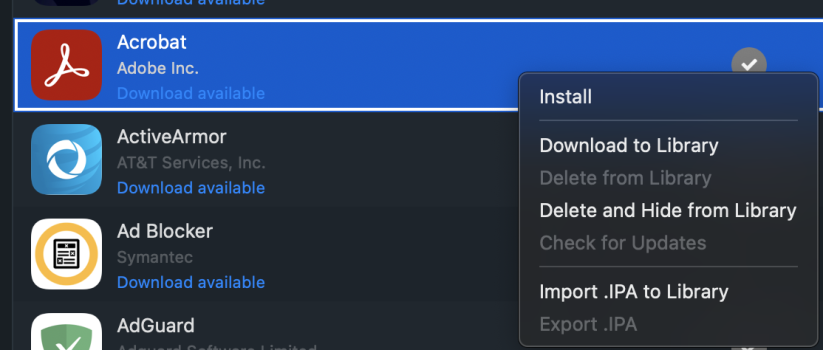
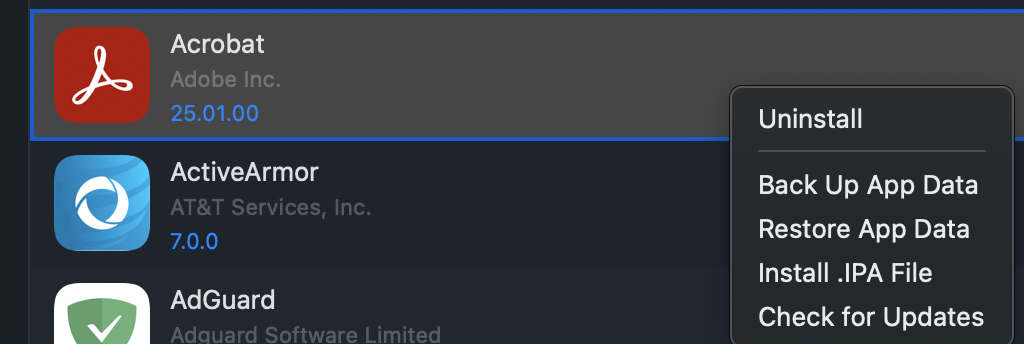
No apps on my phone that are unavailable, but even with available, needs to download from App Store first.
ADD: and another reason I think that iMazing only deals with downloads is due to Apple introducing App Thinning. App on an old device might be "incompatible" for device targeting.
No apps on my phone that are unavailable, but even with available, needs to download from App Store first.
ADD: and another reason I think that iMazing only deals with downloads is due to Apple introducing App Thinning. App on an old device might be "incompatible" for device targeting.
Leverage app thinning
App thinning is a technology that ensures that an app’s IPA file only contains resources and code that’s necessary to run the app on a particular device.
Attachments

Last edited:
HobeSoundDarryl
macrumors G5
OP: it looks like all that remains is moving to the EU where their laws let YOU decide what apps can be on your device. That's a long way to go and a big change for one app... but that option should easily work from one of the ALT stores.
I was able to backup an app with iMazing from my iPhone SE and can now install it on my other iPhones now that it's been removed from the store without issue. I was able to simply connect the SE (which already had the app, running iOS 14) to back it up. Whenever I restore a backup the offloaded app data gets placed but not the app itself unless I install it via iMazing.
Could be different now on iOS 18, also may depend on what way the app was removed by Apple or the developer. Since this is a potential legal issue it may be extra locked down.
Could be different now on iOS 18, also may depend on what way the app was removed by Apple or the developer. Since this is a potential legal issue it may be extra locked down.
iMazing is a great app, but there's a lot of misunderstanding on how exactly it works (not just here, but across the web).
iMazing can either:
An app can be removed/delisted from the App Store, but still be able to be downloaded through your purchase history (App Store -> Account -> Apps -> Not on this iPhone). Not many people know that; they just search the App Store, see it's not there and think they can't get it anymore. Then they see iMazing can do what they want, but it's really just downloading the app from their purchase history (which they could have just done on their iPhone), or they lucked out and already had the app’s .ipa file on their computer somehow (i.e. from when iTunes used to download them).
In some rare cases, an app can be completely removed from the App Store. When that happens, your purchase history nor iMazing can help (unless you already have the app downloaded/archived on your computer).
For TikTok, the app has been banned from the App Store in the US. It's not possible to download it through the App Store, iMazing, or purchase history even though it may still show up there.
In this case, the easiest workaround is to add tiktok.com to your home screen and use it as a PWA app.
iMazing can either:
- Download an app through your purchase history, and then install it.
- Install an app that you've previously downloaded to the computer.
- Extract an app from an iPhone to put on another iPhone, at least not since iOS 8.
- Install an app that you didn't download from your account (cannot use someone else's .ipa file).
An app can be removed/delisted from the App Store, but still be able to be downloaded through your purchase history (App Store -> Account -> Apps -> Not on this iPhone). Not many people know that; they just search the App Store, see it's not there and think they can't get it anymore. Then they see iMazing can do what they want, but it's really just downloading the app from their purchase history (which they could have just done on their iPhone), or they lucked out and already had the app’s .ipa file on their computer somehow (i.e. from when iTunes used to download them).
In some rare cases, an app can be completely removed from the App Store. When that happens, your purchase history nor iMazing can help (unless you already have the app downloaded/archived on your computer).
For TikTok, the app has been banned from the App Store in the US. It's not possible to download it through the App Store, iMazing, or purchase history even though it may still show up there.
In this case, the easiest workaround is to add tiktok.com to your home screen and use it as a PWA app.
The app I'm talking about doesn't show up under "Not on this iPhone". I followed the steps in this video:iMazing is a great app, but there's a lot of misunderstanding on how exactly it works (not just here, but across the web).
iMazing can either:
iMazing cannot:
- Download an app through your purchase history, and then install it.
- Install an app that you've previously downloaded to the computer.
Background:
- Extract an app from an iPhone to put on another iPhone, at least not since iOS 8.
- Install an app that you didn't download from your account (cannot use someone else's .ipa file).
An app can be removed/delisted from the App Store, but still be able to be downloaded through your purchase history (App Store -> Account -> Apps -> Not on this iPhone). Not many people know that; they just search the App Store, see it's not there and think they can't get it anymore. Then they see iMazing can do what they want, but it's really just downloading the app from their purchase history (which they could have just done on their iPhone), or they lucked out and already had the app’s .ipa file on their computer somehow (i.e. from when iTunes used to download them).
In some rare cases, an app can be completely removed from the App Store. When that happens, your purchase history nor iMazing can help (unless you already have the app downloaded/archived on your computer).
For TikTok, the app has been banned from the App Store in the US. It's not possible to download it through the App Store, iMazing, or purchase history even though it may still show up there.
In this case, the easiest workaround is to add tiktok.com to your home screen and use it as a PWA app.
In that video, it's downloading the app from Apple's servers into an iPad library on his computer. He then exports the app and imports it into his iPhone library, and then installs it. It didn't come from the iPad itself.The app I'm talking about doesn't show up under "Not on this iPhone". I followed the steps in this video:
Just curious, is the app you're talking about already on your phone? If so, it would be on the 'All' tab instead.
The app is in an offloaded state and doesn't appear under either tab. Other offloaded apps do appear under "Not on this iPhone".In that video, it's downloading the app from Apple's servers into an iPad library on his computer. He then exports the app and imports it into his iPhone library, and then installs it. It didn't come from the iPad itself.
Just curious, is the app you're talking about already on your phone? If so, it would be on the 'All' tab instead.
I noticed the video creator said this method doesn't work on TikTok so it's clear that it's restricted by Apple in some way.
Apps can be fully removed from App Store or put into limbo, hence why an app might no longer be listed in Store but can download.
For example, from developer docs:
For example, from developer docs:
Note: After deselecting a country or region where your app was previously available, the app will be removed from the App Store in that country or region. Users who previously downloaded your app from the App Store in that country or region will continue to receive app updates.

how?Create a free app store account from a non-US country and use that to download TikTok, then switch back to your usual account.