Become a MacRumors Supporter for $50/year with no ads, ability to filter front page stories, and private forums.

Peter Franks

macrumors 68020
Original poster
Can someone please explain this to me.
I wanted to try the Turbo Boost Switcher on the 2011, on an OCLP OS as battery is shocking, and it's not that old.

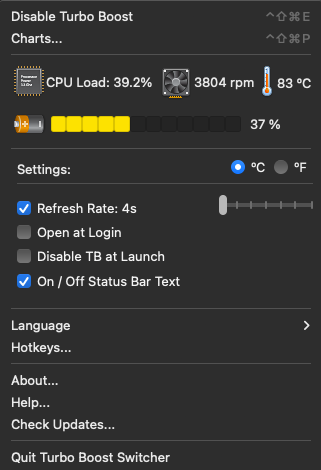
Couple of things. Firstly, I don't understand the set up, Refresh rate is on 4s. Means nothing to me?

The most confusing thing is the option to 'Disable' brings up the password sign in, but when I enter password it still won't disable.
It seems I can't turn it off. There is a 'Quit Turbo Boost Switcher', but I think that just removes it from the toolbar and not much else.
When it's not in the toolbar where do you see if it's running?

It says there is an update, but when I click update it takes me to a page where it has the download for the one I'm on 2.12, but I understand there is a 13 and 14.

Anyone have any info and help about it and what it should be doing? Thanks
 
I did read it but there was nothing relating to my questions about why disabling and enabling doesn't work
Or the latest versions, 'helper' no?
 
I did read it but there was nothing relating to my questions about why disabling and enabling doesn't work
Or the latest versions, 'helper' no?
The FAQ literally starts with instructions how to enable the helper along with a screenshot. ¯\_(ツ)_/¯
 
The FAQ literally starts with instructions how to enable the helper along with a screenshot. ¯\_(ツ)_/¯
That must just be the Pro version, which I'm not going to bother with until I know what I've asked works, because I don't get any of that diagram on my controls, and the questions I've asked on here aren't covered on that list, and the one that is, doesn't work, hence me asking on here. My fans are still at full pelt. Thanks anyway...
 
The most confusing thing is the option to 'Disable' brings up the password sign in, but when I enter password it still won't disable.
When you disable it it changes the icon to have a cross through it, and the menu text changes to "Enable Turbo Boost"
Refresh rate is on 4s. Means nothing to me?
That's just for the readout of temp/fan/usage, how often it refreshes the values.
 
When you disable it it changes the icon to have a cross through it, and the menu text changes to "Enable Turbo Boost"

That's just for the readout of temp/fan/usage, how often it refreshes the values.
Thanks for that.

It doesn’t disable it. That’s what I was asking. It doesn’t work, password box comes up twice and it stays as is.
There is no way to disable from that option. Same as update won’t work either.

What should refresh be on to combat fans, or just leave it at that. Settings must need sorting, because I don't see much difference. It is on and visible in Activity Monitor usually up there in the top dozen.
 
Last edited:
Free version 2.12. Pro version 2.14
Free version 2.13
 
  • Like
Reactions: Peter Franks
Free version 2.12. Pro version 2.14
Free version 2.13
Ah, thanks, yes, it says on there that the updates still point to 2.12 and should be 13.
Thanks for that. I will see if that one will enable the 'disable'...?
 
Update:

I don't know if I'm not using it correctly to be honest. It makes little difference. I have one window open and a youtube video playing at 720. The fans are still deranged on youtube, as they usually are, and TBS is on, but I honestly can't tell the difference to when it's off. I lost 30% of battery in barely 15 minutes, and the battery readings are still decent, capacity wise.

Any tips for it's use, or is it just beyond help. I see so many videos and posts saying how amazing OCLP is on these older machines. But rarely read the battery reduces at a rate of knots. It just indicates that there's no getting away from updating the machine....

TBS.png
 
There's probably no getting away from replacing the battery on a 2011 Mac laptop.
I'm on my third, I had 2 x OEM prior, but I couldn't get another OEM, this current battery is only about a year old. If Coconut is to be trusted, it's still in good condition. It's a Duracell branded 2-Power. I can strongly advise anyone and everyone to definitely avoid them. I don't think it's ever been decent. You assume Duracell is a decent make, but they're not Duracell, and this was 2-Power, which was not in any way cheap either. Despite being under 300 cycles it's not a performer, even when on High Sierra. And those steep jumps from 50 or 60% to 20% in 15 minutes, can't all be the OS. Lousy batteries, and lousy rude customer service for a Duracell company
 
Last edited:
  • Like
Reactions: chown33
It just indicates that there's no getting away from updating the machine....
Yes. (As discussed in your other post on the subject !) 😀


A 2011 Mac is 15 years old. It might keep working on an old OS with old software; but that will come with compatibility problems if you want to interact with modern websites. OCLP does a marvellous job, but there's usually a reason why Apple cuts off older Macs -- the OS might run, but it will tire out the machine, trying to keep up.


I had 2 x OEM prior, but I couldn't get another OEM,
Apple doesn't sell OEM batteries to third parties. At best, the factory that makes them for Apple ran the machines a bit longer to make more than Apple asked for, and sold them through back-channels; though Apple polices its suppliers against this practice. Most likely, it's a knock-off imitation, even if it's got Apple branding on it.
 
  • Like
Reactions: Peter Franks
Yes. (As discussed in your other post on the subject !) 😀


A 2011 Mac is 15 years old. It might keep working on an old OS with old software; but that will come with compatibility problems if you want to interact with modern websites. OCLP does a marvellous job, but there's usually a reason why Apple cuts off older Macs -- the OS might run, but it will tire out the machine, trying to keep up.


Apple doesn't sell OEM batteries to third parties. At best, the factory that makes them for Apple ran the machines a bit longer to make more than Apple asked for, and sold them through back-channels; though Apple polices its suppliers against this practice. Most likely, it's a knock-off imitation, even if it's got Apple branding on it.
Yep, I’d not tried OCLP at that time. But battery problems were a staple on every OS. As were constant running fans. That’s nothing new sadly.

The OEM batteries were from ReplaceBase several years ago, and I’m pretty sure they were genuine. The Duracell Direct one however, is atrocious (as is their refusal to accept), was also on a standard OS, before OCLP. I always find it remarkable that there is nobody on the planet that can make a battery equally on a par as an OEM. Why is that so difficult? Nobody has ever said they bought a laptop battery and it’s as good as. It doesn’t matter how much you spend on them. I’ve never bought a cheap one. Maybe I should have. I may be clutching at desperate straws now, but will fan control help? I mean there’s thousands of people using OCLP and I see many of them using a 2009 MBP. They can’t all have fantastic battery life…….
 
nobody on the planet that can make a battery equally on a par as an OEM. Why is that so difficult?
Cost per unit volume. The number of people prepared to pay top dollar for a high-spec 'vintage' part is very small.

If they can sell it at a low price, that maximizes the size of the market. To sell at a low price, they need to drop the spec.
 
  • Like
Reactions: Peter Franks
Cost per unit volume. The number of people prepared to pay top dollar for a high-spec 'vintage' part is very small.

If they can sell it at a low price, that maximizes the size of the market. To sell at a low price, they need to drop the spec.
I added Macs Fan Control as well as the Turbo Switcher and I can tell you, it makes zero difference to the battery life.
I can't say if it's kinder to the hardware because I'm not that technical to know for sure, but I can say that the couple of hours of battery life is still the same.
 
Register on MacRumors! This sidebar will go away, and you'll see fewer ads.