Become a MacRumors Supporter for $50/year with no ads, ability to filter front page stories, and private forums.

jsnuff1

macrumors 6502a
Original poster
Is there any way to tell when the new processors are in turbo mode and shutting a core down and increasing clock frequency?

Would be cool if there was a way to force this and see performance differences...
 
Wirelessly posted (iPod Touch 2G 8GB: Opera/9.80 (iPhone; Opera Mini/5.0.0176/802; U; en) Presto/2.4.15)

I dont know about forcing it into turbo, but i know that you can tell if its on or not using software...
 
Wirelessly posted (iPod Touch 2G 8GB: Opera/9.80 (iPhone; Opera Mini/5.0.0176/802; U; en) Presto/2.4.15)

I dont know about forcing it into turbo, but i know that you can tell if its on or not using software...

For Mac? I'm aware of PC software that will do this but none for Mac.
 
What software is this? Im really curious how this turbo boost works and would like to see it in action.

Im using iStat to monitor the cores, and I never see any of the cores shutdown.
 
turboboost is automatic....all I know is that processors go up .5-.6Ghz more for tasks that require a lot of cpu power
 
This works on Windows only and only when running bootcamp.

http://downloadcenter.intel.com/Detail_Desc.aspx?agr=Y&DwnldID=18353


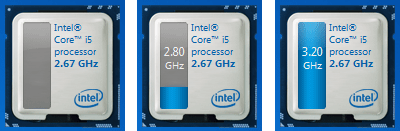
It's the Intel Turbo Boost Monitor widget that clings to your windows 7 desktop.


Intel-Turbo-Boost-Monitor.png


The i7-620M has three basic tiers for turbo boost.


Both cores have a base clock of 2.66ghz, both cores can turbo up to 3.06ghz, and one core by itself can turbo up to 3.33ghz.
 
Hi.
On my old quad G5 PPC, i have a pref pane inside
Macintosh HD1/Developer/Extras/PreferencePanes/

that is named "Processor.prefPane"

It allows me to manually shut down cores. I'm not sure if they still have that with intel macs, but it's worth a look.
 
Ah

Marcel Bresink's "Temperature Monitor" has this display in the program under the window menu in system information:

TurboBoost.jpg


That is while running BOINC / Seti at Home with 8 workunits crunching at once.
 
I would like to know this also. I would like an app or something that will give me more info on my CPU and Mem usage / speeds. Something that will indicate if Turbo is being used.
 
Register on MacRumors! This sidebar will go away, and you'll see fewer ads.