Become a MacRumors Supporter for $50/year with no ads, ability to filter front page stories, and private forums.
You can limit what agents/ AI models have access to on your devices just like you can limit what files any app has access too..
They wanted to be able to use 3rd party AI apps the way Siri has been integrated into iOS 27 with access to indexed data. It’s a privacy disaster. And it won’t be battery-friendly either. People are complaining now about battery drain. Imagine what they’d do when their phones start exploding.

For limited access runs, you already have those. They’re called ChatGPT, Gemini and other garbage.
 
If anyone else is still struggling with iPadOS 27’s required Siri space on their 64gb or 128gb devices, you can clear the space by:

1. Ensure Siri is toggled on and active in Settings, then exit Siri settings and go to iCloud. Visit Saved to iCloud, then toggle Siri sync off.
2. Change the iPad Siri voice to English (United Kingdom) to delete Apple Intelligence data.
3. Reboot iPad.
4. If the data doesn’t free up on the iPad within a couple hours, go to a data-intensive app like Apple Music. Download all of your songs until the device is full, then delete the app to clear the downloads and reinstall.
Thanks for this. I am fine with all of this except for step #1. How do I get to the 'Saved to iCloud' you are talking about in iCloud.com? I don't see it available. Thanks again.

Some context:

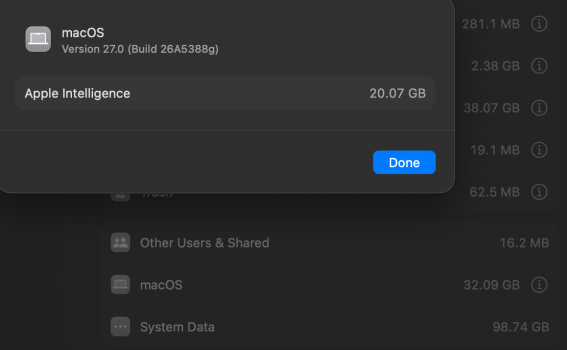
Devices are on iOS 26.5.x respectively with the iPhone 11 on iOS 27 b2. In the last month Apple Intelligence data has been constantly pushed on the 26.5.x devices - iPads and iPhone. This is with all options to use Apple Intelligence and Siri set to off. It has been that way since day one.

This only appeared to have started the last month. I pretty much follow what you do in step#4 and storage eventually does free up, sometimes it gets stubborn though. But then hours later it downloads the same initial 4.43 gigs of AI data. Sometimes even more with the switch off.

This gets me to your step #1. I am wondering if some master cloud switch is causing this after I installed iOS 27 on the iPhone 11. I know the 11 doesn't support Apple Intelligence, but maybe it still tripped something up?

I have Siri off on all of the devices in Settings and in the iCloud settings on the phone/ipad itself. But that is for individual device support, not some global switch.

Apple Intelligence data is weed in my garden at this point. Every time I kill it, it comes back soon after. Sometimes it takes every bit of available storage causing my device to stop functioning. That is by definition a weed in my opinion.

And for those saying it is integral to the operating system to function I say prove it. Why is it still a separate line item in 'iOS' data? if its that important it should be part of the OS bundle, not a separate entry, my opinion.
 
Apple Intelligence data is weed in my garden at this point. Every time I kill it, it comes back soon after. Sometimes it takes every bit of available storage causing my device to stop functioning. That is by definition a weed in my opinion.

And for those saying it is integral to the operating system to function I say prove it. Why is it still a separate line item in 'iOS' data? if its that important it should be part of the OS bundle, not a separate entry, my opinion.
Isn’t it a bit dramatic? Calling a feature weed just because you don’t use it?

And as for the next one, it’s called being transparent. Just because the size is listed as a separate entry doesn’t mean it can be turned off at will. It’s part of iOS itself, which is how it was able to access much more data on the device.
If your opinion is based on a simple entry in storage settings, then you’re ignoring engineering aspects of it.
 
  • Like
Reactions: fatTribble
Isn’t it a bit dramatic? Calling a feature weed just because you don’t use it?

And as for the next one, it’s called being transparent. Just because the size is listed as a separate entry doesn’t mean it can be turned off at will. It’s part of iOS itself, which is how it was able to access much more data on the device.
If your opinion is based on a simple entry in storage settings, then you’re ignoring engineering aspects of it.
No, fair assessment and again, my opinion.

Having four+ gigs free of space and then coming back to an iPad an hour later with 110 megs of free storage that stops working until I free up space is pretty much my definition of a weed I do not want to deal with. If I was using it I would free up more space.

And the fact that the files can go away at least temporarily, and the ipad and iPhone functioning as designed tells me they are not integral to the OS. If they were, they wouldn't just drop off like that. Apple would keep anything to the OS.

For example, my iPhone is running just fine without it. If I stay on wifi for too long though it starts downloading again. iPads are the real problem now. No, something changed in the last month, this is either a bug with 26.5.x or Apple is just pushing it regardless on their side.

Back to my original question to kind gentlemen a few posts above, is there an actual iCloud.com option for turning off Siri? That is all I need to know. Not debate stuff like this, as much fun as it is. Thanks!
 
  • Like
Reactions: CrabQueenInc
No, fair assessment and again, my opinion.

Having four+ gigs free of space and then coming back to an iPad an hour later with 110 megs of free storage that stops working until I free up space is pretty much my definition of a weed I do not want to deal with. If I was using it I would free up more space.

And the fact that the files can go away at least temporarily, and the ipad and iPhone functioning as designed tells me they are not integral to the OS. If they were, they wouldn't just drop off like that. Apple would keep anything to the OS.

For example, my iPhone is running just fine without it. If I stay on wifi for too long though it starts downloading again. iPads are the real problem now. No, something changed in the last month, this is either a bug with 26.5.x or Apple is just pushing it regardless on their side.

Back to my original question to kind gentlemen a few posts above, is there an actual iCloud.com option for turning off Siri? That is all I need to know. Not debate stuff like this, as much fun as it is. Thanks!
Now I’m really confused. This is an iOS 27 forum, so I’m not sure why you’re talking about 26.5.1. And I’m not sure what files have been dropping off from your phone, but only the System Data varies constantly. Apple Intelligence in iOS 27 varies sometimes depending on what features you use. The AI features that you use frequently determine the model downloaded, which in turn is why you see a handful of variations in AI storage.
Besides that, the rest of what you said either doesn’t make sense to me. So I’m going to leave it at that.
 
Register on MacRumors! This sidebar will go away, and you'll see fewer ads.