
(Images attached below)
I’m wondering if anyone else has noticed display colour differences between 15" M4 MacBook Air units.
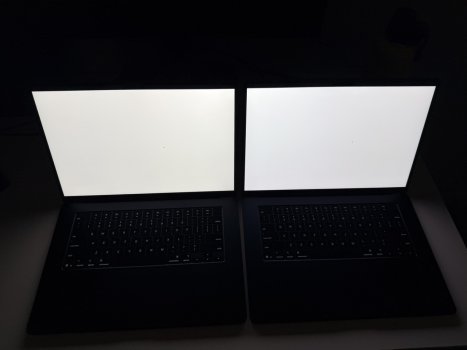
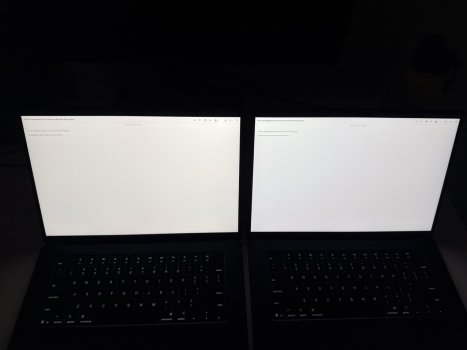
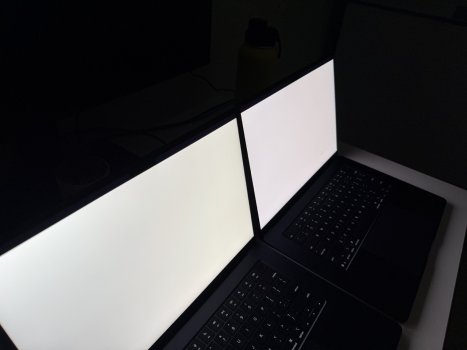
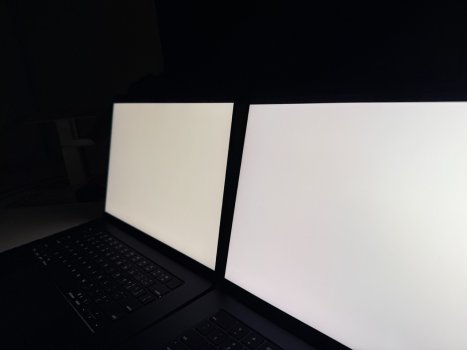
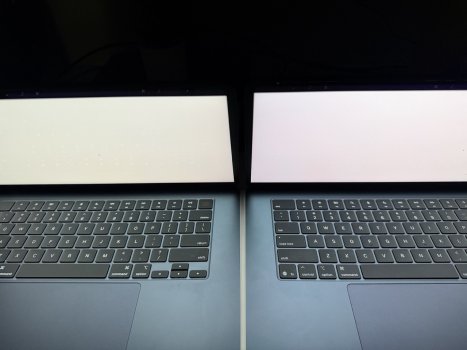
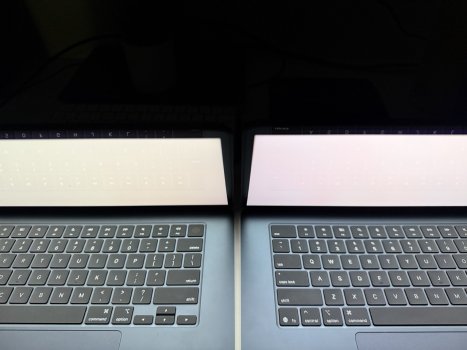
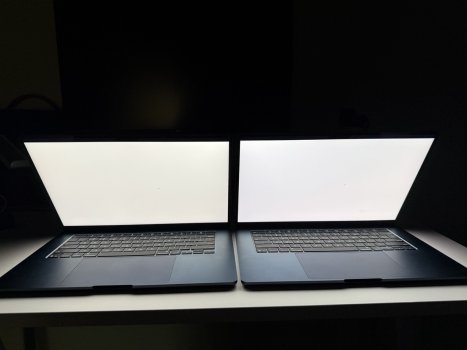
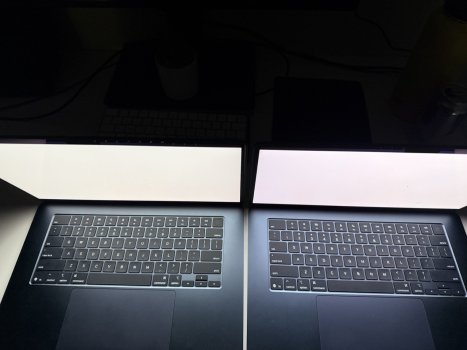
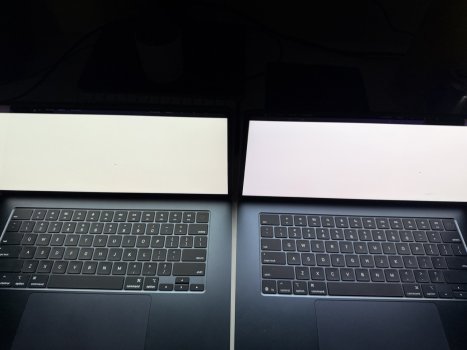
I have two 15" M4 MacBook Airs side by side:
- Left: base model
- Right: 24GB RAM / 512GB storage model
Both are using the exact same display settings:
- True Tone off
- Night Shift off
- Default Color LCD profile
- No custom colour profile
- No colour filters
- Same white page/document open
- Same brightness level
The issue is that the base model on the left looks noticeably warmer/yellower, almost cream-coloured, while the 24GB/512GB model on the right looks much more neutral white. It is especially obvious on white backgrounds.
I know some amount of panel variation is normal, but this looks pretty noticeable to me. In person the model on the left looks like it has a piss stain filter on it making it really uncomfortable to work on. The base model only has 6 battery cycles and still has warranty until March 2027, so I’m trying to figure out whether this is normal “panel lottery” or something worth bringing to Apple for inspection.
Has anyone else seen this with the M4 MacBook Air displays? Would Apple consider this within spec, or does this look like a display calibration/panel issue?
I’m wondering if anyone else has noticed display colour differences between 15" M4 MacBook Air units.
I have two 15" M4 MacBook Airs side by side:
- Left: base model
- Right: 24GB RAM / 512GB storage model
Both are using the exact same display settings:
- True Tone off
- Night Shift off
- Default Color LCD profile
- No custom colour profile
- No colour filters
- Same white page/document open
- Same brightness level
The issue is that the base model on the left looks noticeably warmer/yellower, almost cream-coloured, while the 24GB/512GB model on the right looks much more neutral white. It is especially obvious on white backgrounds.
I know some amount of panel variation is normal, but this looks pretty noticeable to me. In person the model on the left looks like it has a piss stain filter on it making it really uncomfortable to work on. The base model only has 6 battery cycles and still has warranty until March 2027, so I’m trying to figure out whether this is normal “panel lottery” or something worth bringing to Apple for inspection.
Has anyone else seen this with the M4 MacBook Air displays? Would Apple consider this within spec, or does this look like a display calibration/panel issue?
Attachments
-
 IMG_0033 Large.jpeg107.8 KB · Views: 205
 -
 IMG_0046 Large.jpeg109.7 KB · Views: 132
 -
 IMG_0044 Large.jpeg120.7 KB · Views: 154
 -
 IMG_0043 Large.jpeg92 KB · Views: 154
 -
 IMG_0040 Large.jpeg171.5 KB · Views: 114
 -
 IMG_0041 Large.jpeg178 KB · Views: 151
 -
 IMG_0042 Large.jpeg133.5 KB · Views: 111
 -
 IMG_0037 Large.jpeg181.6 KB · Views: 97
 -
 IMG_0035 Large.jpeg170.1 KB · Views: 159


