Become a MacRumors Supporter for $50/year with no ads, ability to filter front page stories, and private forums.

DennisBlah

macrumors 6502
Original poster
Hi all,

I'm working on my 'footer' with dynamic buttons.
These buttons don't get an title, only an image. For both states, normal and selected.

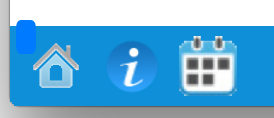
However when I programaticly set the button state to selected, there is this anoying small blue square at the top left of my button.

How do I get rid of this ?
 
Last edited:
Hi all,

I'm working on my 'footer' with dynamic buttons.
These buttons don't get an title, only an image. For both states, normal and selected.

However when I programaticly set the button state to selected, there is this anoying small blue square at the top left of my button.

How do I get rid of this ?

Could you provide both a screenshot of the problem and the code you've used to set up the buttons?
 
Could you provide both a screenshot of the problem and the code you've used to set up the buttons?

Hi Ubuntu,

right now, they are setup in storyboard. In future I will add them programaticly.
Dont mind the calendar button it's not the correct one yet xD

Screen_Shot_2014_12_20_at_18_43_05.png

At the top left of the Home button you see a blue square.
(This is in selected state)

Code:
-(void)prepareForSegue:(UIStoryboardSegue *)segue sender:(id)sender {
    //Bunch of  code here to setup seque, check for viewcontroller etc etc.
    int counter = 0;
    for (UIButton *aButton in self.buttons) {
//Setup buttons
        [aButton setBackgroundImage: [UIImage imageNamed: [buttonImages objectAtIndex: counter]] forState: UIControlStateNormal];
        [aButton setBackgroundImage: [UIImage imageNamed: [buttonImagesActive objectAtIndex: counter]] forState: UIControlStateSelected];
        [aButton setSelected: NO];
        counter++;
    }

//Set current state of pressed button to selected
    UIButton *button = (UIButton *)sender;
    [button setSelected:YES];
    
    
//Bunch of code here, check if my original 'rootViewcontroller's header' must be in or not.
}
 
Hi Ubuntu,

right now, they are setup in storyboard. In future I will add them programaticly.
Dont mind the calendar button it's not the correct one yet xD

Image
At the top left of the Home button you see a blue square.
(This is in selected state)

Code:
-(void)prepareForSegue:(UIStoryboardSegue *)segue sender:(id)sender {
    //Bunch of  code here to setup seque, check for viewcontroller etc etc.
    int counter = 0;
    for (UIButton *aButton in self.buttons) {
//Setup buttons
        [aButton setBackgroundImage: [UIImage imageNamed: [buttonImages objectAtIndex: counter]] forState: UIControlStateNormal];
        [aButton setBackgroundImage: [UIImage imageNamed: [buttonImagesActive objectAtIndex: counter]] forState: UIControlStateSelected];
        [aButton setSelected: NO];
        counter++;
    }

//Set current state of pressed button to selected
    UIButton *button = (UIButton *)sender;
    [button setSelected:YES];
    
    
//Bunch of code here, check if my original 'rootViewcontroller's header' must be in or not.
}

I can't see anything wrong with that code.
  • Are you setting the button's image anywhere? In the storyboard?
  • Have you checked the original icon to make sure it's fine?
  • What happens if you set the background image in the storyboards?

Also you don't need the counter variable. You're using a for-in loop which means you can simply state the following:
Code:
[buttonImages objectAtIndex: [self.buttons indexOfObject:aButton]]
 
I can't see anything wrong with that code.
  • Are you setting the button's image anywhere? In the storyboard?
  • Have you checked the original icon to make sure it's fine?
  • What happens if you set the background image in the storyboards?

Also you don't need the counter variable. You're using a for-in loop which means you can simply state the following:
Code:
[buttonImages objectAtIndex: [self.buttons indexOfObject:aButton]]

Ah lol I didnt thought if that
The normal image is also set in storyboard for now

The thing is where the button is set as selected
Then I get this blue square on the top left corner of the button

I dont know how to set different images for different states in storyboard? :-$

P.s. It are 2 different images. 1 with a brightness of +50 for the selected button

----

Resolved:
In storyboard, I had to set background and tint, under View, to clear color.
That solved the problem.

Thanks for the help!
 
Last edited:
Ah lol I didnt thought if that
The normal image is also set in storyboard for now

The thing is where the button is set as selected
Then I get this blue square on the top left corner of the button

I dont know how to set different images for different states in storyboard? :-$

P.s. It are 2 different images. 1 with a brightness of +50 for the selected button

----

Resolved:
In storyboard, I had to set background and tint, under View, to clear color.
That solved the problem.

Thanks for the help!

Glad you got it sorted!😀
 
Register on MacRumors! This sidebar will go away, and you'll see fewer ads.