Become a MacRumors Supporter for $50/year with no ads, ability to filter front page stories, and private forums.

pollycat

macrumors member
Original poster
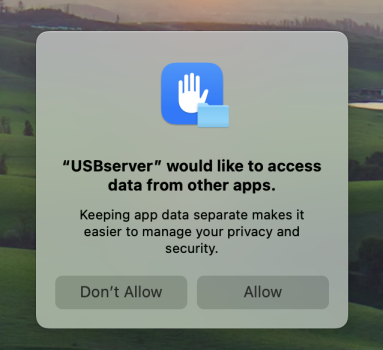
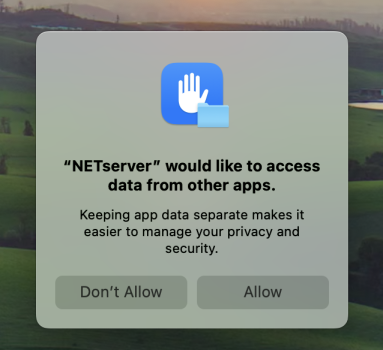
Since updating to Sonoma, I keep getting the dialogues:

"USBserver would like to access data from other apps"
"NETserver would like to access data from other apps"

after logging in.

Any ideas why these keep asking for access on each reboot and how I can permanently stop them from showing up?

Thanks for any help.
 

Attachments

  • Screenshot 2023-09-27 at 8.33.22 pm.png
    Screenshot 2023-09-27 at 8.33.22 pm.png
    273.9 KB · Views: 2,103
  • Screenshot 2023-09-27 at 8.33.14 pm.png
    Screenshot 2023-09-27 at 8.33.14 pm.png
    275.4 KB · Views: 260
Have a similar message popping up on a Microsoft Word extension. Very annoying, and I would like to find a way to stop it from popping up every time I start Word.
 
Part of my problem is that I don't know which program my pop-ups refer to, can't find the corresponding names in the Full Disk Access part of the System Preferences.
 
I have been getting this exact same issue. I "don't allow" every morning when I log on as I have no idea what these are relating to. Generally, I have found that any pop up like this is not a good thing. Hoping to see an answer come up on this thread soon.
 
Found the solution! It's connected to Brother printer software.

Go to Macintosh HD > Library > Printers > Brother > Utilities > Server

then delete the contents of "Server" = USBserver, NETserver, LOGINserver.

Reboot and the popups have gone!

The above three files are apparently legacy 32-bit apps that are installed by the Brother software but not needed at all for the printer to function fully, so are safe to delete.
 
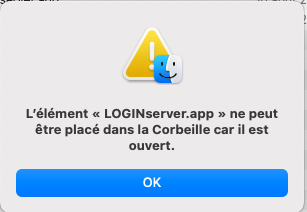
Hello, I cannot delete them because they are open, what should I do ??
 
Last edited:
Hello, I cannot delete them because they are open, what should I do ??


Traduction capture = The item “LOGINserver.app” cannot be placed in the Trash because it is open.
 

Attachments

  • Capture d’écran 2023-10-07 à 10.53.12.png
    Capture d’écran 2023-10-07 à 10.53.12.png
    20.3 KB · Views: 247
Last edited:
Open the app Activity Monitor (found in Applications > Utilities > Activity Monitor).

You'll see a list of all processes running on your Mac.

Scroll down to find "LOGINserver" and click on it to highlight it.
Then, click on the circle with a cross in it at the top of the window to stop the LOGINserver process.

After doing this, you should be able to delete LOGINserver and empty the Trash to make sure it's gone.
 
  • Like
  • Love
Reactions: firevsh2o and waw4
It was not possible to remove LOGINserver, I was able to remove NETserver and USBserver.
To delete LOGINserver I had to delete the Server folder in Brother Utilities, I cannot recreate it, is this serious?
How do I recreate the Server folder please ?
 
As far as I know, you don’t need the Server folder or its contents as it only contained useless, obsolete items. Your Brother printer will still work fully and reliably without Server.
 
Google search got me to this thread. I was recently seeing the pop ups. Thank you for posting the solution to remove on startup.
 
Found the solution! It's connected to Brother printer software.

Go to Macintosh HD > Library > Printers > Brother > Utilities > Server

then delete the contents of "Server" = USBserver, NETserver, LOGINserver.

Reboot and the popups have gone!

The above three files are apparently legacy 32-bit apps that are installed by the Brother software but not needed at all for the printer to function fully, so are safe to delete.
Thanks a lot for your advice. Works great ! I confirm it's safe to delete the whole "Server" content on macOS Tahoe.
Best regards,
JeF
 
Setup: iMacPro running MacOS Sequoia 15.5.7 with Brother MFC.L3770CDW
After one particular update of Sequoia I started to see these pop-up dialogues from:
Library/Printers/Brother/Utilities/Server > Netserver.app, USBserver.app and WorkflowAppControl
requesting to access data from other apps. I believe this is the result of Apple's tightened security permissions.
I use the Brother printer to scan docs and send them (over WLAN) to the iMac.
If you delete these apps (as suggested above) this function will no longer work (using Brother software).
Consequently, the better solution is to give these Brother apps FDA (Full Disk Access); as suggested by Phantom iCloud tabs. Whilst not particularly elegant, it does resolve the issue…
 
Setup : MacBook M1Pro running macOS Tahoe 26.5.1 with Brother MFC J-5335 DW.
I have deleted the Server folder. I use Brother iPrint & Scan utility for scanning documents and send them to the computer over WLAN. No issue ! It always works correctly.
 
Register on MacRumors! This sidebar will go away, and you'll see fewer ads.