
Got a tip for us?
Let us know
Become a MacRumors Supporter for $50/year with no ads, ability to filter front page stories, and private forums.
Use lightening to USB camera adaptor to transfer files?
- Thread starter DekuBleep
- Start date
- Sort by reaction score
You are using an out of date browser. It may not display this or other websites correctly.
You should upgrade or use an alternative browser.
You should upgrade or use an alternative browser.


blaine07
macrumors 68040
I wonder if this would work with a jailbreak?
I believe YES. They have apps to access file system with.
No idea if any are compatible with IOS 10 yet though.

Honestly that's what I thought too. But then I saw this article in wired:
https://www.wired.com/2017/01/how-to-make-your-ipad-your-only-computer/
Linked from the loop. The article says: "You’ll occasionally need to plug stuff into your iPad, which is what Apple’s Lightning-to-USBadapter is for. (Ignore the fact that it’s called a “Camera Adapter,” it supports basically anything.)"
Was wondering what the author was thinking??
https://www.wired.com/2017/01/how-to-make-your-ipad-your-only-computer/
Linked from the loop. The article says: "You’ll occasionally need to plug stuff into your iPad, which is what Apple’s Lightning-to-USBadapter is for. (Ignore the fact that it’s called a “Camera Adapter,” it supports basically anything.)"
Was wondering what the author was thinking??
Beerstalker
macrumors 6502a
I would think there must be ways to make it work. Otherwise maybe look into jump drives that have lightning built in like this:
https://www.amazon.com/SanDisk-Lightning-connector-Computers-SDIX-064G-G57/dp/B00RBGYPNE
https://www.amazon.com/SanDisk-Lightning-connector-Computers-SDIX-064G-G57/dp/B00RBGYPNE
As an Amazon Associate, MacRumors earns a commission from qualifying purchases made through links in this post.
I would think there must be ways to make it work. Otherwise maybe look into jump drives that have lightning built in like this:
https://www.amazon.com/SanDisk-Lightning-connector-Computers-SDIX-064G-G57/dp/B00RBGYPNE
Basically someone would have to write an app that makes it work I think. You have an app that can access a USB from the adaptor and then you can transfer your files from the app to other apps. I don't know that such an App exists.
As an Amazon Associate, MacRumors earns a commission from qualifying purchases made through links in this post.

Hym tix
macrumors 6502
The SanDisk app supposedly is written for this purpose, I'm not sure if it only works with the ixpand flash drive or if it will also work with a lightning to USB adapter.
SanDisk iXpand™ Drive by SanDisk
https://appsto.re/us/ztyxab.i
SanDisk iXpand™ Drive by SanDisk
https://appsto.re/us/ztyxab.i
Actually tried this a few years ago on a jail broken iPhone. Somebody wrote an app that kinda/sorta did what you want. Problem was, getting files into the phone is only half the problem. Since iOS doesn't have a MacOS style Finder (or whatever the Windows equivalent is) file must be accessed by an app. iOS apps only look for files where Apple says they should be, not where some jailbreak app eventually puts them. So even though my files were on the phone I couldn't do anything with them.

canesalato
Cancelled

Newtons Apple
Suspended
Apple does this deliberately as they want to control what goes in their devices. The refuse to give us a proper file system. The iPad could be so much more if Apple would let it.


ericwn
macrumors G5
Honestly that's what I thought too. But then I saw this article in wired:
https://www.wired.com/2017/01/how-to-make-your-ipad-your-only-computer/
Linked from the loop. The article says: "You’ll occasionally need to plug stuff into your iPad, which is what Apple’s Lightning-to-USBadapter is for. (Ignore the fact that it’s called a “Camera Adapter,” it supports basically anything.)"
Was wondering what the author was thinking??
I read this and thought it's just a lousily written filler article without much relation to most users' real world.
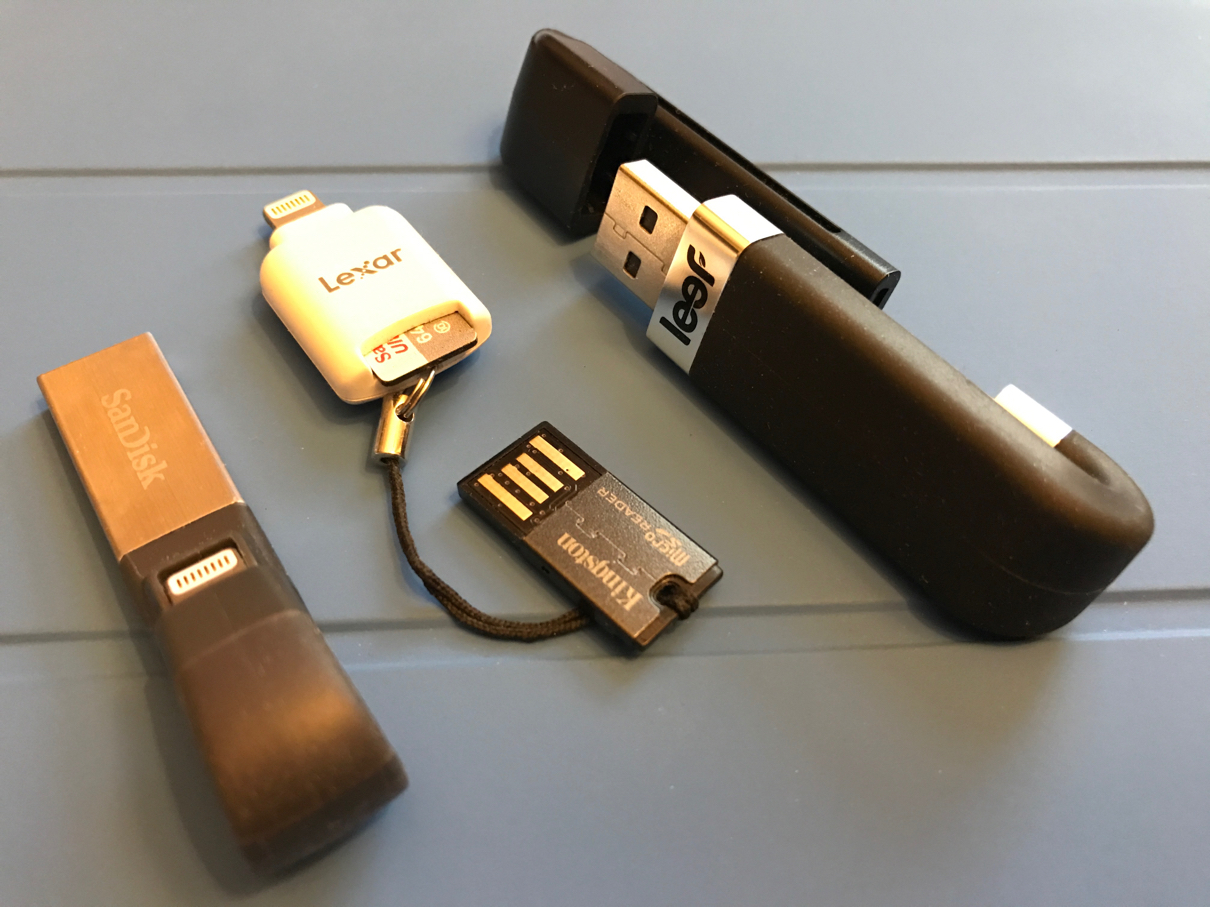
It's really worth investing in one of those Lightning OTG USB sticks like the Sandisk mentioned earlier if you need to transfer files to and from your iOS devices. There are lot of unknown 'Shanzai' companies that make these OTG drives as seen on eBay, Amazon etc, but I would wanna stick with one of the better known brands. Apart from Sandisk, Leef are another company that produce these OTG sticks. Lexar makes a different type that takes Micro SD cards, which is really handy for getting footage from cameras, dashcams etc.
These adaptors all tend to work in a similar fashion, requiring the use of their own proprietary app. Most are really easy to use - plug the USB into your Mac or PC. Drag the files onto the stick. Unmount the stick and plug into the Lightning port. Open the app and then you should be able to see the file and play or view the file within the app if it is one of the supported formats.
If the file isn't supported with the proprietary app but you have another app which can read the file, then you can try the 'Open in' option by selecting the file and using the Action/Share icon (box with upwards arrow) to open the file with the other app. I use this function a lot to transfer PDFs to Goodreader and to get ePUBs into iBooks.
These adaptors all tend to work in a similar fashion, requiring the use of their own proprietary app. Most are really easy to use - plug the USB into your Mac or PC. Drag the files onto the stick. Unmount the stick and plug into the Lightning port. Open the app and then you should be able to see the file and play or view the file within the app if it is one of the supported formats.
If the file isn't supported with the proprietary app but you have another app which can read the file, then you can try the 'Open in' option by selecting the file and using the Action/Share icon (box with upwards arrow) to open the file with the other app. I use this function a lot to transfer PDFs to Goodreader and to get ePUBs into iBooks.
It's really worth investing in one of those Lightning OTG USB sticks like the Sandisk mentioned earlier if you need to transfer files to and from your iOS devices. There are lot of unknown 'Shanzai' companies that make these OTG drives as seen on eBay, Amazon etc, but I would wanna stick with one of the better known brands. Apart from Sandisk, Leef are another company that produce these OTG sticks. Lexar makes a different type that takes Micro SD cards, which is really handy for getting footage from cameras, dashcams etc.
These adaptors all tend to work in a similar fashion, requiring the use of their own proprietary app. Most are really easy to use - plug the USB into your Mac or PC. Drag the files onto the stick. Unmount the stick and plug into the Lightning port. Open the app and then you should be able to see the file and play or view the file within the app if it is one of the supported formats.
If the file isn't supported with the proprietary app but you have another app which can read the file, then you can try the 'Open in' option by selecting the file and using the Action/Share icon (box with upwards arrow) to open the file with the other app. I use this function a lot to transfer PDFs to Goodreader and to get ePUBs into iBooks.
Few cameras use microSD, most using SD-sized cards (there are exceptions, e.g., GoPro). I went through three of the Leef devices, all returned/replaced by Leef because they didn't work. I gave up on them and if I need external storage access I use a wireless FileHub.
Few cameras use microSD, most using SD-sized cards (there are exceptions, e.g., GoPro). I went through three of the Leef devices, all returned/replaced by Leef because they didn't work. I gave up on them and if I need external storage access I use a wireless FileHub.
Yep, I'm talking about my GoPro, Wildlife Observation camera and IP cameras which use Micro SD, rather than SLR cameras etc.
We use three Leef Lightning devices in our house and haven't had any problems with them. What was wrong with yours?
Yep, I'm talking about my GoPro, Wildlife Observation camera and IP cameras which use Micro SD, rather than SLR cameras etc.
We use three Leef Lightning devices in our house and haven't had any problems with them. What was wrong with yours?
I was trying to use the Leef to store and watch mp4 videos on my Air 2 and the iOS app was always crashing if there were more than a few videos on the uSD card. I went through a lot of back and forth with Leef, debugging the issues and trying new apps, new firmware, different devices (3), different files and different cards but after a couple of months I gave up and they were good enough to make a full refund. This was late 2015 so I assume the product has matured since then. Like I said, I have been using a FileHub with different cards and portable HDDs with great success.
Is the throughput sufficient for viewing GoPro videos directly from the device or do you have to first transfer them to your iPad?
I was trying to use the Leef to store and watch mp4 videos on my Air 2 and the iOS app was always crashing if there were more than a few videos on the uSD card. I went through a lot of back and forth with Leef, debugging the issues and trying new apps, new firmware, different devices (3), different files and different cards but after a couple of months I gave up and they were good enough to make a full refund.
Is the throughput sufficient for viewing GoPro videos directly from the device or do you have to first transfer them to your iPad?
I heard in reviews of the Leef iAccess Micro SD Card Reader that there were numerous complaints regarding Micro SD card compatibility issues, which was one of the reasons I went for the Lexar version instead.
GoPro footage playing straight from the Micro SD card on the Lexar can have glitches, so I would only use it like that just to quickly check the framing of the shot etc. When the footage is copied over to the app/camera roll then it usually plays fine.
I heard in reviews of the Leef iAccess Micro SD Card Reader that there were numerous complaints regarding Micro SD card compatibility issues, which was one of the reasons I went for the Lexar version instead.
GoPro footage playing straight from the Micro SD card on the Lexar can have glitches, so I would only use it like that just to quickly check the framing of the shot etc. When the footage is copied over to the app/camera roll then it usually plays fine.
GoPro video can be a challenge for a lot of devices (and network streaming) with its potentially very high bit rate. Even with a PC I generally just view my GoPro video locally.
I like the FileHub approach because it can be used by multiple devices simultaneously and is compatible with Android, Windows, etc. I can also use a variety of storage - uSD, SD, flash drives, HDD (I use a 4TB portable with it). I can also access the storage with file managers, e.g. FileBrowser, to view files and stream video without copying locally (not GoPro, though). If you need versatility (which you may not), it works extremely well.
Wifi hub is definitely much easier. With most iOS devices still stuck in USB 2.0 speeds (SMH!!!!) wifi is just as good.
I use the "HooToo Nano" from Amazon. There are many options and different brands available.
Yeah, I gave my Nano to my sister-in-law and use the RAVPower FileHub.